TL;DR
- Decide between web-enabling and rebuilding first. Web-enabling runs the existing application in a modern browser or launcher. Rebuilding replaces it with a web application and an API.
- Treat web-enabling as a stopgap. It restores access quickly and leaves the Forms runtime, licensing, support dates and PL/SQL coupling in place.
- Choose the front-end framework on team skills and grid needs. Angular, React and Vue all handle data-entry screens. The fit depends on the team and the size of the estate.
- Redesign the transaction model before converting screens. Held row locks have no place in stateless web requests, so each save checks a row version to stop lost updates.
- Move module by module on the same database. Start with read-heavy screens, validate each module against Forms, then switch users.
Two Ways to Convert Oracle Forms to a Web Application
There are two ways to convert Oracle Forms to a web application. Web-enabling runs the existing application through a browser or launcher, with its runtime and code unchanged. Rebuilding produces a modern web application with a React, Angular or Vue front end and an API back end.
The two projects differ on seven points.
| Criterion | Web-enable | Rebuild |
| What changes | Delivery to the user’s device | Front end, API layer, transaction model and where logic runs |
| Speed | A configuration and rollout project | A multi-phase program, module by module |
| Up-front cost | Low | Higher |
| Forms runtime and licensing | Stay in place | Retired with the last module |
| User experience | Same screens and function keys | New web UI, designed to match Forms speed |
| Integration | Forms screens offer no API to other systems | Every module exposed through APIs |
| Long-term fit | Buys time | Ends the Forms dependency |
One test tells the two apart in any proposal. If the Forms modules and the Forms runtime are still in production when the project ends, the application was web-enabled.
Many estates combine the two as a form of incremental modernization. They web-enable to restore access, then rebuild module by module on their own schedule.
The platform behind a rebuild is a separate decision. The guide to Oracle Forms migration to Java, .NET or APEX compares the back-end platforms and the Forms 12c and 14c support dates. Oracle APEX, covered there, is one more route to a web UI for teams staying on Oracle Database.
When Web-Enabling Oracle Forms Is Enough
Oracle Forms ran in the browser as a Java applet. By late 2015, many browser vendors had removed plug-in support or announced timelines to remove it [1]. Oracle’s Forms 14.1.2 release notes no longer recommend the embedded applet setup, such as Edge in IE mode [2].
Three routes put the same application in front of users today.
- Forms Standalone Launcher. Oracle’s launcher runs the application in its own window, with the same functionality as the browser version except event-driven single sign-off [3].
- Java Web Start. Launches the Forms client from a link, outside the browser.
- Server-side HTML5 hosting. Third-party products run the Forms client on a server and render it in the browser.
The two Oracle routes need a Java runtime on every desktop, and Java Web Start ships only with Java 8. HTML5 hosting needs a browser alone. Each route changes delivery and leaves the Forms modules, PL/SQL and runtime as they are.
Web-enabling is enough when three conditions hold.
- The application is stable. Few changes are planned, and users accept the Forms UI.
- The problem is access. Users need the application on current browsers now.
- A rebuild is funded for later. Web-enabling buys the time.
Web-enabling also leaves the cost of staying on Forms in place, from WebLogic Server and Forms licensing to the support timeline.
Architecture of a Modern Web Application Built From Oracle Forms
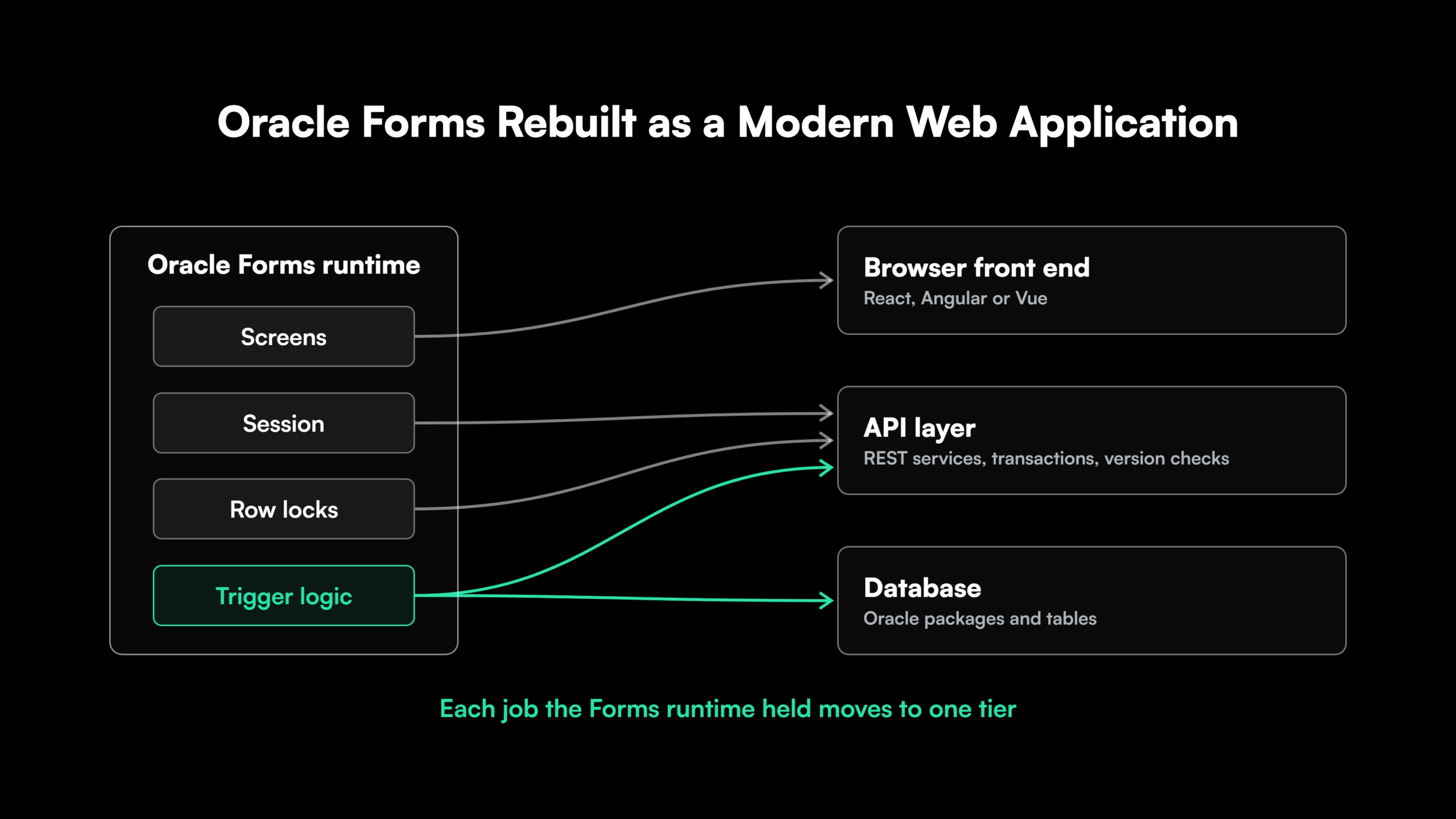
In Forms, one runtime holds the screen, the database session, the row locks and the trigger logic, which makes every Forms application a tightly coupled application by design. A rebuilt application splits that work across three tiers.
- Browser front end. React, Angular or Vue renders screens, holds screen state, runs field-level checks and handles keyboard navigation.
- API layer. REST services authenticate users, enforce business rules, group changes into transactions and detect conflicting edits.
- Database. Oracle stays with its packages and constraints, or moves to another database in a later phase.
Screen state moves to the browser. Session handling and locking move to the API, which holds no database session between requests. Trigger logic moves into the API, into database packages or into front-end validation, depending on the rule.
Security moves as well. Many Forms applications connect each user as a database account and rely on roles, grants and the USER function. A web API connects through a pooled account, so it passes the user’s identity to the database explicitly, for example through a client identifier or application context.
The API back end runs on Java or .NET. The choice usually follows the platform the rest of the estate runs on.
Oracle Forms to React, Angular or Vue.js Compared
A Forms replacement has a specific workload. It is data-entry heavy, built on grids and master-detail screens, driven from the keyboard, and used all day by internal staff.
| Criterion | Angular | React | Vue.js |
| Structure | Full framework with routing, HTTP client and forms built in | UI library, with routing, forms and state from separate libraries | Progressive framework with an official router and state library |
| Forms handling | Reactive forms with typed models and validators | Form libraries chosen per project | Two-way binding, with validation libraries added |
| Data grids | AG Grid, Angular Material table and other mature grids | AG Grid, MUI Data Grid, TanStack Table and many more | AG Grid and the Vuetify data table, with fewer choices overall |
| Keyboard and focus tooling | Angular CDK utilities for focus management and keyboard navigation | Supplied by the chosen component library | Supplied by the chosen component library |
| Language | TypeScript by default | JavaScript or TypeScript | JavaScript or TypeScript |
| Learning curve for a PL/SQL team | Steeper, then one fixed structure | Moderate, with architecture decisions up front | Gentler |
| Ecosystem and hiring | Large enterprise footprint | Large ecosystem and hiring pool | Smaller enterprise ecosystem |
Each framework suits a different team.
- Oracle Forms to Angular. Suits large enterprise teams. Its enforced structure keeps hundreds of screens consistent across many developers.
- Oracle Forms to React. Suits teams with React skills or a React standard. Grid and form libraries are mature, and the team settles the architecture before the first module.
- Oracle Forms to Vue.js. Suits smaller teams and estates. It is quick to learn, with a smaller enterprise ecosystem to draw on.
Team skills, estate size and any existing front-end standard decide the choice. The default output of a conversion tool is a weak reason to pick a framework.
Whichever framework wins, one shared component library for grids, LOV fields and shortcuts keeps every converted module consistent. Building it before the first module avoids reworking screens later.
The same trade-offs shape any frontend modernization program. React vs Angular for existing enterprise applications compares the two larger frameworks in more depth.
Translating Oracle Forms UX Patterns to the Browser
Forms users are fast because of how Forms works. They type, tab and press function keys without touching a mouse, across hundreds of records a day. A web version that matches the function and loses that speed fails user acceptance.
| Forms pattern | Web equivalent | Design note |
| Multi-record block | Data grid with inline editing | Row navigation and save from the keyboard |
| Master-detail blocks | Linked views or a split pane | Detail refreshes when the master row changes |
| List of values (LOV) | Searchable select or typeahead field | Server-side search for long lists |
| Function keys and KEY- triggers | Mapped keyboard shortcuts | Keys the browser reserves, such as Ctrl+N, Ctrl+T and Ctrl+W, avoided |
| Enter-query mode | Search and filter controls | Query by example kept on key columns |
| Alerts and messages | Inline validation and notifications | Errors shown at the field |
| WHEN-VALIDATE-ITEM triggers | Field-level checks on exit | The same rule repeated in the API |
| POST-QUERY lookups | Joined or computed columns in the API response | One query per page of rows |
Keyboard design needs a deliberate plan. List every function key the current forms use, map each one to a shortcut, and test focus order on every screen against WCAG 2.2 accessibility criteria.
The POST-QUERY row matters for speed. In Forms, the trigger runs a lookup for each fetched row [4]. Repeating that per row through an API slows every grid, so the lookup moves into the query behind the endpoint.
Copying each Forms screen exactly carries old layouts into the new application. Changing too much slows down users who know the old screens by heart. Prototypes tested with the heaviest users settle the balance early.
Measure keystrokes and time per task on the Forms screen first. The web screen is then held to the same numbers.
See How Legacy Screens and Logic Become a Modern Front End and API Services
See how Legacyleap’s agents convert legacy screens and logic into a modern front end and API services, with every change arriving as a diff-based pull request that an engineer reviews before merge.
Redesigning the Oracle Forms Transaction and Locking Model for the Web
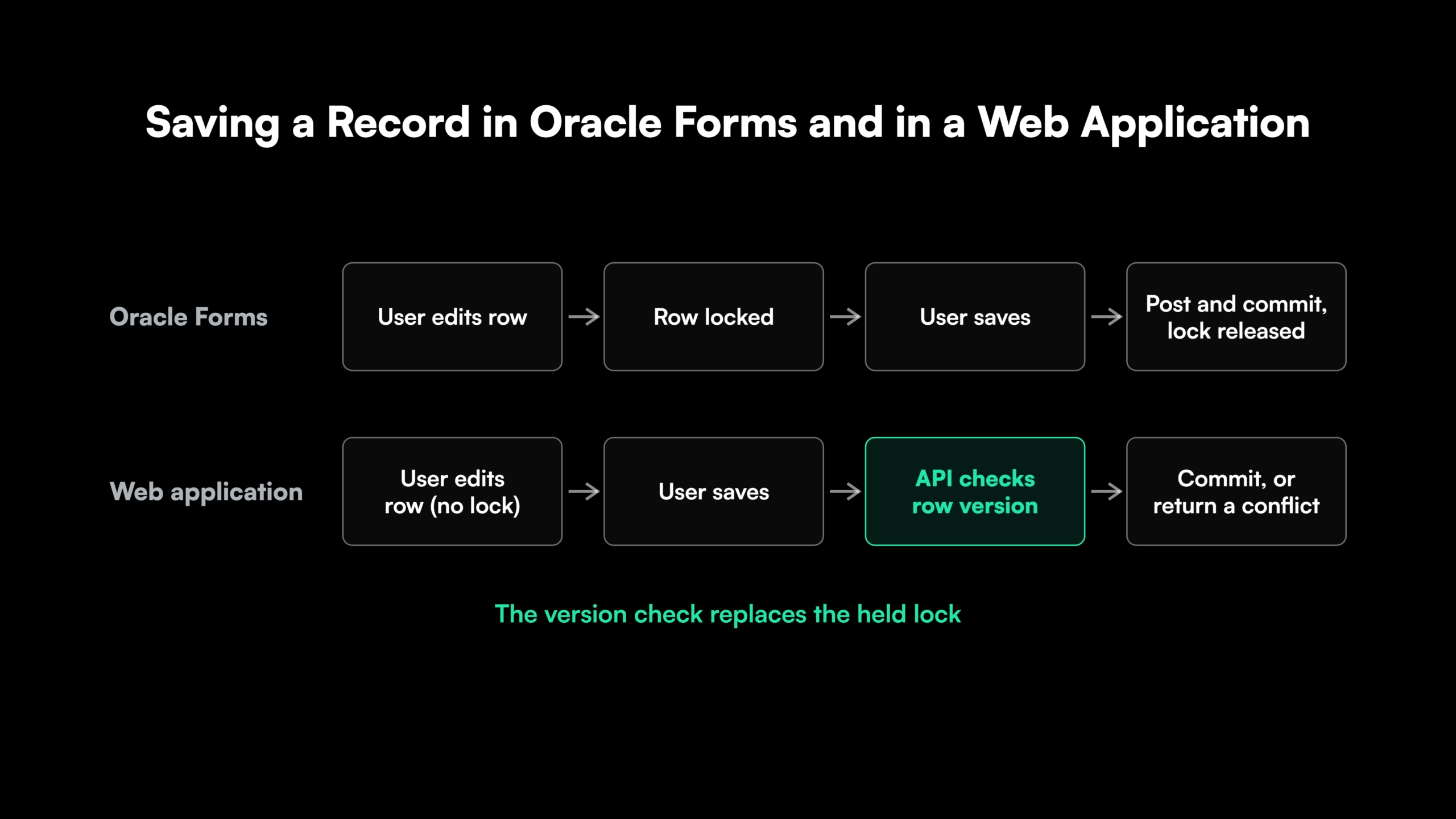
Forms keeps a database session open for each user. By default, Forms locks a row as soon as a user starts changing it. On save, it posts every changed record in the form and commits them in one transaction [4].
A web application works through stateless requests. The API opens a transaction for one request and closes it before responding, so no session holds locks during an edit.
Four parts of the model need a redesign.
- Save grouping. Each screen defines one unit of work. A master record and its detail rows save together in one API call and one transaction.
- Conflict detection. Optimistic concurrency replaces held locks. Each row carries a version value, and an update fails if the data has changed since it was read [5]. The screen then shows the conflict to the user.
- Abandoned edits. A user who closes the tab leaves no lock behind. Unsaved changes stay in the browser or are discarded, and the database stays consistent.
- Multi-form transactions. Forms can post changes without committing, then call a second form inside the same transaction. On the web, that flow becomes a multi-step screen saved in one final API call.
Lock and commit triggers need a new home. ON-LOCK, PRE-UPDATE, POST-INSERT and POST-FORMS-COMMIT logic moves into the API’s save path or into database packages.
Converters that copy screens and skip this redesign produce applications that lose updates when two users edit the same record. They also behave differently under load, since the locking underneath the same screens has changed.
Exposing Oracle Forms PL/SQL Logic Through a Web API Layer
Every web front end needs an API, and the API decides where the business logic runs. Three options exist, and one estate can use more than one.
| Option | How it works | Trade-off |
| Thin API over PL/SQL | REST endpoints call existing database packages, for example through Oracle REST Data Services [6] | Fastest route, keeps the Oracle dependency |
| Service layer in Java or .NET | Logic moves from PL/SQL into application services | More work, more freedom on database and hosting |
| Temporary bridge | Existing Forms transactions are exposed as APIs during the rebuild | Buys time, adds a layer to retire later |
Logic inside form triggers and program units runs in the Forms runtime, which a web application cannot call. Under the first two options, that logic is extracted into packages or services first. The bridge reaches it through the running form until the rebuild replaces it.
A rebuild that keeps the PL/SQL therefore rewrites the UI, the transaction model and the code that calls the logic.
Endpoints follow the screen’s unit of work, so one save endpoint takes an order and its lines and commits them together, as the form did.
Legacy system comprehension with Gen AI reads every trigger, program unit and library across the estate and marks which ones hold business rules.
API design follows the same patterns as any enterprise API modernization program. A service layer also leaves room for a later Oracle to PostgreSQL migration once no logic depends on Oracle packages.
Find the Logic Your Web API Will Need Before the Rebuild Starts


 +more
+moreRunning Oracle Forms and the Web Application Side by Side
A Forms estate moves to the web one module at a time. The strangler fig approach routes users to each new module as it is ready, and the remaining forms keep running.
- Start with low-risk screens. Read-heavy inquiry screens move first, since they write no data.
- Share one database. Forms and the web application read and write the same tables during the move. A database trigger that updates the version column on every write lets the web application detect changes made from Forms.
- Move tightly linked modules together. Modules that write the same tables in one business process cut over as a group.
- Validate each module against Forms. The same test cases run through the form and the new screen, and the results must match before users switch.
- Keep rollback by module. The Forms module stays available until the web module runs clean through a full business cycle.
Parity on the data itself is confirmed through data migration validation on every table the module writes.
How Legacyleap’s AI Agents Rebuild Oracle Forms as a Web Application
Legacyleap is a Gen AI-powered legacy application modernization platform built on multi-agent orchestration. Oracle Forms and PL/SQL are supported sources, and Angular, React and Vue.js are supported front-end targets.
Five agents carry a Forms rebuild through the Assess, Comprehend, Modernize, Validate and Deploy lifecycle.
- Assessment Agent. Maps forms, libraries, menus, database dependencies and risk hotspots, and estimates effort per module.
- Documentation Agent. Reconstructs business rules from triggers, program units and PLL libraries, along with data flows and integration maps.
- Recommendation Agent. Sets the target architecture, including the front end and REST services for each module, and orders the modules for migration.
- Modernization Agent. Generates front-end components and API services as diff-based pull requests, with TODO markers on low-confidence areas. About 70% of the modernization work is automated, and engineers finish the business logic.
- QA Agent. Generates unit, integration, API and functional tests, and validates behavior parity against the Forms baseline.
The UI, services and data layers are modernized in coordination, so the save logic and the screens that depend on it change in step.
Every pull request is reviewed by an engineer before it merges. The agents cannot merge, deploy or execute code, and source code never leaves the client’s environment.
Programs run 50-70% faster than manual modernization, with 100% functional parity validated before deployment. Legacyleap has completed more than 150 production-grade assessments, and offers Turnkey Modernization Services or Platform Licensing for internal and SI teams.
Steps to Convert Oracle Forms to a Modern Web Application
A rebuild follows seven steps.
- Decide whether each module is web-enabled or rebuilt.
- Map the screens and the UX patterns users depend on.
- Design the API layer and decide where the PL/SQL logic runs.
- Choose React, Angular or Vue for the front end.
- Redesign the transaction and locking model.
- Build module by module alongside Forms on the same database.
- Validate each module against Forms and cut over.
Start with a $0 Modernization Assessment. It maps one representative codebase, including its forms, PL/SQL logic, database dependencies and risk areas. The output is a migration plan and estimate in 3 to 5 days, at no cost, run entirely inside your environment. To see the platform first, Book a Demo.
Start With a Map of Your Oracle Forms Codebase
A $0 Modernization Assessment maps one representative codebase, including its forms, PL/SQL logic, database dependencies and risk areas, and returns a migration plan and estimate in 3 to 5 days, inside your own environment.
FAQs
Yes, through server-side HTML5 hosting, which needs only a browser on the device. The screens keep their fixed desktop layout, so data entry on a small screen stays hard.
Package code can stay as written behind a thin API, and trigger code survives once it moves into a package or service. Calls to Forms built-ins such as GO_BLOCK and SET_ITEM_PROPERTY are rewritten in the front end.
Trigger logic drives a rebuild’s length. Screens and grids convert quickly, and the PL/SQL, save logic and integrations behind them take most of the effort.
Forms 6i modules are first upgraded to a current Forms release, with Oracle’s Forms Migration Assistant updating obsolete built-ins such as RUN_PRODUCT. The upgraded modules can then be web-enabled or rebuilt.
Yes. Vue 3 is actively maintained with TypeScript support, and the practical check is the data grid and component library, which carry most of a Forms-style screen.
Yes. Inline-editable grids need ARIA grid roles and an announcement when a cell is saved or rejected, so screen-reader users hear the result of each edit.
References
[1] Oracle Java Platform Group, “Moving to a Plugin-Free Web” (January 2016).
[2] Oracle, “Oracle Forms 14.1.2 Release Notes: Deprecated and Desupported Features..
[3] Oracle, “Forms Standalone Launcher,” Oracle Forms documentation.
[5] Microsoft Learn, “Handling Concurrency Conflicts,” Entity Framework Core documentation.
[6] Oracle, “Developing Oracle REST Data Services Applications,” ORDS Developer’s Guide 25.2.