TL;DR
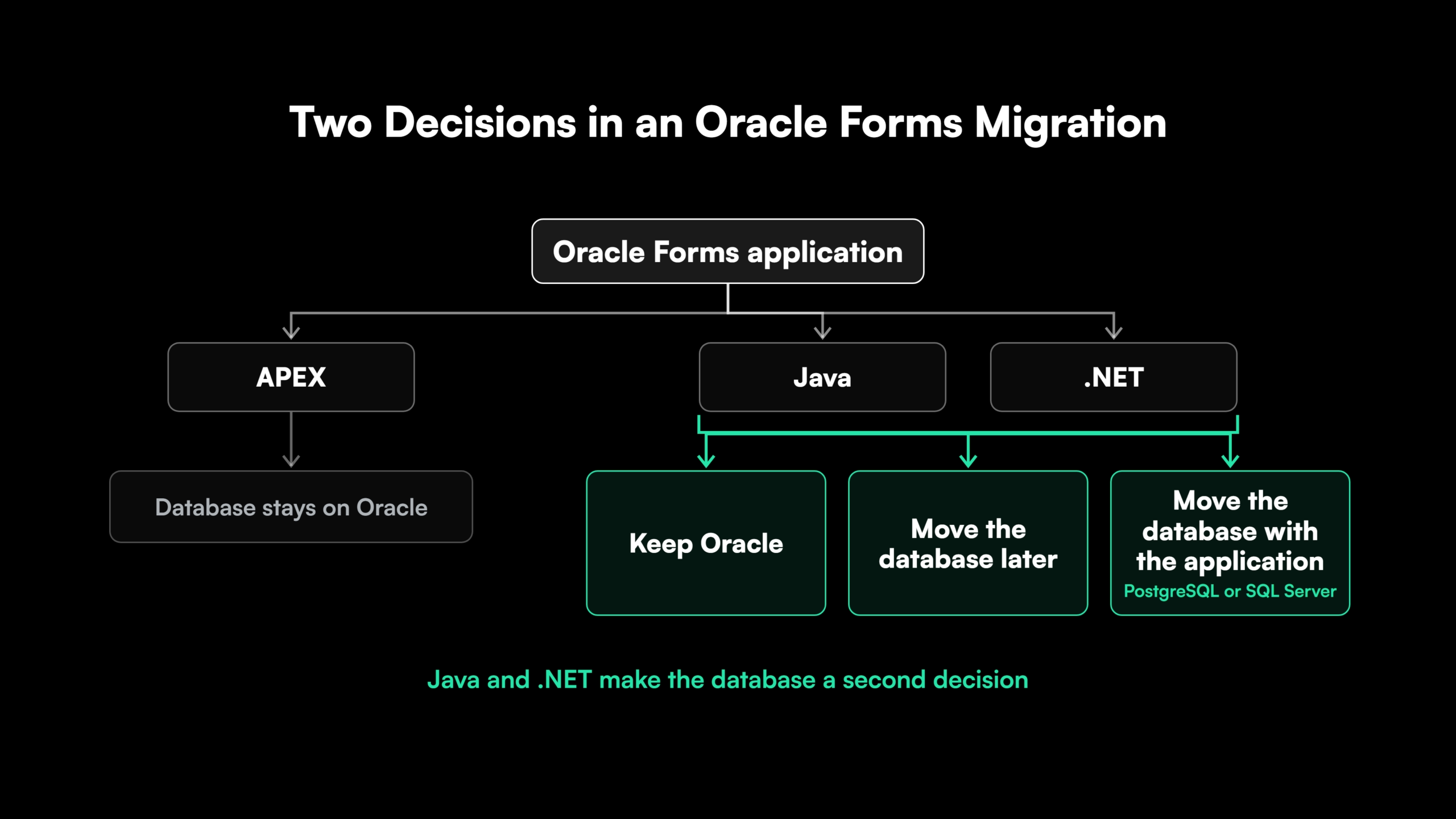
- Treat the move as two decisions. One decides where the application goes. The other decides whether the Oracle database goes with it, and APEX, Java and .NET answer it differently.
- Plan around the Forms 12c support dates. Premier Support ends in December 2026 and Extended Support in December 2027. Forms 14c is supported to December 2033, so an upgrade buys time and leaves the migration decision open.
- Choose APEX to stay on Oracle. APEX reuses PL/SQL, suits data-entry applications, and keeps the database and licensing on Oracle. Java and .NET fit teams that want a mainstream stack or a path off Oracle.
- Inventory the PL/SQL logic before choosing a converter. Business rules sit in form triggers, program units, PLL libraries and database packages, and each piece needs a decision to keep, move or retire.
- Ask what an automation percentage counts. Screens, data blocks and simple validations convert well. Complex trigger chains, built-ins, Oracle Reports and integrations need rework on every path.
Oracle Forms Migration Options for Java, .NET and APEX
An Oracle Forms application can migrate to Java, .NET or Oracle APEX. Oracle APEX keeps the application inside the Oracle database. Java and .NET move it to mainstream application stacks that can stay on Oracle or leave it. Upgrading to Forms 14c is a holding move that defers the decision.
Choosing among them involves two decisions. The first is where the application goes. The second is whether the Oracle database goes with it.
APEX settles the second decision, since it runs inside Oracle Database. With Java or .NET, the database can stay, move later, or move with the application.
The largest risk sits in the PL/SQL logic spread across the forms. Automated converters handle part of that logic and leave the rest for engineers to finish.
Oracle Forms 12c and 14c Support Dates in 2026
Oracle Forms remains a supported product with a published support timeline [1]. Forms 14c (14.1.2) shipped in December 2024 [2]. In February 2026, Oracle added a year to both 14c support dates [1].
| Release | Premier Support ends | Extended Support ends |
| Forms 12c (12.2.1) | December 2026 | December 2027 |
| Forms 14c (14.1.2) | December 2030 | December 2033 |
The hard date belongs to 12c. Premier Support for 12c ends this December, and Extended Support runs one more year, to December 2027.
Upgrading to 14c moves the Premier Support deadline to December 2030 and leaves the application’s architecture unchanged. The upgrade is a project of its own, with every form retested on the 14c runtime.
Migrating straight from 12c fits two situations.
- The estate is small enough to finish before December 2027. The team skips the upgrade project and moves once.
- The organization plans to leave the Oracle database. A 14c upgrade keeps every dependency on Oracle in place.
For larger estates, upgrading to 14c and migrating in phases spreads the work across the 14c support window.
Oracle Forms to Java, .NET or APEX Compared
The three destinations differ on six criteria that decide fit for an Oracle Forms application.
| Criterion | Oracle APEX | Java | .NET |
| Language | SQL and PL/SQL, with a low-code page builder | Java, typically Spring Boot with a React or Angular frontend | C# on ASP.NET Core with a React, Angular or Blazor frontend |
| Database dependency | Runs as part of Oracle Database [3] | Oracle or another database through JDBC | Oracle through ODP.NET, directly or with Entity Framework Core, or another database through its own provider |
| Licensing | No-cost feature of every Oracle Database edition [3], with the database license still required | No Oracle dependency once the database moves | No Oracle dependency once the database moves |
| Skills pool | PL/SQL developers, often the existing Forms team | Large pool of mainstream Java developers | Large pool of C# developers, common in Microsoft shops |
| UI and architecture | Fast for data-entry and reporting screens on Oracle’s page model | Any architecture, including APIs and customer-facing applications | Any architecture, with close Azure and Microsoft integration |
| Migration effort | PL/SQL reused, screens rebuilt as APEX pages | PL/SQL converted to Java or kept in database packages | PL/SQL converted to C# or kept in database packages |
The database row decides most comparisons. APEX runs inside Oracle Database, so choosing APEX also settles the database question.
Java and .NET sit close to each other on every row. The choice between them usually follows the platform the rest of the estate runs on.
When Oracle Forms to APEX Migration Is the Right Choice
Oracle APEX is Oracle’s low-code platform for web applications. It runs as part of Oracle Database and comes with every database edition at no extra cost [3]. Oracle describes APEX as the natural evolution of Forms, since both build on SQL and PL/SQL.
APEX is the right destination when three conditions hold.
- The team writes PL/SQL. Forms developers move to APEX with the language they already use.
- The applications are data-entry and reporting screens. APEX builds forms, grids and interactive reports quickly on Oracle’s page model.
- The organization plans to stay on Oracle Database. APEX keeps the database, its licensing and its operations on Oracle.
An Oracle Forms to APEX migration rebuilds each form as APEX pages. Oracle maps data blocks to page regions and record groups to LOV queries. Trigger logic becomes validations, computations, dynamic actions and processes [4].
Oracle also advises moving business logic out of form triggers and program units into database packages before the migration starts [4]. Packages that already hold logic run in APEX unchanged.
Teams that plan to convert Oracle Forms to APEX with Oracle’s tooling should check its status. Oracle desupported the APEX Migration Project in APEX 21.1 and tells teams to skip that step [5]. Teams that migrate Oracle Forms to APEX today rebuild each form in the APEX page builder.
Oracle’s stated direction for APEX 26 adds a Forms Modernization Agent [6]. It checks the database objects and business logic behind a form and generates a functional requirements spec for the APEX build. Oracle presents it as product direction, subject to change [6].
When Oracle Forms to Java or .NET Migration Fits Better
Java and .NET fit when one of four conditions holds.
- The organization wants off Oracle’s database or licensing. Java and .NET make that move possible on the team’s own schedule.
- The application faces customers or partners. A React or Angular frontend over REST APIs gives full control over design, performance and integration.
- The organization standardizes on a mainstream stack. Hiring, tooling and support follow the platform the rest of the estate runs.
- The logic needs re-architecture. Services, APIs and automated tests give long-lived business rules a maintainable home.
The trade-off is migration effort. PL/SQL in the forms is converted to Java or C#, or moved into database packages the new application calls.
Oracle Forms to Java Migration
An Oracle Forms to Java migration typically targets Spring Boot services with a React or Angular frontend. An Oracle Forms migration to Java suits organizations with Java teams, Linux-based infrastructure, or other Java applications in the estate. Data access runs through JDBC, with Spring Data or JPA where the domain model supports it.
Oracle Forms to .NET Migration
An Oracle Forms to .NET migration targets C# on ASP.NET Core, with React, Angular or Blazor for the UI. It suits Microsoft shops standardizing their estate, and teams running Azure or SQL Server elsewhere.
Oracle’s ODP.NET provider and its Entity Framework Core provider keep the Oracle database reachable. A later move to SQL Server swaps the provider, and any SQL written for Oracle is converted with it.
Keeping or Moving the Oracle Database in an Oracle Forms Migration
The database decision is the second half of an Oracle Forms migration. APEX settles it, since APEX runs inside Oracle Database. Java and .NET leave three options open.
- Keep Oracle. The new application connects to the existing schema and packages. Data stays in place, and the database work covers access patterns and permissions.
- Move the database later. The application moves first against Oracle, with data access isolated behind a repository or service layer. The database migration runs as a second phase once the application is stable.
- Move the database with the application. Schema, data and PL/SQL move to a target such as PostgreSQL or SQL Server in the same program. Risk concentrates in one cutover, and licensing savings arrive sooner.
Three factors decide which option fits.
- Logic in database packages. Every package that stays in PL/SQL ties the application to Oracle. Heavy package logic favors keeping Oracle or moving later.
- Licensing pressure. A renewal date or a cost target pulls the database move forward.
- Target cloud. Managed PostgreSQL and SQL Server services on AWS and Azure make a database exit simpler on those clouds.
Gen AI tooling with full-codebase context counts the SQL statements and package calls in each form. That count shows how tightly each module is bound to Oracle before the option is chosen.
An Oracle to PostgreSQL migration adds schema, data type and PL/SQL conversion work on top of the application move.
Locating PL/SQL Business Logic Across an Oracle Forms Estate
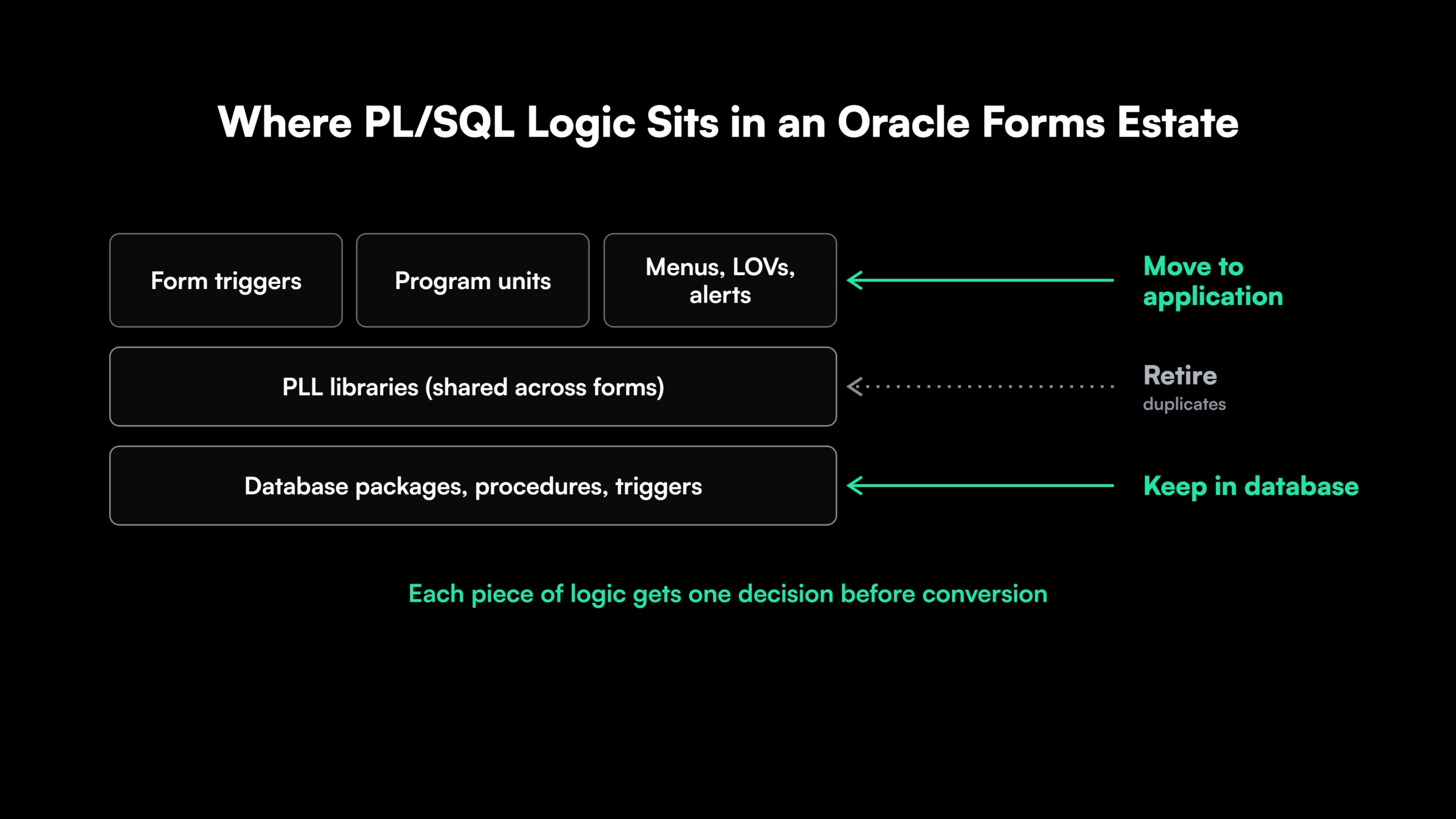
Business logic in a Forms application sits in five places, and each needs a decision before conversion starts.
- Form-level triggers. WHEN-VALIDATE-ITEM, POST-QUERY, PRE-INSERT, KEY- triggers and the rest hold validation, defaulting and navigation rules.
- Program units. Procedures and functions stored inside each form, often duplicated across forms.
- Shared PL/SQL libraries. PLL files attached to many forms, holding shared validation and utility code.
- Database packages, procedures and triggers. Logic already in the database, called by the forms and often by other systems.
- Forms built-ins. Calls such as GO_BLOCK, SET_ITEM_PROPERTY and CALL_FORM control navigation and screen state, and they have no direct equivalent outside Forms.
Menu modules, LOVs and alerts carry rules as well, and they are easy to miss in an undocumented estate.
| Decision | Applies to | Example |
| Keep in the database | Data integrity rules, set-based processing, logic other systems call | A package that prices orders for both the forms and a nightly batch job |
| Move into the application | UI behavior, navigation, field-level validation, screen state | A WHEN-VALIDATE-ITEM trigger that checks a date range |
| Retire | Dead code, duplicated program units, logic for retired processes | A program unit copied into several forms and called by none |
Inventory comes first. In an estate of hundreds of forms, AI-assisted code analysis reads every trigger, program unit and library, maps each database call, and flags duplicates before conversion is estimated. The same discipline applies to any legacy code modernization program.
Map the PL/SQL Logic Before Choosing Between Java and .NET

 +more
+moreWhat AI-Assisted Oracle Forms Conversion Automates and What Needs Rework
Rule-based converters and Gen AI tools both publish automation figures for Oracle Forms. The figures vary widely, and each one counts different objects.
| Converts well | Needs rework |
| Screen layouts and canvases | Complex trigger chains that depend on firing order |
| Data blocks and their queries | Forms built-ins for navigation and screen state |
| Simple validation triggers | Cross-form navigation and global variables |
| LOVs and record groups | Oracle Reports |
| Field defaults and formatting | External integrations, file handling and host calls |
One-to-one conversion keeps the structure and naming of Forms in the new code. That makes the output easy to compare against the original, and it also carries the old design into an application the team will maintain for years.
Some re-architecture usually pays off, especially for forms that hold heavy logic or face customers.
Four questions make any vendor’s figure comparable.
- Which object types the percentage counts, and which it excludes
- Whether it measures converted lines or forms that pass their tests
- How built-ins, Reports and integrations are handled
- What the converted code looks like for one complex form from the team’s own estate
See How Oracle Forms Code Becomes Reviewed Java or .NET Pull Requests
See how Legacyleap’s agents convert legacy code to Java or .NET as diff-based pull requests, each reviewed by an engineer before it merges.
Replacing Oracle Reports in an Oracle Forms Migration
Forms applications commonly call Oracle Reports for printed output, so every migration path needs a reporting replacement. Oracle Reports ships in the 14c release as a deprecated product with critical fixes only [7]. Oracle recommends Oracle Analytics Publisher as its replacement [7].
- APEX. Interactive and classic reports cover on-screen reporting, and Oracle Analytics Publisher handles formatted print documents.
- Java. JasperReports or a document-generation service built on the new data layer.
- .NET. Power BI Report Server, the default on-premises reporting for SQL Server 2025, or a .NET reporting library.
Each report needs its query, parameters and layout inventoried alongside the forms that call it.
Running Oracle Forms and the New Application Side by Side
Large Forms estates move module by module. The strangler fig approach routes users to the new application one module at a time, and the remaining forms keep running against the same database.
Coexistence depends on shared data. Both systems read and write the same tables during the transition, so the database stays on Oracle until the last form that writes to those tables is retired.
Validation compares the two systems on the same inputs. Each migrated module runs its test cases against the form and against the new screen, and the outputs must match before users move.
The same parity checks apply to the data through data migration validation on every table the module writes.
Cutover happens per module once validation passes. The Forms version stays available for rollback until the new module runs clean through a full business cycle. Exit criteria agreed before the parallel run keep a zero-downtime migration from stalling between the two systems.
How Legacyleap’s AI Agents Migrate Oracle Forms to Java and .NET
Legacyleap is a Gen AI-powered legacy application modernization platform built on multi-agent orchestration. Oracle Forms and PL/SQL are supported sources, with Java or .NET as targets. Five agents take the estate through the Assess, Comprehend, Modernize, Validate and Deploy lifecycle.
- Assessment Agent. Maps forms, libraries, menus, database dependencies and risk hotspots, and produces the effort and timeline estimate.
- Documentation Agent. Reconstructs the business rules held in triggers, program units and PLL libraries, from the code itself.
- Recommendation Agent. Sets the target architecture and decides, module by module, which logic stays in the database, moves into the application or is retired.
- Modernization Agent. Converts forms and PL/SQL into Java or C# as diff-based pull requests, with TODO markers on low-confidence areas. About 70% of the modernization work is automated, and engineers finish the business logic.
- QA Agent. Generates unit, integration, regression and functional tests, and validates parity against the Forms baseline.
The platform modernizes the UI, services and data layers in coordination. When the Oracle database moves, Data Platform Modernization covers the schema and the data layer inside the same program.
Every pull request is reviewed by an engineer before it merges. The agents cannot merge, deploy or execute code, and source code never leaves the client’s environment.
Programs run 50-70% faster than manual modernization, with 100% functional parity validated before deployment. Legacyleap has completed more than 150 production-grade assessments, and offers Turnkey Modernization Services or Platform Licensing for internal and SI teams.
For an application owner choosing a modernization partner for a Java or .NET move, the $0 Modernization Assessment produces the PL/SQL inventory, target recommendation and estimate before any commitment.
Steps to Migrate Oracle Forms to Java, .NET or APEX
An Oracle Forms migration follows seven steps on every path.
- Inventory the forms, libraries, menus and reports.
- Locate the PL/SQL logic and decide what stays, moves or retires.
- Choose APEX, Java or .NET as the destination.
- Decide whether the Oracle database stays, moves later or moves with the application.
- Convert or rebuild each module, with re-architecture where the logic justifies it.
- Run Forms and the new application side by side, module by module.
- Validate parity and cut over each module.
For a Java or .NET migration, start with a $0 Modernization Assessment. It maps one representative codebase, including its forms, PL/SQL libraries, database dependencies and risk areas. The output is a migration plan and estimate in 3 to 5 days, at no cost, run entirely inside your environment. To see the platform first, Book a Demo.
Start With a Map of Your Oracle Forms Estate
A $0 Modernization Assessment maps one representative codebase, including its forms, PL/SQL libraries, database dependencies and risk areas, and returns a migration plan and estimate in 3 to 5 days, inside your own environment.
FAQs
Yes. It moves to Sustaining Support, which keeps existing patches available and adds no new fixes, security updates or certifications.
Conversion costs less up front for screen-heavy forms with light logic. For forms with heavy trigger logic, a rebuild avoids carrying the Forms structure into years of maintenance, which shifts the comparison.
Yes, when data access is redesigned for the web. Row-by-row fetches converted from triggers need set-based queries and pagination to match Forms response times.
Yes. Some estates move internal data-entry forms to APEX and customer-facing modules to Java or .NET, and the Oracle database stays for as long as any APEX module remains.
Yes. Forms 14c runs on WebLogic Server in a cloud VM on OCI, AWS or Azure, which changes the hosting and leaves the application and its support dates unchanged.
A record group query becomes a lookup endpoint or repository method. The LOV becomes a searchable select or typeahead component in React, Angular or Blazor.
References
[1] Oracle, “Lifetime Support Policy: Oracle Fusion Middleware..
[2] Oracle Fusion Middleware Support Blog, “Oracle FMW Forms and Reports 14.1.2 has been released..
[3] Oracle, “Oracle APEX Overview..
[4] Oracle Architecture Center, “Migrate Oracle Forms Applications to Oracle APEX..
[5] Oracle APEX Blog, “Forms to APEX: Creating a Migration Project..
[6] Oracle APEX Blog, “Transform Oracle Forms Apps into APEX Apps in the Era of AI” (April 2026).
[7] Oracle, “Oracle Forms 14.1.2 Release Notes: Deprecated and Desupported Features..