TL;DR
- React vs Angular has no universal winner, so which is better depends on the application you already run. For a large production Angular codebase, the decision is whether a move pays back its cost.
- Modern Angular is a sound framework. Signals, zoneless change detection, and standalone components are current Angular, so a migration case has to rest on stack consolidation, hiring, upgrade position, or server rendering.
- Pick the target before the first converted screen. A React single-page application is the closest like-for-like for an internal app, and Next.js fits when public pages, SEO, or server-side data access matter.
- Treat a mixed Angular and React application as temporary scaffolding. Set the migration order, one owner for shared state, and exit criteria for removing the Angular shell before coexistence starts.
- Capture the Angular behavior baseline before converting anything. The same end-to-end and API test suite runs against both versions, and Angular code is deleted only after a module passes.
Choosing Between React and Angular When the Angular Application Already Exists
For a new build, the React vs Angular question of which is better comes down to team fit. Both are mature, well-supported choices for enterprise frontends, and neither is better in absolute terms. Angular ships as a complete framework with its own conventions, and React is a library that teams assemble into a stack.
For a team that already runs a large Angular application, the decision turns on whether moving to React pays back its cost. Moving makes sense when it consolidates the organization onto one frontend stack, eases hiring, or adds server rendering through Next.js. A senior Angular team with a stable application and no hiring problem usually gets more value from staying.
That cost covers converting the codebase, retraining the team, and running two frameworks during the transition. This guide covers how the two frameworks compare at scale and when staying on Angular is the right call. It then works through the target choice, the concept mapping, coexistence, and parity validation, all of which sit inside the wider frontend modernization program an engineering organization runs across its UI estate.
React vs Angular for Enterprise Applications
The comparison below covers architecture, performance, security, hiring, and long-term direction, the five dimensions that matter when the application already exists. Each one reflects current Angular and current React.
React vs Angular Pros and Cons
Angular is a full framework. Routing, forms, an HTTP client, dependency injection, and a CLI ship together, and every Angular team structures code the same way. That consistency is its main strength in organizations where many squads work on one codebase.
Angular has also changed substantially in recent releases. Standalone components have been the default since v19, which makes NgModules optional. Since v21, new applications run without zone.js by default, with signals driving change detection [1].
React is a UI library. Teams choose the router, state management, forms, and data-fetching libraries themselves, which gives flexibility and the largest ecosystem in frontend development. The cost is that two React applications in the same company can look structurally different unless the organization sets conventions.
| Dimension | Angular | React |
| Architecture | Full framework with built-in router, forms, HTTP client, and DI | UI library, with the surrounding stack chosen by the team |
| Reactivity | Signals, with zoneless change detection by default in new apps | Hooks and state, with automatic memoization from the React Compiler |
| Conventions across teams | Enforced by the framework and CLI | Set by the organization |
| Server rendering | Angular SSR with hydration | Next.js and other React frameworks, with Server Components |
| Ecosystem | Smaller and more curated | Largest frontend ecosystem by usage |
| Upgrade model | Scheduled majors with a published support window | No fixed support window, security fixes backported |
React vs Angular Performance Benchmarks
Both frameworks have closed the performance gaps that older comparisons describe. With zoneless change detection, Angular runs change detection when a signal, input, or template event notifies it. Zone.js used to trigger it after every intercepted async event.
React Compiler 1.0 applies memoization automatically at build time. In Meta’s Quest Store, it improved initial loads and navigation by up to 12%, and some interactions became more than 2.5 times faster [2].
In public micro-benchmarks, modern Angular and React 19 land close enough that the framework rarely explains a slow enterprise screen. Bundle size, data-fetching patterns, list virtualization, and component design account for most of the difference users feel.
For an existing application, performance on its own is a weak reason to migrate. A slow Angular screen is usually faster to fix inside Angular. The exception is first-load performance on public pages, where server rendering through Next.js changes the result, covered in the target section below.
React vs Angular Security
Angular treats every value as untrusted by default. It sanitizes template bindings by context, requires an explicit DomSanitizer call to bypass that, and ships an XSRF interceptor in HttpClient that attaches a token to mutating same-origin requests [3].
React escapes values rendered in JSX, and dangerouslySetInnerHTML is the explicit bypass. React has no HTTP client of its own, so CSRF protection becomes a decision the application team makes and enforces.
For a migration, this means two Angular defaults have to be re-implemented on purpose. XSRF handling moves into the shared fetch layer, and any place the Angular code used a DomSanitizer bypass needs a reviewed equivalent in React.
Moving to Next.js adds a server tier, and with it server-side patching. CVE-2025-55182, disclosed in December 2025, was a CVSS 10.0 remote code execution flaw in React Server Components that affected Next.js among other frameworks [4]. Applications with no server and no Server Components were unaffected. A client-only React application has an attack surface close to an Angular one.
React and Angular Hiring and Talent Pool
The talent gap is the strongest data point in favor of React. In the 2025 Stack Overflow Developer Survey, 46.9% of professional developers reported using React, 21.5% used Next.js, and 19.8% used Angular [5].
Angular developers rate their framework well. In the same survey, 45.5% of Angular users said they want to keep working with it. The hiring gap comes from the size of the candidate pool.
Hiring weight depends on scale. An organization staffing one stable Angular team feels little of this gap. An organization staffing several product teams across one frontend estate feels it in every hiring cycle.
React vs Angular Future and Release Cadence
Angular’s long-term outlook is stable and predictable. Its published policy is now a major release every 12 months, with 12 months of active support and 12 months of long-term support [6]. Angular 22, released in June 2026, is supported through June 2028, and versions 2 through 19 are out of support.
React’s direction is set by React 19, the compiler, and Server Components, with Next.js as the main production framework built around them. React publishes no fixed support window per major version, and its policy is to backport security fixes to every affected major. Long-term planning depends more on the framework a team builds on, such as Next.js.
Neither framework is at risk of abandonment. For an existing application, the long-term question is where the organization’s frontend estate is heading, which the next two sections address.
When Staying on Angular Is the Better Decision
A migration off Angular is expensive, and a successful one produces an application that behaves exactly like the old one. The return has to come from the organization, so staying on Angular is the better decision when most of the following hold.
- The team is senior in Angular. Deep framework knowledge is an asset a migration discards for the length of the move and the ramp-up after it.
- The application is stable. Low change volume means the cost of the move is spread over little future work.
- Hiring is not a constraint. The team can fill Angular roles at the pace the roadmap needs.
- Server rendering is unnecessary. The application sits behind a login, and first-load SEO is irrelevant to it.
- The application is on a supported Angular version. Angular 21 and 22 receive patches, and Angular 20’s long-term support ends in November 2026 [6].
In that case, the path is upgrading within Angular and adopting signals and zoneless change detection. This guide stops at that decision point, since the Angular upgrade is a separate project.
| Signal | Favors staying on Angular | Favors moving to React |
| Team | Senior Angular engineers, low turnover | Mixed stack, React-skilled hires, several squads |
| Change volume | Stable, few new features | Active roadmap with years of new work |
| Frontend estate | Angular is the organization standard | Angular is one of several frameworks in use |
| Rendering needs | Internal app behind a login | Public pages, SEO, first-load performance |
| Version position | On a supported major | Several majors behind, upgrade touches most files |
Reasons to Use React Over Angular in an Existing Application
The case for moving rests on four reasons, and none of them depend on Angular being outdated. The framework’s recent releases answer the criticisms older comparisons make.
- Consolidating onto one frontend stack. Organizations that run React for most products and Angular for a few pay for two design-system implementations, two sets of build tooling, and two hiring profiles. Moving the Angular applications ends that duplication.
- Hiring and staffing. The survey gap above compounds when the roadmap needs several new frontend teams. By survey usage, a React estate draws from a candidate pool more than twice the size.
- Upgrade position. An application several majors behind faces an upgrade that touches most files anyway. At that point the upgrade and the migration are comparable in scope, and the comparison deserves a real estimate. Angular’s move to yearly majors lowers this pressure for applications that stay current.
- Server rendering and public surfaces. Applications that need server rendering, SEO, or server-side data access are a natural fit for Next.js. Angular has its own server rendering, so this reason holds mainly when the organization is already standardizing on React elsewhere.
A reason needs to hold for the next several years of the application’s life. A single hiring cycle or a single slow screen is a weak basis for a multi-quarter program.
Measure One Angular Application Before Deciding to Move


 +more
+moreChoosing Between React and Next.js as the Migration Target
The target decision shapes the migration plan, so it belongs before the first converted screen. React on its own, usually built with Vite and React Router now that Create React App is deprecated, produces a client-rendered single-page application. Next.js adds server rendering, file-based routing, and a server runtime.
A typical enterprise Angular application is a client-rendered single-page application behind a login. For that profile, a React single-page application is the closest like-for-like target, with the least change to hosting and deployment.
Next.js fits when the application has public pages, depends on SEO, needs fast first loads on slow devices, or benefits from fetching data on the server. Those are the usual drivers for server-side rendering with Next.js. In the Next.js App Router, pages and layouts are Server Components by default, and interactive parts opt in as Client Components [7].
That model reduces the JavaScript sent to the browser. It also adds a server runtime, on Node.js or a managed platform, whose packages join the patching schedule.
Teams comparing Next.js or Angular for a new public surface face the same tradeoff. Angular has its own server rendering, so the deciding factor is usually where the rest of the estate is standardizing.
| Factor | React single-page application | Next.js |
| Rendering | Client-side | Server Components by default, Client Components where needed |
| Routing | Library-based, such as React Router | File-based App Router |
| SEO and public pages | Weak without extra work | Strong |
| Hosting | Static hosting or a CDN | Node.js server or a managed platform |
| Security surface | Browser only | Browser plus a server tier to patch |
| Closest fit | Internal apps behind a login | Public, content-heavy, or data-heavy surfaces |
How Angular Services, RxJS, Forms, and Routing Map to React
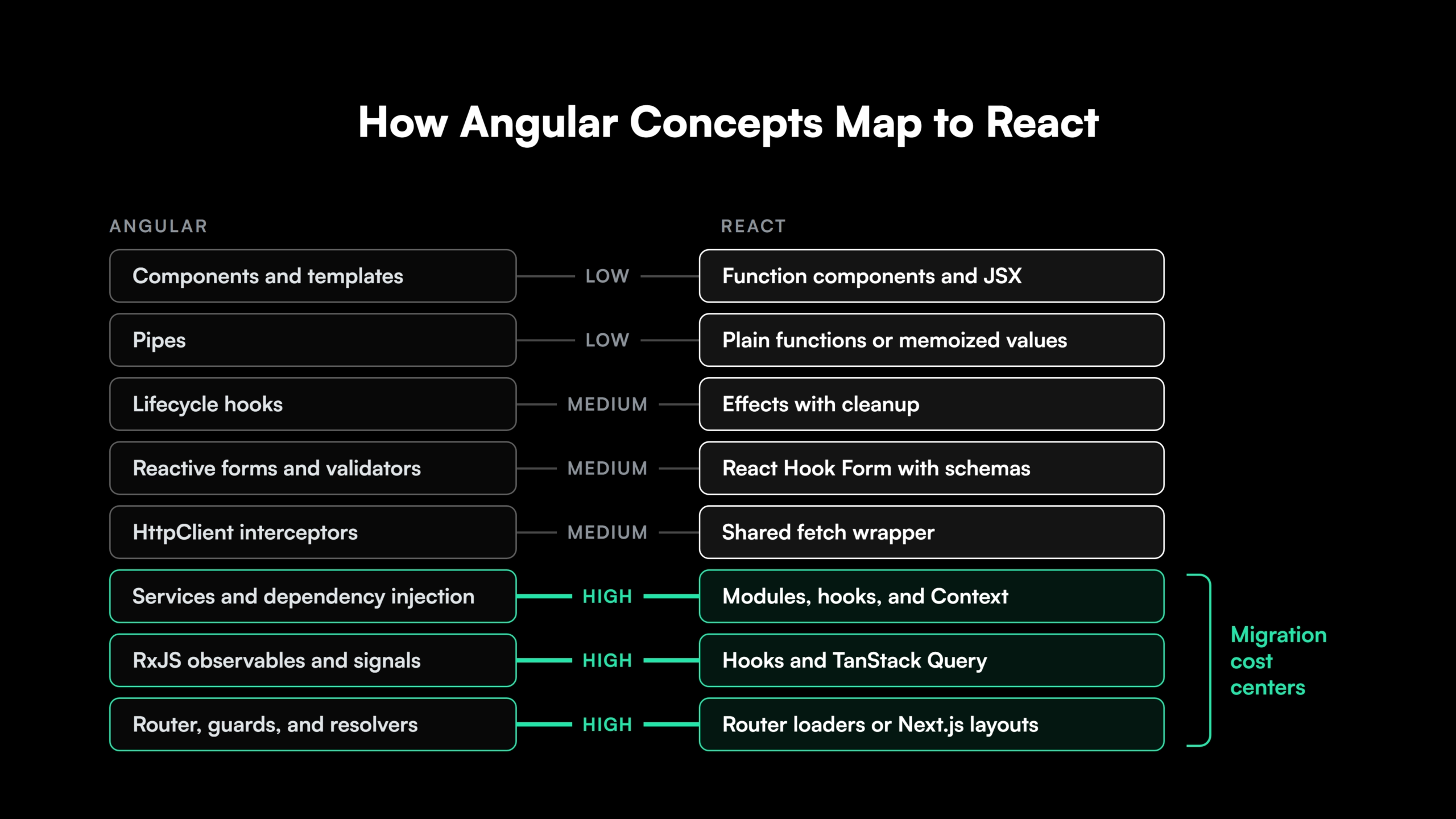
Templates and components convert in a predictable way. The cost of an Angular to React migration sits in the parts of Angular that have no single React equivalent. The mapping below describes how these migrations generally work.
| Angular concept | Common React equivalent | Migration difficulty |
| Components, templates, and control flow (@if, @for) | Function components and JSX | Low |
| Pipes | Plain functions or memoized values | Low |
| Lifecycle hooks (ngOnInit, ngOnDestroy) | Effects with cleanup | Medium |
| Reactive forms and validators | A form library such as React Hook Form, with schema validation | Medium |
| HttpClient interceptors | A shared fetch wrapper with request and response handlers | Medium |
| Services and dependency injection | Modules, custom hooks, and React Context | High |
| RxJS observables and signals | Component state, hooks, and a server-state library such as TanStack Query | High |
| Router, guards, and resolvers | React Router loaders, or Next.js layouts and proxy (formerly middleware) | High |
Where Angular to React Conversion Gets Hard
Dependency injection scope. Angular’s hierarchical injectors let a service be a singleton app-wide, per route, or per component. React Context reproduces that only when each provider scope is mapped deliberately. A service provided at three different levels becomes three separate decisions.
RxJS stream logic. Simple observables that load data map cleanly to hooks or a server-state library. Streams built from operators such as switchMap, debounceTime, and combineLatest encode business behavior in their composition. Those need a careful rewrite, or they stay in RxJS behind a small hook.
Guards and interceptors. Route guards and HTTP interceptors often carry authorization, token refresh, and error handling. Because they hold security behavior, a missed guard is a security regression. Each one needs an explicit owner in the target design.
Running Angular and React in the Same Application During Migration
Large Angular applications rarely move in one release. Running Angular and React in the same application lets a team convert screen by screen and keep shipping. Three patterns cover the common cases.
- React inside Angular. An Angular wrapper component mounts a React root into its own element and passes inputs as props. This suits converting leaf components inside Angular-owned pages.
- Angular inside React. Angular Elements package Angular components as standard custom elements, so a React page can render them like any HTML tag. This is the usual way to use Angular in React when a complex Angular widget is converted last.
- Route-level split. An Angular shell and React applications own separate routes, joined through Module Federation or a reverse proxy. Each route switches frameworks in one deployment.
Utilities such as angular2react and react2angular were built for the 1.x framework and do not apply to modern Angular. Applications still on 1.x follow a separate AngularJS migration path. Teams there either upgrade to modern Angular first or move straight to React.
Migration Order, Shared State, and Exit Criteria
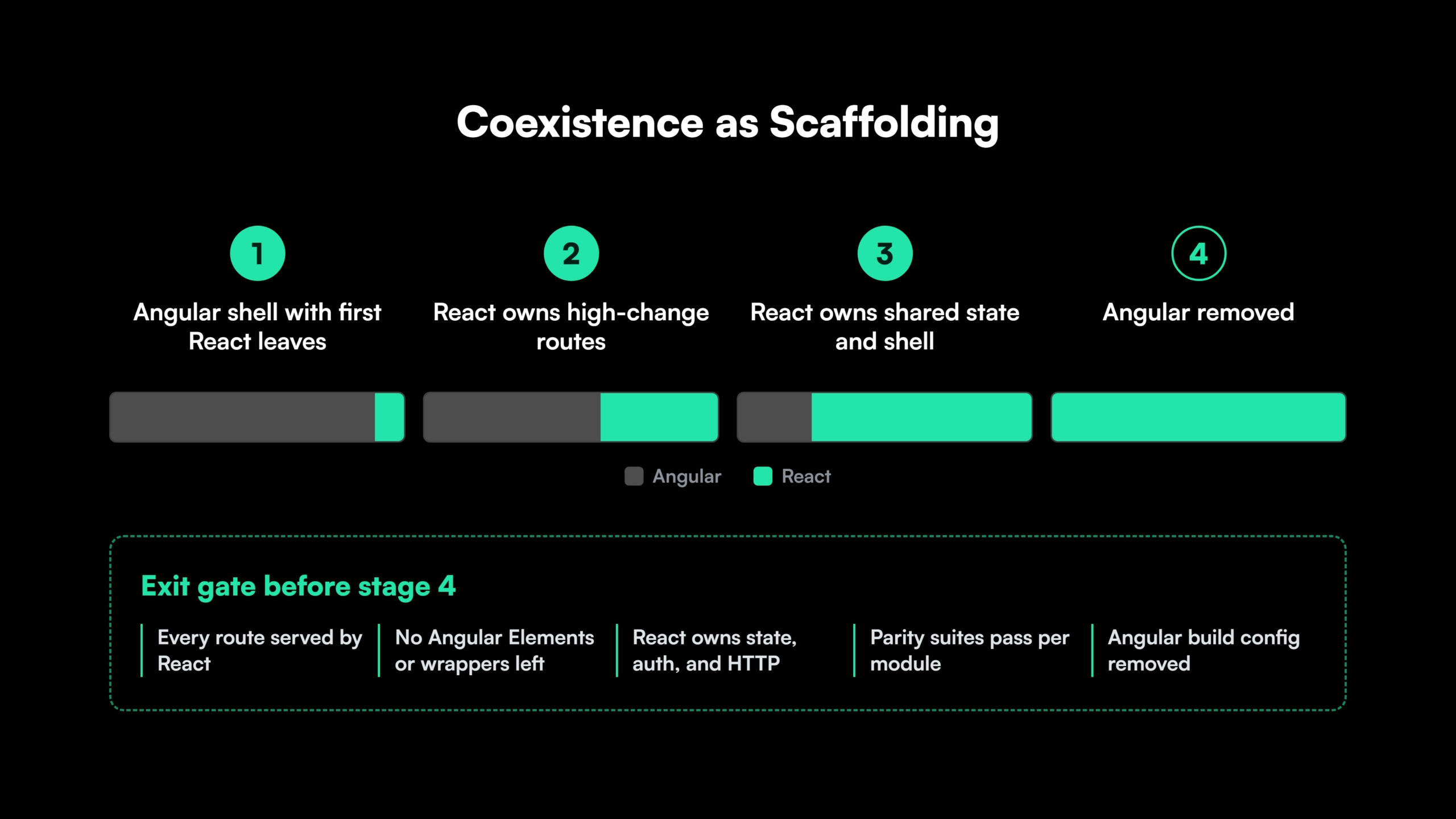
Start with leaf components and low-risk routes to prove the toolchain. Then convert the high-change areas where the team spends most of its time. Shared services and the application shell go last.
One framework owns each piece of shared state at any point. Session data, auth tokens, and feature flags live in a framework-neutral module both sides read. Duplicated stores that sync to each other are a frequent source of coexistence bugs.
The Angular shell comes out when all of the following are true.
- Every route is served by React.
- No Angular Elements or React wrappers remain in production code.
- React owns shared state, authentication, and HTTP handling.
- Parity suites pass for every converted module.
- Angular dependencies and build configuration are removed from the repository.
A mixed Angular and React estate is defensible as a transition with an end date. Left open-ended, it doubles framework upgrades, bundle weight, and the skills the team must keep. Set the target date for the exit criteria at the start.
See How a Phased Angular Migration Is Sequenced
Planning a phased move off Angular? See how the platform sequences a frontend migration with human review at every step.
Validating Behavior Parity in an AI-Assisted Angular to React Migration
Parity validation proves the React version behaves like the Angular one. It depends on a baseline captured from the Angular version before any conversion starts, and that baseline usually combines four layers.
- End-to-end journeys for the workflows users run daily, written in a framework-neutral tool so the same tests run against both versions.
- API contract tests confirming the React frontend sends the same requests, headers, and payloads, including XSRF tokens.
- Visual regression snapshots for screens where layout matters.
- Accessibility checks so keyboard navigation and screen-reader behavior carry over.
Each converted module passes the same suite before its Angular code is deleted. That gate makes parity a per-module check that runs for the whole migration.
AI-assisted conversion raises the volume of changed code per week, and hand-written tests fall behind that pace. Generated test suites, the Gen AI safety nets of a modernization program, keep coverage in step with conversion, and every generated test is reviewed like any other code.
Reskilling Angular Developers on React and Next.js
A large share of Angular experience transfers to React. TypeScript, component design, reactive thinking from RxJS and signals, and testing discipline all carry over directly.
The new material is narrower. React for Angular developers mostly means learning the rules of hooks and effects, choosing libraries the Angular CLI used to provide, and, on Next.js, understanding the boundary between Server and Client Components.
- Fix the target stack before the first pull request. Router, state, forms, data fetching, and testing libraries are decided once and documented.
- Pair on the first conversions. Engineers with React experience pair with Angular engineers on the first modules, and those patterns become the template for the rest.
- Enforce conventions in review. Lint rules and review checklists keep the converted codebase consistent across squads.
- Keep Angular experts on parity review. The engineers who know the original behavior are the best reviewers of whether the React version matches it.
How Legacyleap’s AI Agents Migrate Angular Applications to React and Next.js
Legacyleap is a Gen AI-powered legacy application modernization platform built on multi-agent orchestration. Its five agents execute the decisions this guide has laid out, from the stay-or-move estimate through parity validation, across the Assess, Comprehend, Modernize, Validate, and Deploy lifecycle.
- Assessment Agent. Inventories modules, dependencies, and hotspots, and produces the migration effort and timeline estimate.
- Documentation Agent. Reconstructs architecture, data flows, and API specs from the Angular code, including the behavior held in services, guards, and interceptors.
- Recommendation Agent. Recommends the target, React or Next.js, with ordered migration phases and module-level effort and risk scores.
- Modernization Agent. Converts the Angular code into the chosen React target as diff-based pull requests, with gap reports and TODO markers on low-confidence areas. About 70% of the modernization work is automated.
- QA Agent. Generates unit, integration, regression, API, and end-to-end tests, 70-80% of the test cases in total, and runs them against live servers to validate parity.
Engineers review every pull request before it merges. The agents cannot merge, deploy, or execute code, and the platform runs entirely inside the client’s environment, so source code never leaves it.
Modernization runs 50-70% faster than a manual program, and 100% functional parity is validated before deployment. Texas-based Legacyleap has completed more than 150 production-grade assessments. Turnkey Modernization Services hand the migration to Legacyleap’s team end to end, and Platform Licensing puts the platform in the hands of internal or SI teams.
For an engineering leader choosing a modernization partner for an Angular to React migration, the $0 Modernization Assessment produces the dependency map, target recommendation, and estimate before any commitment.
Next Steps for an Angular to React Decision
For a team that owns a large Angular application, React vs Angular is a switching-cost decision. Modern Angular is a strong framework, and staying is the right call for a senior team with a stable application and no hiring pressure.
Moving pays back when it consolidates the frontend estate, eases hiring, fixes a far-behind upgrade position, or brings server rendering through Next.js. It succeeds when the target is chosen first, coexistence has exit criteria, and parity is proven module by module.
Start with a $0 Modernization Assessment. It maps the Angular codebase, its dependencies, and its risk areas, and returns a migration plan and estimate for one representative application in 3 to 5 days, at no cost, entirely inside your environment. To see the platform first, Book a Demo.
Start the Angular Decision With Measured Data
A $0 Modernization Assessment maps one representative Angular application, its dependencies, and its risk areas, and returns a migration plan and estimate in 3 to 5 days, inside your own environment.
FAQs
Only when the migration will outlast your current version’s support window. Coexistence past a major’s LTS end date leaves the Angular side unpatched, so move to a supported major first.
Yes. Design tokens as CSS variables work in both frameworks, and a component library built as standard web components renders in Angular and React alike.
Framework-agnostic TypeScript, such as models, validators, formatters, and generated API clients, usually moves unchanged. Code tied to Angular decorators, dependency injection, or template-bound RxJS needs conversion.
Yes, at the cost of a second routing migration. Single-page application components carry over to Next.js as Client Components, so the later rework sits in routing, data loading, and the server and client boundary.
Duration depends on module count, RxJS and dependency injection depth, and test coverage more than raw lines of code. A $0 Modernization Assessment documents one representative application in 3 to 5 days to ground the estimate.
AI coding assistants convert individual files within one session’s context. Hierarchical DI scope, guard behavior, and app-wide parity need full-codebase context and generated test suites, the gap a modernization platform covers.
Not on its own. Next.js server rendering tends to improve Largest Contentful Paint on public pages, and Interaction to Next Paint improves only where heavy components are redesigned.
References
[1] Angular Blog, “Announcing Angular v21.”
[2] React Blog, “React Compiler v1.0.”
[3] Angular Documentation, “Security.”
[4] React Blog, “Critical Security Vulnerability in React Server Components.”
[5] Stack Overflow Developer Survey 2025, Technology.