TL;DR
- Plan for MFA on every path into every application. Since November 1, 2025, 23 NYCRR 500.12 requires MFA for any individual accessing any information system, internal legacy applications included. Small entities under 500.19(a) have a narrower scope.
- Treat each compensating control as a signed, yearly decision. A CISO approves it in writing and reviews it at least once a year. Entities without a CISO cannot use compensating controls.
- Use the 500.13 support expiration field as a replacement list. The asset inventory records when each system loses vendor support. Each certification is signed with that record on file.
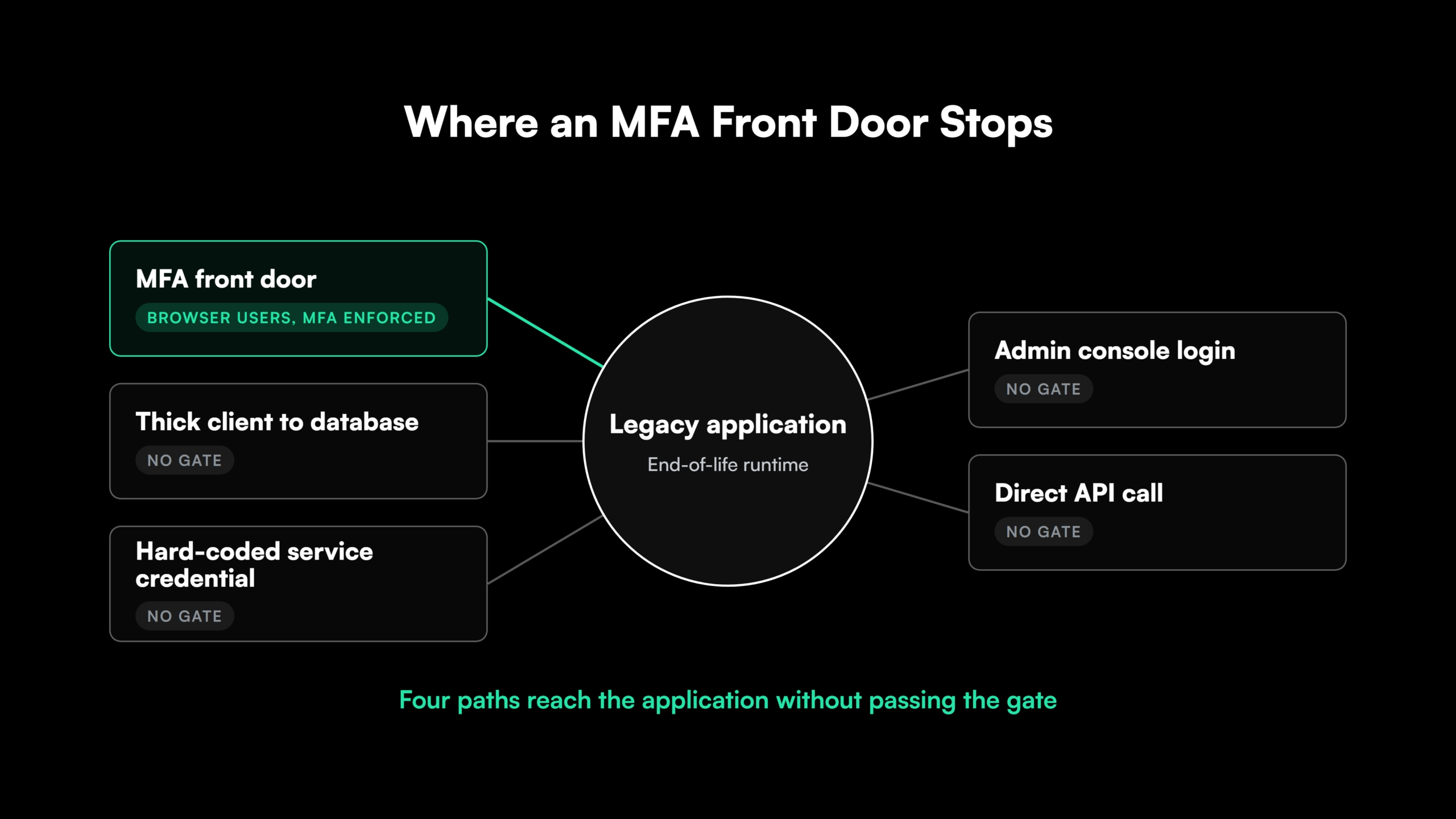
- Check what an MFA front door leaves uncovered. Thick clients, direct database connections and hard-coded credentials bypass a proxy placed in front of a web application.
- Turn the exception register into a modernization plan before April 15, 2027. That filing is the first to cover a full calendar year of universal MFA. Modernizing an application’s authentication and runtime retires its exception for good.
NYDFS Part 500 MFA Requirements Under Section 500.12
NYDFS Part 500 MFA requirements have applied to any individual accessing any of a covered entity’s information systems since November 1, 2025, legacy applications included. Part 500 is the NYDFS cybersecurity regulation for banks, insurers and other entities the Department licenses or charters.
An application that cannot support MFA has three routes. It can sit behind a layer that enforces MFA on every path into it. It can run under compensating controls the CISO approves in writing and reviews at least annually. It can also be modernized to support MFA.
Front doors and compensating controls keep the legacy application and its end-of-life runtime in place. Modernization removes the MFA gap and the support expiration risk in the same program of work.
The text of 23 NYCRR 500.12 has four parts that matter for legacy applications:
| Element | What the regulation says |
| Scope | MFA “shall be utilized for any individual accessing any information systems of a covered entity” |
| Effective date | November 1, 2025 |
| Compensating controls | The CISO “may approve in writing the use of reasonably equivalent or more secure compensating controls,” reviewed “at a minimum annually” |
| Limited exemption | Entities exempt under 500.19(a) need MFA for remote access, remote access to third-party applications from which nonpublic information is accessible, and privileged accounts other than service accounts that prohibit interactive login |
Entities under the limited exemption do not have to designate a CISO. Without a CISO, 500.12(b) gives them no alternative to MFA.
The NYDFS FAQs define MFA as “two or more different types of verification.” They state that “Passwords are a single factor.” Factors from the same category, such as a password plus a PIN, do not qualify.
What the NYDFS 500.13 Asset Inventory Must Track
Section 500.13 requires written policies and procedures that “produce and maintain a complete, accurate and documented asset inventory” of a covered entity’s information systems. It took effect on November 1, 2025, the same day as universal MFA. The policies must track these fields for each asset, as applicable:
- Owner
- Location
- Classification or sensitivity
- Support expiration date
- Recovery time objectives
The same policies set how often the inventory is updated and validated.
The support expiration date is the field that matters most for legacy applications. It turns an end-of-life runtime, framework or operating system into a dated entry on a written record. The risk assessment and the annual certification are then both made with that fact on file.
NYDFS tied inventories to legacy risk two years before the amendment took effect. Its December 2021 MFA guidance reported cases where “an attacker exploited a legacy system that the Covered Entity did not realize was still active.”
The October 22, 2026 NYDFS alert on PHP vulnerabilities shows the inventory in use. Its first step tells entities to “determine whether PHP is used across your organization.” Entities unable to patch immediately “should take affected systems and applications offline until they are appropriately secured.”
An accurate inventory turns that first step into a lookup. The PHP2Shell vulnerability shows how fast that lookup is needed.
Why Legacy Applications Cannot Support NYDFS MFA Requirements
MFA is enforced where a user authenticates. Many legacy applications authenticate users inside their own code, on paths an identity provider never sees. The NYDFS FAQs expect MFA enforcement that “cannot be bypassed through legacy logins, direct application access, or API connections that circumvent SSO controls.”
NYDFS’s 2021 guidance traced MFA gaps to legacy systems that “do not support MFA.” About 64% of covered entities reporting cybersecurity events from January 2020 to July 2021 had some gap in their MFA.
MFA fails to attach at these points in legacy applications:
| Authentication pattern | Typical stacks | Why MFA cannot attach | Bypass route |
| Own user table and forms login | Classic ASP, WebForms, older Java EE and PHP | The form checks a stored password hash with no second-factor hook | Direct requests to internal URLs |
| Windows-integrated or LDAP bind | Intranet applications | Trusts the domain session | Any domain-joined workstation |
| Thick client to database | VB6, Delphi, WinForms | The client logs in with its own connection string | Database connections with no web tier |
| Shared or hard-coded credentials | Batch jobs, integrations, reports | One stored credential serves many users | Anyone who can read the file |
| Admin consoles and direct APIs | Server consoles, SOAP and REST endpoints | Separate logins and API keys | Calls that skip the user interface |
A Classic ASP to ASP.NET Core migration or a VB6 to .NET migration closes these paths by replacing the login code and the direct database connection together.
The $0 Security Assessment maps end-of-life runtimes, hard-coded secrets and OWASP-class vulnerabilities to their exact code locations.

 +more
Three Ways to Meet NYDFS MFA Requirements for a Legacy Application
A legacy application that cannot take MFA natively ends up on one of three paths. They differ in what they cover and how long they last:
| Path | Fits when | Covers | Leaves open | Recurring obligation |
| MFA front door | Users arrive through a browser or remote session | Access through the enforced entry point | Thick clients, embedded credentials, the end-of-life runtime | Proof that nothing bypasses it |
| CISO-approved compensating control | A documented constraint blocks MFA for a defined period | The access the control was designed for | The application, its runtime and its bypass paths | Written approval, reviewed at least annually |
| Modernized authentication | The application stays in service long term | Central identity provider sign-in, direct paths retired | Delivery time and cost | Standard MFA operation |
A front door places an identity-aware proxy, gateway or virtual desktop between users and the application. It requires MFA before passing the session through, often with no code change for browser-based applications.
Its limits sit in the bypass routes above. A desktop client with its own database connection never passes through a web proxy. A credential in a configuration file works from any machine that reaches the database.
Behind the proxy, the runtime keeps its support expiration date. Front doors and other zero trust for legacy systems controls work as interim layers.
Modernization moves authentication to the central identity provider through SAML or OpenID Connect, retires direct database logins and puts the application on a supported runtime.
Many programs use all three in sequence. A front door and a compensating control cover the near term, and modernization, dated against both, retires the exception.
Compensating Controls and the Annual Certification Under the NYDFS Cybersecurity Regulation
A compensating control under 500.12(b) needs written CISO approval and a review “at a minimum annually.” Each review falls inside a certification year.
By April 15, covered entities without a full exemption file a certification of material compliance or an acknowledgment of noncompliance for the previous calendar year. The highest-ranking executive and the CISO sign it. An entity without a CISO substitutes the senior officer responsible for its cybersecurity program.
That places each legacy MFA exception in front of two named signers every year. NYDFS set the standard for exceptions in its 2021 guidance, which states they “should be granted sparingly, tracked, and last only as long as necessary.” A modernization date gives each annual renewal a defined end.
Counted from the November 1, 2025 effective date, the April 15, 2026 filing covered two months of universal MFA and asset inventory. The filing due April 15, 2027 is the first to cover a full calendar year under both rules.
The Healthplex consent order shows how an MFA gap and a certification combine. Healthplex migrated its email to Office 365 in 2021. NYDFS found that MFA was not fully operational for users reaching the new email from an external web browser. When a phishing email arrived in November 2021, MFA was not enabled for its Outlook Web Access.
NYDFS also found that Healthplex “improperly certified compliance with the Cybersecurity Regulation,” because it was not in compliance when it signed. The MFA gap was one of the findings behind that conclusion. The August 2025 consent order carried a $2 million penalty.
Two of the violations NYDFS found apply directly to legacy applications. The migration left an MFA gap under 500.12, and certifying compliance during a period of noncompliance violated 500.17(b).
What NYDFS Has Said About Replacing Legacy Systems, Including the 2026 Frontier AI Advisory
No section of Part 500 requires replacing end-of-life systems. Section 500.3 does require a policy covering “asset inventory, device management and end of life management.” NYDFS guidance has pointed toward retiring and replacing legacy systems since 2021.
| Date | NYDFS document | What it says about legacy systems |
| December 7, 2021 | MFA guidance letter | Legacy systems that “do not support MFA” create coverage gaps, and entities should “regularly decommission systems that are no longer needed” |
| November 1, 2025 | 500.12 and 500.13 take effect | MFA for any individual, and a support expiration date on file for each asset |
| May 21, 2026 | Frontier AI advisory | Entities “should consider whether to strengthen operational resilience by replacing end-of-life or legacy information systems” |
| October 22, 2026 | PHP alert | Systems that cannot be patched immediately should go offline until secured |
The May 2026 advisory responds to frontier AI models that speed up “identifying vulnerabilities and exploits in information systems.” Faster discovery shortens the time an unpatched legacy runtime stays unexploited. The same shift sits behind AI-driven vulnerability discovery against older codebases.
The advisory also covers AI used to fix code. It points to “additional testing and validation procedures, including human oversight, for AI-generated code prior to deployment in production environments.” For AI-assisted modernization of legacy applications, that means human-reviewed code changes and validation before release.
NYDFS states that the advisory “does not impose any new requirements.” It is meant to inform risk management and compliance efforts, and decisions about legacy applications with MFA exceptions sit inside those efforts.
How to Turn the NYDFS Exception Register and Asset Inventory Into a Modernization Plan
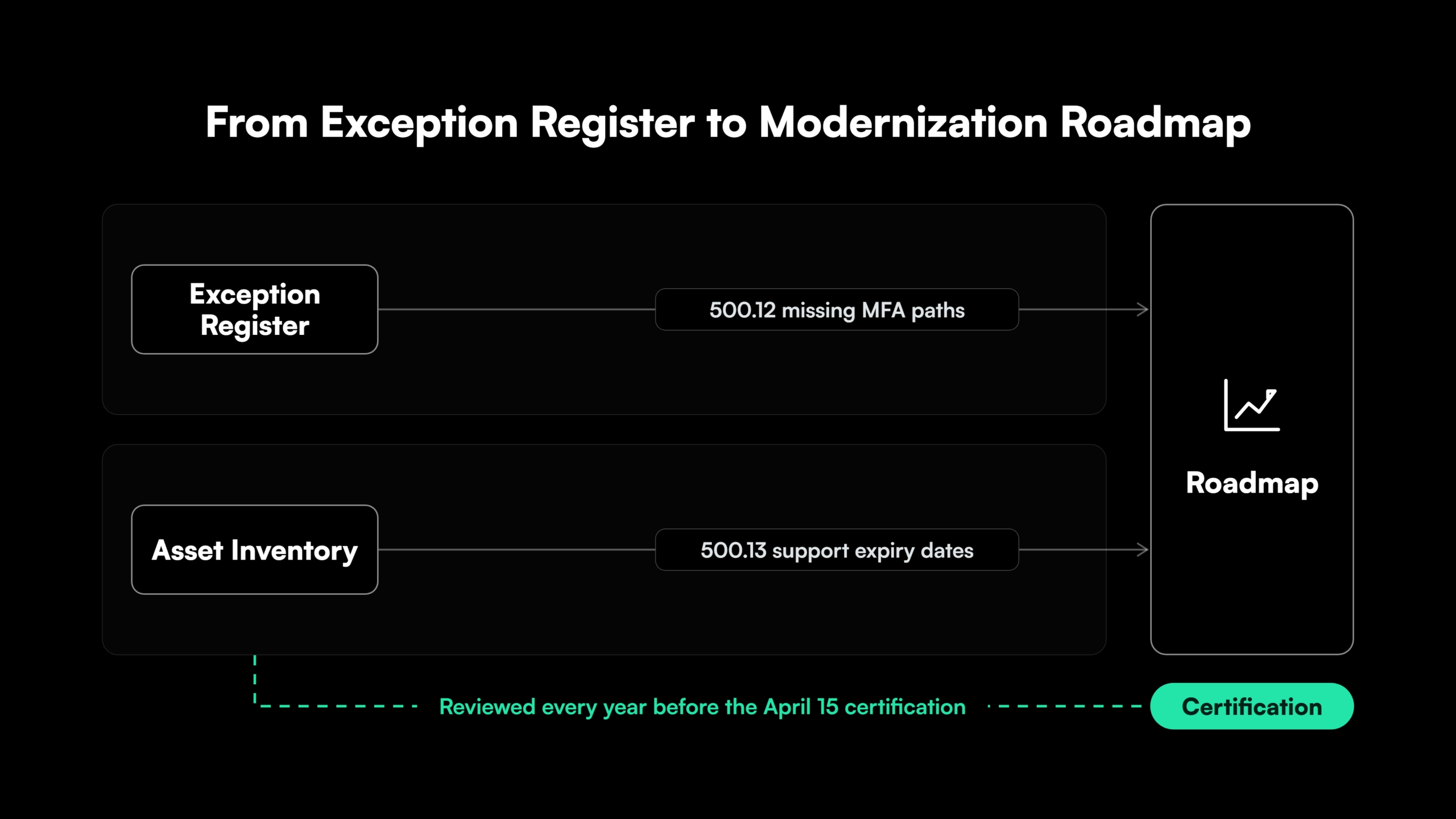
The exception register shows where MFA is missing. The asset inventory shows when each system lost or will lose vendor support. Joined application by application, the two records hold a modernization backlog.
The plan runs in seven steps:
- Exception register: List each application where MFA is not enforced on every path, including thick-client, service-credential and direct-API paths.
- Inventory join: Attach the 500.13 record to each entry, with owner, classification, support expiration date and recovery time objective.
- Risk ranking: Order applications by nonpublic information exposure, remote or privileged access, and support status.
- Path per application: Assign a front door, a compensating control, modernization or retirement, each with a target date.
- Review dates tied to milestones: Align each compensating control’s annual review with a milestone, so the CISO re-approves against progress.
- Sequenced modernization: Replace authentication and runtime module by module through the strangler fig approach.
- Evidence for the certification: Record progress in the risk assessment and keep the records behind each April 15 filing.
The first two steps take the longest. Legacy applications rarely have current documentation, so login paths, embedded credentials and runtime versions have to be read from the source code. Gen AI code analysis extracts those facts at scale, and a legacy system audit applies the same review across an estate.
Ranking depends on the business. Policy and claims systems in insurance legacy modernization and account systems in core banking modernization often carry the highest classification.
Start the exception register and inventory join from the code
The $0 Security Assessment delivers a security debt inventory mapped to code locations, a fix approach per finding and a modernization opportunity map.
How Legacyleap’s Gen AI Agents Modernize Legacy Applications for NYDFS Part 500
Legacyleap is a Gen AI-powered legacy application modernization platform built on multi-agent orchestration. Its agents carry a legacy application from the exception register to a modernized, validated release across five stages. Those stages are Assess, Comprehend, Modernize, Validate and Deploy.
The $0 Security Assessment runs first, inside the client’s environment, with findings in 3 to 5 days. It analyzes end-of-life runtimes, vulnerable dependencies, deprecated cryptography, hard-coded secrets and OWASP-class vulnerabilities. Each finding is mapped to its code location, which feeds the first three steps of the plan.
Five agents then run the modernization:
- Assessment Agent: Produces the technical debt report, dependency map, security vulnerabilities and effort estimate.
- Documentation Agent: Rebuilds architecture diagrams, data flows, integration maps and a software bill of materials (SBOM) from the code.
- Recommendation Agent: Sets refactor, replace or retain decisions and an ordered migration plan, the path and dates for each application.
- Modernization Agent: Converts the code to a supported stack as diff-based pull requests, with security modernization covering authentication, encryption and secure communication. About 70% of the work is automated.
- QA Agent: Generates unit, integration, regression and functional tests, and validates 100% functional parity before deployment.
Engineers review every pull request. The agents cannot merge, deploy or execute code, so every AI-generated change passes human review before production. Source code never leaves the client’s environment.
The output is an evidence pack. It links each finding to its fix, records verified closure and shows functional parity, giving the CISO a record to review before signing.
Next Steps for NYDFS Part 500 MFA Compliance on Legacy Applications
NYDFS Part 500 has made each legacy MFA exception a dated, signed decision that returns every year. The asset inventory records which of those applications run on unsupported technology. Read together, the two records show which applications to modernize first.
The same pattern runs through PCI DSS 4.0 compliance for legacy applications, the GLBA Safeguards Rule and the wider legacy software compliance risk facing regulated firms.
For legacy applications under Part 500, the $0 Security Assessment produces the findings, code locations and fix approach that the exception register and inventory join start from. It takes 3 to 5 days, costs nothing and runs inside your environment. To see how the agents run a modernization first, book a Technical Demo.
FAQs
Under 500.19(a), an entity qualifies with fewer than 20 employees and independent contractors, counting affiliates. Revenue under $7.5 million in each of the last three fiscal years, counting affiliates’ New York operations, also qualifies, as do year-end total assets under $15 million including affiliates. Any one test is enough.
SSO counts only when MFA is enforced in the SSO sign-in flow. The NYDFS FAQs state that “SSO alone does not meet the requirements of Section 500.12.”
It covers remote access. For entities outside the limited exemption, 500.12(a) also reaches on-site users on the internal network, who need MFA or a CISO-approved compensating control.
It files a written acknowledgment of noncompliance. The acknowledgment identifies the sections not met, describes the nature and extent of the noncompliance, and gives a remediation timeline or confirms remediation is complete.
The earlier version of 500.12 required MFA for remote access to internal networks, including applications and systems. A CISO could approve reasonably equivalent or more secure access controls in writing, as NYDFS’s December 2021 guidance summarizes.
Five years. Section 500.17(b)(3) requires covered entities to maintain the data and documentation supporting each certification or acknowledgment for that period.
References
- New York State Department of Financial Services, “23 NYCRR Part 500.”
- New York State Department of Financial Services, “Cybersecurity FAQs.”
- New York State Department of Financial Services, “Guidance on Multi-Factor Authentication.”
- New York State Department of Financial Services, “Cybersecurity Alert: Critical Vulnerabilities in PHP that Require Immediate Patching.”
- New York State Department of Financial Services, “Cybersecurity Submissions.”
- New York State Department of Financial Services, “Consent Order, In the Matter of Healthplex, Inc.”
- New York State Department of Financial Services, “Heightened Cybersecurity Risks Associated with Frontier AI Models.”