TL;DR
- Backbone and React can run in the same app. React mounts inside Backbone views with
createRootand reads Backbone models throughuseSyncExternalStore, so screens move one at a time. - Inventory the custom code around Backbone before moving any view. View base classes, event buses, routing helpers, jQuery plugins, template helpers, and model extensions decide how much of the work is replacement and how much is deletion.
- Sequence the work as build, leaf views, then routing. A modern bundler comes first, small high-churn views follow, and React Router takes over the URL once most screens run in React.
- Map Marionette to current React patterns. Regions become composition, behaviors become custom hooks, and lifecycle callbacks become effects with cleanup.
- Prove each screen against the Backbone version. The same end-to-end journeys run against both apps, and a screen counts as migrated once it passes on both.
Using React with Backbone.js
React can run inside a Backbone.js app. A Backbone view mounts a React component into its own element, and the component reads Backbone models directly. Teams then replace views one screen at a time, move routing to React, and remove Backbone once no screen depends on it.
A Backbone.js to React migration is one workstream inside a wider frontend modernization program. Teams comparing paths for several older frameworks at once can start from the ExtJS, Backbone, and Knockout migration overview.
When to Migrate from Backbone.js to React
Three triggers decide when a working Backbone app needs to move.
- Hiring. Backbone.js is absent from the web frameworks list in the 2025 Stack Overflow Developer Survey, where React is used by 46.9% of professional developers [1].
- jQuery maintenance. Backbone views use jQuery for DOM work and event delegation. jQuery 1.x and 2.x are no longer supported, and 3.x receives only critical security patches and bug fixes [2].
- Feature velocity. Every new screen built in Backbone adds to the code that has to move later.
An app with few planned changes and an experienced team can stay on Backbone for now. Teams that start the move keep shipping by building new features in React from the first day, inside the Backbone app.
Inventorying the Custom Code Built Around Backbone.js
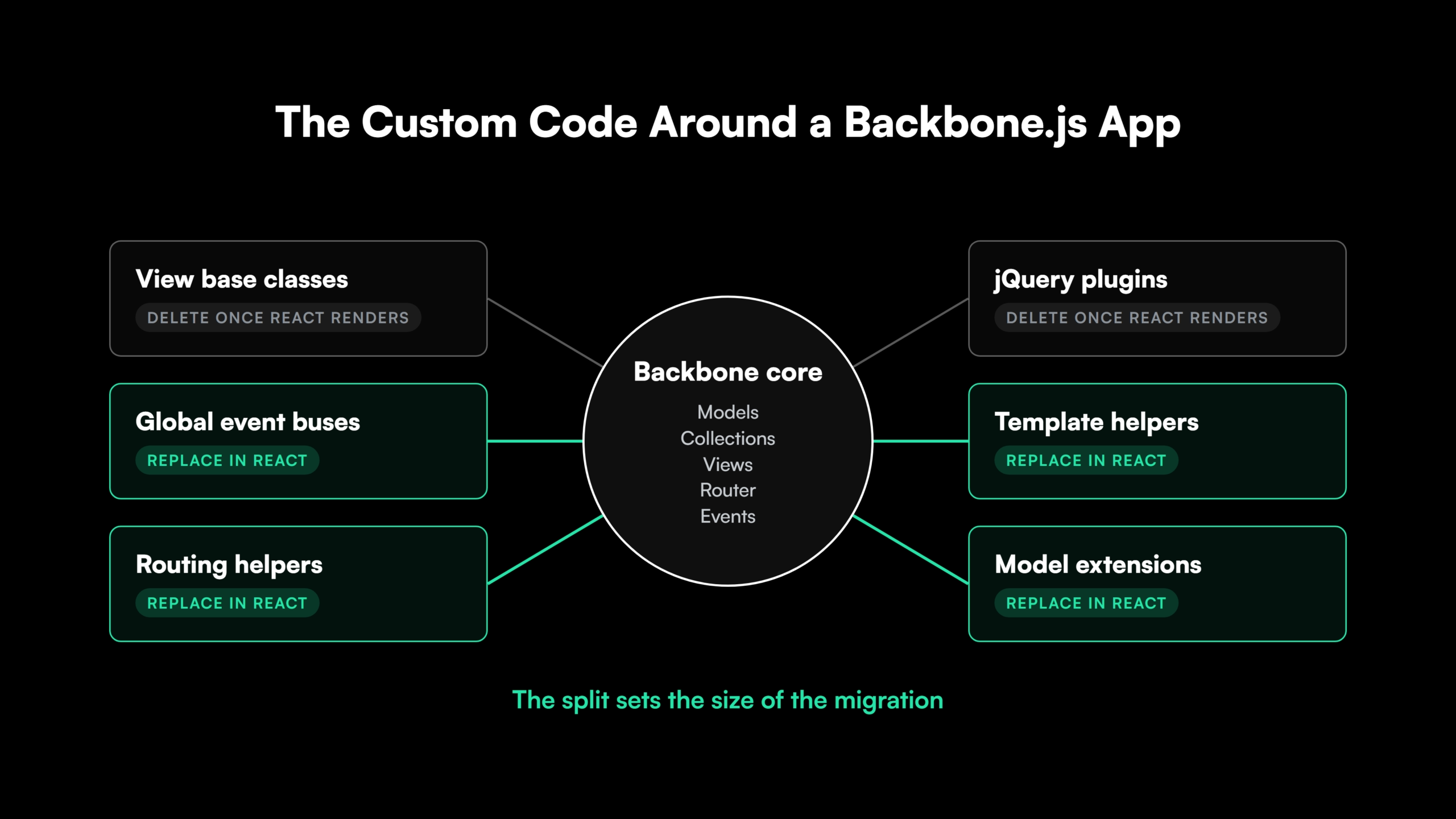
Backbone supplies models, collections, views, a router, and events. Large apps needed more than that, so teams built the rest themselves. That custom code makes up most of a Backbone.js to React migration, and it goes on the inventory before any view moves.
- View base classes and render helpers. A shared base view that handles templates, subviews, and teardown.
- Global event buses. A
Backbone.Eventsobject or Backbone.Radio channels wiring views and modules together. - Routing helpers. Navigation controllers, route guards, and code that rewrites URLs or tracks page history.
- jQuery plugins. Date pickers, modals, grids, and validation plugins tied to specific views.
- Template helpers. Underscore, Handlebars, or server-rendered templates with helper functions holding display logic.
- Model extensions. Validation, nested models, computed attributes, and custom
syncorparseoverrides.
Each item lands in one of two columns. Validation rules and parse logic need a React-side replacement. Teardown code and manual event cleanup disappear once React owns rendering. The split between the two columns sets the real size of the migration.
In a codebase with hundreds of views, the inventory has to come from the code itself. Gen AI tooling with full-codebase context traces every subclass of a base view, every subscriber to an event channel, and every view that loads a plugin.
Reading one file at a time misses the links between them, a known limit of Gen AI coding tools in modernization.
Size the Custom Code Around Your Backbone App Before Planning the React Build


 +more
+moreBackbone.js Concepts Mapped to React
| Backbone.js | React equivalent | During migration |
| View | Function component | render() and the events hash become JSX and props such as onClick |
| Template (Underscore, Handlebars) | JSX | Template helpers become plain functions or small components |
| Model | Fetch functions plus a server-state library such as TanStack Query | parse() becomes a tested function, and validation moves into form state |
| Collection | An array from a query, rendered with map and stable keys | Underscore filters become array methods |
| Router | React Router | Takes over the URL late in the migration |
| Events and event buses | Props, callbacks, and context | A global bus becomes shared state or context |
listenTo and remove() cleanup | Effect cleanup and unmount | Manual teardown code is deleted |
The table describes the end state. During coexistence, React reads Backbone models as they are, and the replacements in the middle column arrive one screen at a time. Keeping Backbone as the interim data layer lets rendering move first, which is where users see the change.
Running Backbone and React Together During Migration
Running Backbone and React together is what keeps the app shipping during a Backbone.js to React migration. The pattern is the strangler fig approach applied to a front end, with React taking over one view at a time.
Mounting a React Component Inside a Backbone View
React’s createRoot supports pages built partly in another framework, with one root for each piece of UI that React manages [3]. Each migrated Backbone view becomes the host for one root.
import { createElement } from 'react';
import { createRoot } from 'react-dom/client';
import Backbone from 'backbone';
import { CartSummary } from './CartSummary';

export const CartView = Backbone.View.extend({
  render() {
    this.root ??= createRoot(this.el);
    this.root.render(createElement(CartSummary, { cart: this.model }));
    return this;
  },
  remove() {
    this.root?.unmount();
    return Backbone.View.prototype.remove.call(this);
  },
});
The remove override is the important part. React needs root.unmount whenever another library removes its DOM node [3], and Backbone removes view elements during navigation.
Reading Backbone Models and Collections from React
useSyncExternalStore subscribes a component to an external store [4]. Backbone models already fire change events, so a small hook connects the two.
import { useCallback, useSyncExternalStore } from 'react';

export function useModelValue(model, key) {
  const subscribe = useCallback((onChange) => {
    model.on(`change:${key}`, onChange);
    return () => model.off(`change:${key}`, onChange);
  }, [model, key]);
  return useSyncExternalStore(subscribe, () => model.get(key));
}
React compares snapshots by reference [4]. Code that mutates an object or array attribute in place has to call set with a new value, or the component keeps showing the old one. Collections follow the same pattern on update, reset, and sort events, with a cached snapshot rebuilt on each event, since the collection’s internal array changes in place.
Backbone.js to React Migration Steps
A Backbone.js to React migration follows seven steps, whatever the size of the app.
- Inventory the custom code. List base classes, event buses, routing helpers, plugins, templates, and model extensions.
- Set up React in the build. Move to a modern bundler so JSX and ES modules compile next to the existing code.
- Mount React in one view. Ship a single leaf component inside a Backbone view to prove the setup.
- Share data. Read Backbone models through a hook, then move fetching and
parselogic into tested functions. - Replace views. Convert views screen by screen, starting with leaf views and high-churn screens.
- Move routing. Hand the URL to React Router and wrap the remaining Backbone screens in components.
- Remove Backbone. Delete Backbone, Underscore, jQuery, and the template runtime once no screen loads them.
Sequencing a Large Backbone Codebase
Leaf views go first. They have no subviews, so a React version swaps in without touching the views around it. High-churn screens follow, since every feature built there in React stops adding Backbone code.
Coexistence on a large app is measured in months or years. Close, a sales CRM company, began rendering new React features inside Backbone views in 2017 and moved routing to React Router later, starting with its self-contained Settings sub-router [5].
Several teams can migrate in parallel when each one owns a set of screens. Shared pieces such as the event bus and the base view need a single owner, because every team depends on them.
Moving Routing Ownership to React Router
One router owns the URL at a time. Backbone’s router keeps it as long as React runs as islands inside Backbone views. Once most screens are in React, React Router takes over, and wrapper components mount the remaining Backbone views on their routes.
Backbone’s router uses hash fragments by default and supports pushState as an opt-in [6]. Apps on hash URLs need client-side redirects from old # paths once React Router moves to path-based URLs. The server never receives the part after the #.
Replacing jQuery Plugins and the RequireJS Build
The build changes first, because JSX and ES modules need a modern bundler. Webpack bundles existing AMD define() modules, so RequireJS code moves over once its paths, shims, and loader plugins such as text! are mapped in the webpack config. Files then convert to ES modules one at a time.
Moving off RequireJS is one part of wider frontend toolchain modernization.
jQuery work follows the views. DOM manipulation inside a view becomes state-driven rendering. Each plugin gets a React component or a thin wrapper that mounts the plugin in an effect. Global $.ajaxSetup hooks for authentication and errors move into a shared fetch client. Code outside Backbone views follows the broader jQuery migration patterns.
See How a Frontend Migration Is Planned and Delivered
See how the platform plans a Backbone to React migration and delivers each change as a diff-based pull request reviewed by an engineer.
Migrating a Backbone Marionette App to React
Marionette adds regions, layout views, behaviors, and lifecycle callbacks on top of Backbone. Marionette-era migration guides use React.createClass, mixins, and the legacy top-level render API. React 19 removed that API in favor of createRoot [7]. Each Marionette concept has a current React equivalent.
| Marionette | Current React pattern |
Region and showChildView | Conditional rendering of a child component |
| View with regions (LayoutView in v2) | Layout component with children or named props |
| CollectionView | map over an array with stable keys |
| Behavior | Custom hook |
onRender, onAttach, onDestroy | useEffect with a cleanup function |
templateContext | Values derived inside the component |
| Backbone.Radio channels | Context or a shared store |
Regions make Marionette apps easier to migrate in steps. A region can show a Backbone view that hosts a React root, so a layout converts from its leaf regions upward.
Validating Behavior Parity in an AI-Assisted Backbone to React Migration
A Backbone app without tests gets them before any view changes. Characterization tests record what the app does today, including quirks users depend on. Each finding becomes a test or a recorded decision to change the behavior.
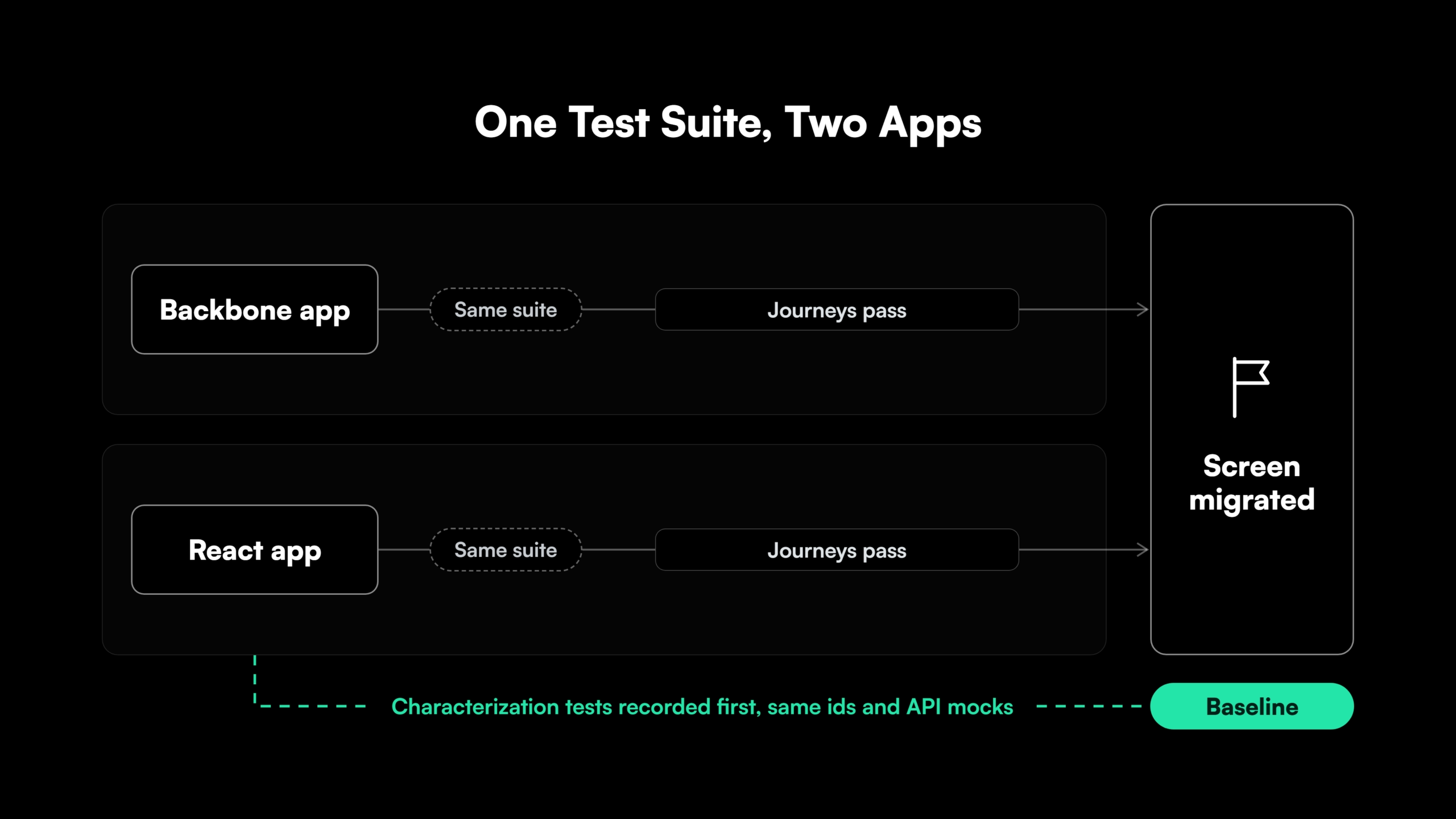
Key user journeys are written as end-to-end tests in a tool such as Playwright and run against the Backbone app first. The same suite then runs against the React version. A screen counts as migrated once its journeys pass on both.
Keeping the original element ids and mocking the API the same way for both apps lets one suite serve both. AI-assisted conversion raises the volume of changed code each week, so generated tests keep coverage in step, and every generated test is reviewed like any other code. The approach applies the same parity discipline used in data migration validation.
How Legacyleap’s AI Agents Migrate Backbone.js Applications to React
Legacyleap is a Gen AI-powered legacy application modernization platform built on multi-agent orchestration. Five specialized agents take a frontend codebase through the Assess, Comprehend, Modernize, Validate, and Deploy lifecycle, in the same order this guide describes.
- Assessment Agent. Maps views, models, dependencies, and risk hotspots, and produces the effort and timeline estimate.
- Documentation Agent. Reconstructs the custom code around Backbone from the code itself, including base classes, event wiring, routing helpers, and data flows.
- Recommendation Agent. Sets the target architecture and the order in which screens and routes move.
- Modernization Agent. Converts views into React components as diff-based pull requests, with TODO markers on low-confidence areas. About 70% of the modernization work is automated.
- QA Agent. Generates unit, integration, regression, and end-to-end tests, and validates parity against the Backbone baseline.
Every pull request is reviewed by an engineer before it merges. The agents cannot merge, deploy, or execute code, and the platform runs inside the client’s environment, so source code never leaves it.
Programs run 50-70% faster than manual modernization, with 100% functional parity validated before deployment. Texas-based Legacyleap has completed more than 150 production-grade assessments. Turnkey Modernization Services hand the migration to Legacyleap’s team, and Platform Licensing lets internal or SI teams run the platform themselves.
For a front-end lead choosing a modernization partner for a large Backbone codebase, the $0 Modernization Assessment produces the inventory, target plan, and estimate before any commitment.
Next Steps for a Backbone.js to React Migration
A Backbone.js to React migration succeeds when the custom code around Backbone is inventoried first. Both frameworks then share the app for as long as the move takes, and each screen proves parity before its Backbone code is deleted.
Start with a $0 Modernization Assessment. It maps one representative codebase, including its views, models, the custom code around them, and its risk areas. The output is a migration plan and estimate in 3 to 5 days, at no cost, run entirely inside your environment. To see the platform first, Book a Demo.
Start the Migration With a Map of Your Backbone Code
A $0 Modernization Assessment maps one representative Backbone codebase, its views, models, custom code, and risk areas, and returns a migration plan and estimate in 3 to 5 days, inside your own environment.
FAQs
Yes. A React form can call model.set or model.save, so forms move to React before the data layer does, and Backbone views reading the same model update as usual.
Until every screen reading a given model runs in React. That model’s fetching and parse logic then moves into tested functions, one API resource at a time.
It is when the app still gets new features or depends on jQuery plugins with no recent releases. A frozen internal tool with no planned features and maintained plugins can wait for its next major change.
Redux is optional. Server data fits a fetching library such as TanStack Query, and the client state left over fits component state or context.
Yes, after the routing handover, since Next.js owns routing and rendering. During coexistence, a client-rendered React setup is simpler to mount inside Backbone views.
Yes. Marionette 2 LayoutViews and templateHelpers correspond to Marionette 3 Views with regions and templateContext, so the React mapping holds for both versions.
References
[1] Stack Overflow Developer Survey 2025, Technology..
[2] jQuery, “Version support.”.
[3] React documentation, “createRoot.”.
[4] React documentation, “useSyncExternalStore.”.
[5] Close Engineering, “Migrating all the way up to React Router v6.4+ with data APIs.”.