TL;DR
- Identify the Ember era before planning the move. Classic components, observers, and mixins need redesign in React. Glimmer components and tracked properties map more directly.
- Pick a bridge that supports the Ember version in production. The older React-in-Ember addons stop at React 17. A current toolkit targets Ember 4.12 and above, and a small
createRootwrapper covers apps outside that range. - Give each URL segment one router. Ember keeps the routes it owns, React Router takes over one segment at a time, and cross-boundary links go through the owning router.
- Plan Ember Data as its own workstream. The store’s identity map, relationships, and custom adapters hold behavior that a React data library does not reproduce by default.
- Use the acceptance tests the app already has as the parity record. A screen is done when those same tests pass on its React version.
Migrating from Ember.js to React Incrementally
An Ember.js app can move to React incrementally. React components run inside Ember through a bridge addon or a small wrapper built on createRoot. Teams then move screens and routes one at a time, replace Ember Data behind the same API, and remove Ember once no route depends on it.
How much of the work is a rewrite depends on which Ember the app runs. For many teams, the Ember move sits alongside other front-end upgrades within a broader frontend modernization plan.
When to Migrate from Ember.js to React
A working Ember app usually moves for one of three reasons.
- Hiring. In the 2025 Stack Overflow Developer Survey, 46.9% of professional developers use React, and Ember.js is absent from the technology results [1].
- Support windows. An Ember LTS release receives bug fixes for 36 weeks and security updates for 54 weeks [2]. The active LTS releases are 6.12 and 6.8, so apps on Ember 5 or earlier sit outside both windows.
- Feature velocity. Each Ember screen shipped today becomes one more screen to convert later.
An app on a current Ember LTS, with an experienced team and few planned features, can stay on Ember for now. New screens can be built in React inside the Ember app from the first sprint, so feature work continues during the move.
Identifying Whether an Ember App Is Classic or Octane
Octane shipped with Ember 3.15 in December 2019, and its component model was opt-in and interoperable with existing code [3]. A single app can hold both eras, so the era check reads the code patterns in each route.
Classic Ember shows up in these patterns [4].
- Components built with
Component.extendfrom@ember/component, withtagNameand wrapper elements - Controllers holding most page state, plus
this.getandthis.setcalls - Computed properties, observers, and mixins
- Lifecycle hooks such as
didInsertElement, and two-way bound arguments - Older Ember CLI builds with no ember-auto-import or Embroider
this.$()jQuery calls inside components, deprecated in Ember 3.4 and removed in 4.0
Octane Ember shows up in these patterns.
- Native class components extending
@glimmer/component @trackedproperties,@actionmethods, and{{on}}in templates- Element modifiers for DOM behavior
- Embroider, Vite, or ember-auto-import v2 in the build
Classic patterns have no direct React equivalent. Two-way bindings, observers, and mixins become explicit props, effects, and hooks, so more of the work is redesign. Octane components map more directly, since tracked state and one-way arguments already match React’s model.
Upgrading classic code to Octane first is an option. It produces a cleaner mapping and means converting each component twice, so it fits apps planning a long coexistence period.
Across hundreds of routes, the era split is a code-analysis job. Gen AI tooling that reads the whole codebase counts classic components, observers, and mixins per route, which sizes the redesign before any screen moves.
Know How Much of Your Ember App Is Classic Before Scoping the React Work


 +more
+moreChoosing an Ember and React Bridge by Ember Version
A bridge renders React components inside Ember templates, and each option supports a specific range of Ember and React versions.
| Bridge | Ember fit | React support | Status |
| ember-cli-react | Apps on ember-auto-import v1 | React 15 and 16 | Last release in 2018, described in its README as experimental |
| ember-cli-react-fork (first published as ember-simple-react) | Apps on ember-auto-import v1 | React 15 to 17 | Forked for inactivity, last release in 2021 |
| @qonto/react-migration-toolkit | Ember 4.12 or above with Embroider or ember-auto-import v2 [5] | Ships React 18 | Last release in November 2025, declared peer range ends at Ember 5 |
Custom wrapper on createRoot | Any app that can import npm packages | Current React, including React 19 | Maintained by the team |
The two inactive addons stop at React 17. Classic apps on these addons stay pinned to an old React, and adding ember-auto-import plus a custom wrapper removes that pin.
The toolkit passes Ember services and intl into React through providers. Version 4.0 removed its routing hooks, so navigation between the two frameworks needs its own callback. Apps on Ember 6 or 7 sit outside its declared peer range, so it needs a trial on a branch before adoption.
A custom wrapper needs one modifier. React supports several roots on a page built in another framework, and root.unmount has to run when another library removes the node [6].
// app/modifiers/react-root.js
import { modifier } from 'ember-modifier';
import { createElement } from 'react';
import { createRoot } from 'react-dom/client';

export default modifier((element, [Component], props) => {
  const root = createRoot(element);
  root.render(createElement(Component, props));
  return () => root.unmount();
});
A template mounts it with <div {{react-root this.CartSummary cart=@cart}}></div>. this.CartSummary is a property on the backing component class that holds the imported React component, since an .hbs template cannot import JavaScript.
The modifier recreates the root whenever an argument changes, which resets any React state inside it. That suits leaf components. Stateful components keep one root and call root.render again with new props, which a class-based modifier supports.
The build has to compile JSX, which ties the bridge to wider frontend toolchain modernization. React 19 and React DOM add about 67 kB gzipped to a minified production bundle.
Ember Concepts and Addons Mapped to React
| Ember | React equivalent | During migration |
| Classic component | Function component | Wrapper elements, two-way bindings, and observers are redesigned as props and effects |
| Glimmer component | Function component | @tracked state becomes useState, and this.args becomes props |
| Helpers and modifiers | Plain functions and effects | Modifiers become useEffect with cleanup or a ref callback |
Route model() hook | Route loader or query hook | Loading and error templates become loading and error states |
| Ember Data store and models | A server-state library such as TanStack Query, plus fetch functions | Covered in the Ember Data section |
| Services | Context or a store such as Zustand | Injected services become providers or hooks |
| Computed and tracked properties | Values derived during render, with useMemo where cost matters | Dependent keys disappear |
| Routing addons | React Router | Takes over one URL segment at a time |
| Form and validation addons | A form library such as React Hook Form | Validation rules move with each form |
| Modal and UI kit addons | A React component library or headless UI primitives | Rebuilt screen by screen |
| Testing addons (ember-qunit, Mirage) | Vitest or Jest, Testing Library, Playwright, MSW | Acceptance tests become browser tests |
These are target-state equivalents. Until a screen moves, its React components get Ember data through props or bridge providers, and each replacement ships with the screen that needs it.
Moving Ember Routes to React Router Without Breaking URLs
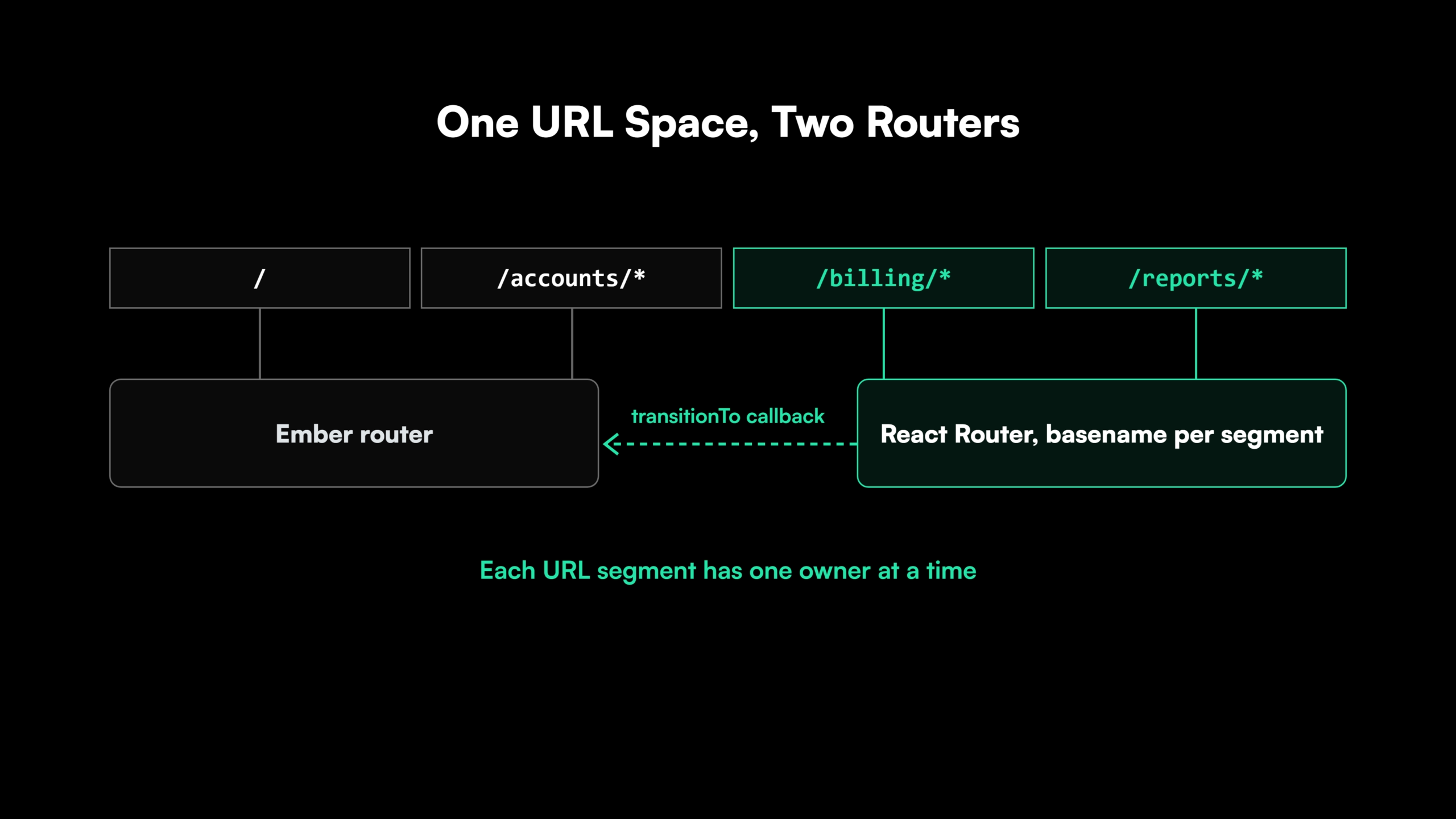
Routing is the first of the two hard parts. Ember’s router and React Router run side by side under the strangler fig approach when each URL segment has one owner at a time.
React screens start as islands inside Ember routes, so Ember’s router keeps every URL early on. When a whole area moves, an Ember wildcard route such as /billing/*path hosts a React app whose router uses /billing as its basename. React Router then owns everything under that segment.
Links that cross the boundary go through the owning router. React code calls Ember’s RouterService.transitionTo through a callback passed from the host route, and Ember templates link into React segments by URL.
Ember apps configured with hash location carry bookmarked #/ URLs. Those links need a client-side redirect to the new paths, because browsers keep the fragment on the client.
The Ember application shell is removed once the last segment it owns moves to React Router.
Replacing Ember Data in an Ember to React Migration
Ember Data is the second hard part, because much of an Ember app’s data behavior lives inside it.
Identity and caching. The store identifies each record by model type and ID and returns the same record object on every lookup [7]. It also refreshes cached records with a background request [7]. Every component reading a record sees an edit at once.
A query-key cache such as TanStack Query stores each response separately. Two queries holding the same customer return two objects, so an edit has to update or invalidate both. Screens that depend on shared identity need a normalized store or explicit invalidation rules.
Relationships. @belongsTo and @hasMany load related records on demand and keep both sides in sync. In React, a relationship becomes an explicit query per resource, or an API response that includes the related data.
Adapters and serializers. Custom adapters and serializers hold the API’s quirks, including URL rules, key casing, embedded records, and error formats. Each one becomes a tested fetch or transform function before the first React screen depends on it.
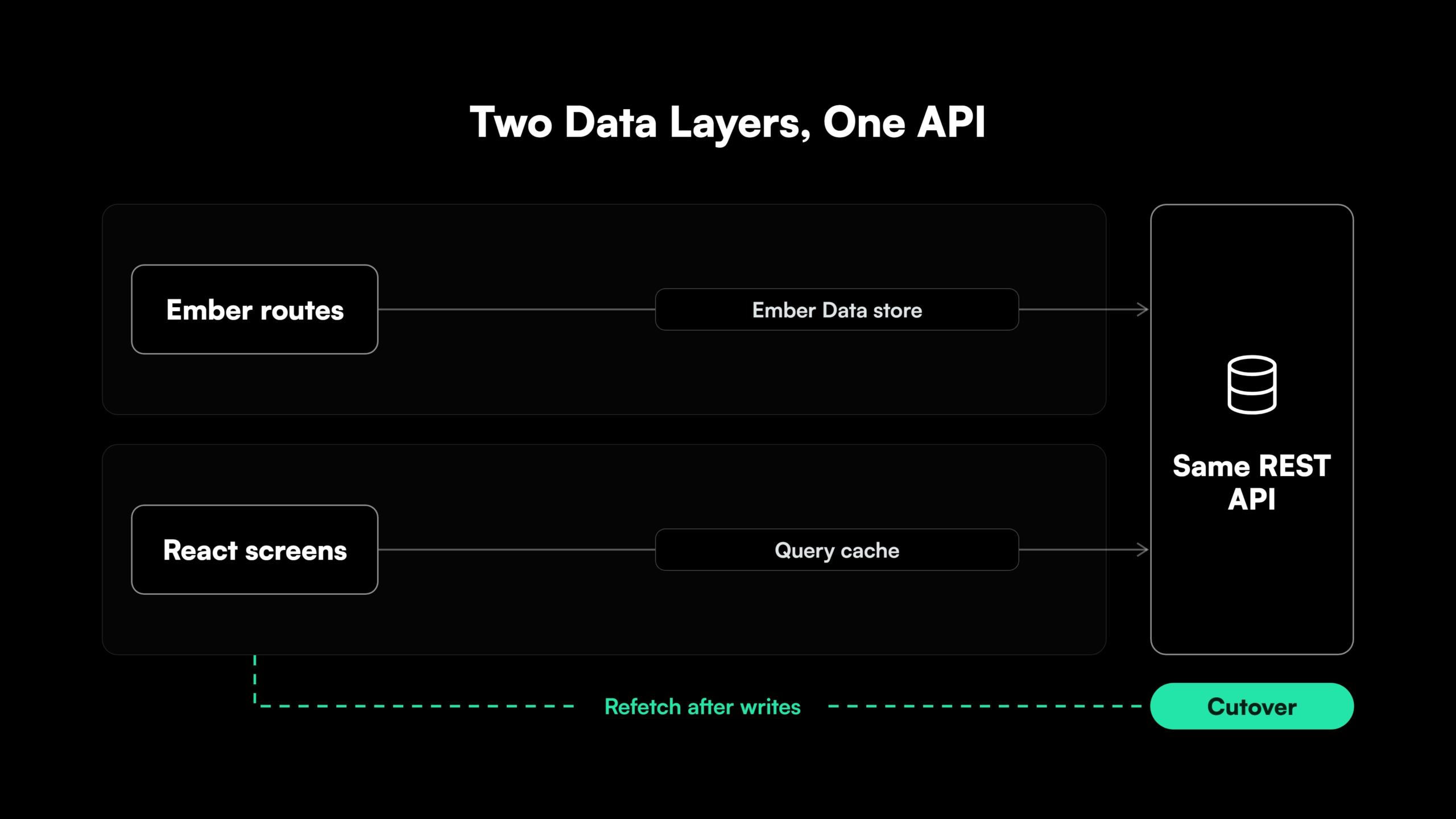
Running both layers. Ember Data and the React data layer call the same API, with the contract unchanged. Ownership moves one resource at a time, and a resource leaves Ember Data once no Ember route reads it. A save in one layer leaves the other layer’s cache stale, so shared resources refetch after each write.
See How a Frontend Migration Is Sequenced and Delivered
See how the platform sequences a frontend migration and turns each step into a diff-based pull request reviewed by an engineer.
Validating Parity with Ember Acceptance Tests in an AI-Assisted Migration
Ember CLI creates a test file with each route, component, and model it generates, and ember generate acceptance-test adds tests for full user journeys. Many Ember apps therefore already carry a test suite, and its acceptance tests are the behavior record for the migration.
As long as React renders as islands inside Ember routes, the existing acceptance tests keep running against the same DOM. Assertions on React output use waitFor from @ember/test-helpers, because React renders outside Ember’s run loop and test waiters.
Before a segment moves to React Router, its journeys get ported to a browser test runner such as Playwright and proven green on Ember. After the move, that unchanged suite runs on React, and passing it is the exit criterion for every screen in the segment.
One suite can serve both versions when the React screens keep the Ember element ids, data-test attributes, and API mocks. AI-assisted conversion changes more code each week than a manual rewrite, so test generation has to keep pace, and each generated test goes through review like application code.
That review is one of the Gen AI safety nets a migration at this volume depends on. Parity works the same way in data migration validation.
How Legacyleap’s AI Agents Migrate Ember.js Applications to React
Legacyleap is a Gen AI-powered legacy application modernization platform built on multi-agent orchestration. On an Ember codebase, five specialized agents run the sequence this guide lays out, from the era check to parity, across the Assess, Comprehend, Modernize, Validate, and Deploy lifecycle.
- Assessment Agent. Produces the era inventory, counting classic components, observers, mixins, and
this.$()calls per route, alongside the dependency map, risk hotspots, and effort estimate. - Documentation Agent. Reconstructs each Ember Data model, relationship, adapter, and serializer, so the API quirks they hold are written down before any React fetch function replaces them.
- Recommendation Agent. Chooses the bridge for the Ember version in production, then orders the URL segments, Engines, and data resources that move to React.
- Modernization Agent. Converts components and routes into React as diff-based pull requests, with TODO markers where classic patterns need redesign. About 70% of the modernization work is automated.
- QA Agent. Builds unit, integration, regression, and end-to-end tests next to the existing acceptance suite, and validates parity against the Ember baseline before each segment moves.
Each change lands as a pull request that an engineer reviews and merges. The agents cannot merge, deploy, or execute code. The platform runs inside the client’s environment, and no source code leaves it.
Legacyleap programs finish 50-70% faster than manual modernization, and every completed project validates 100% functional parity before deployment. Legacyleap has completed more than 150 production-grade assessments.
Teams without spare capacity hand the migration to Legacyleap’s team through Turnkey Modernization Services. Teams with their own front-end engineers or an SI run the platform under Platform Licensing.
For a front-end lead weighing modernization partners for a large Ember app, the $0 Modernization Assessment returns the era inventory, migration plan, and estimate with no obligation to proceed.
Next Steps for an Ember.js to React Migration
An Ember.js to React migration starts with the era check, which decides the bridge and how much of the classic code needs redesign. Routes and Ember Data then move one segment and one resource at a time. No Ember code is deleted until the React version of its screen passes the same tests.
The same coexistence method carries over to a Backbone.js to React migration.
The $0 Modernization Assessment is the starting point. It covers one representative Ember codebase, sizes its classic code and Ember Data layer, and returns a migration plan with an estimate in 3 to 5 days. It costs nothing and runs entirely inside your environment. Teams that want to see the platform first can Book a Demo.
Start the Migration With a Map of Your Ember Code
A $0 Modernization Assessment maps one representative Ember codebase, its components, routes, Ember Data layer, and risk areas, and returns a migration plan and estimate in 3 to 5 days, inside your own environment.
FAQs
Yes. It can call set and save on a record passed in as a prop. Ember screens update through tracked attributes, and the React component re-reads the record once save resolves.
Not when it loads through a dynamic import(), which Embroider and ember-auto-import v2 support. The static import in the modifier above puts React in the main bundle.
Yes. A routable engine already mounts at its own path, so it becomes one URL segment that React Router takes over once its components and data are converted.
No. Each addon keeps serving the Ember routes that use it and is removed once the last of those routes moves to React.
Yes. The bridge passes a service into React as a prop or through a context provider. Tracked changes on the service reach React when the bridge re-renders or when the component subscribes to a callback.
Components and templates are rewritten in React. Plain JavaScript modules, utility functions, and the API contract carry over, so the rewrite share depends on how much logic lives inside components.
References
[1] Stack Overflow Developer Survey 2025, Technology..
[2] Ember.js, “LTS Releases.”.
[3] Ember Blog, “Octane is Here.”.
[4] Ember Learn, “Ember Octane vs Classic Cheat Sheet.”.
[5] Qonto, “react-migration-toolkit” (GitHub)..