TL;DR
- Convert a desktop application to a web application by splitting it. Business logic moves into a C# ASP.NET Core Web API on modern .NET, and the Windows Forms screens are rebuilt in React.
- Find the logic hidden in the forms before building any React screen. Event handlers, control validation, TableAdapters, inline SQL, and shared modules all carry business rules that need extraction and tests first.
- A staged path keeps the desktop app running. Existing VB.NET libraries can sit behind a new C# API on modern .NET, and React screens replace the desktop module by module.
- Plan for desktop behavior the browser handles differently. In-memory state, printing, local hardware, keyboard-heavy data entry, Windows login, and offline use each need a web design decision.
- Record what every screen does today and test the new app against it. Inputs, outputs, database writes, and reports from the desktop app become the parity baseline for the API and the React front end.
How to Convert a VB.NET Desktop Application to a Web Application
A VB.NET desktop application can be converted to a web application by splitting it in two. Business logic moves into a C# ASP.NET Core Web API on modern .NET. The Windows Forms screens are rebuilt as a React front end that runs in the browser and calls that API.
Language converters translate VB.NET syntax into C#. Moving from Windows Forms to a browser interface changes how the application is structured, so the work is a rebuild of the front end with the business logic carried forward.
The risk in this move sits in three places. Business logic buried in form events has to be found before it can move. The split has to keep every rule intact, and the web version has to prove it behaves like the desktop version.
The timing pressure comes from Microsoft’s direction for the language. Its published strategy says Visual Basic will keep a stable design, will adopt new runtime features without new syntax, and won’t be extended to new workloads [1]. VB.NET applications keep running on a language that gains no new syntax and no new workloads.
Hiring adds a second pressure. In the 2025 Stack Overflow Developer Survey, 4.4% of respondents reported using Visual Basic (.NET), against 27.8% for C# [2].
The rebuild also moves the application off .NET Framework, the same runtime shift at the center of any .NET migration for legacy Microsoft stacks. VB.NET is the .NET generation of Visual Basic, so the COM, ActiveX, and OCX dependencies that belong to VB6 play no part in this move.
VB.NET Desktop App Architecture Before and After a React Migration
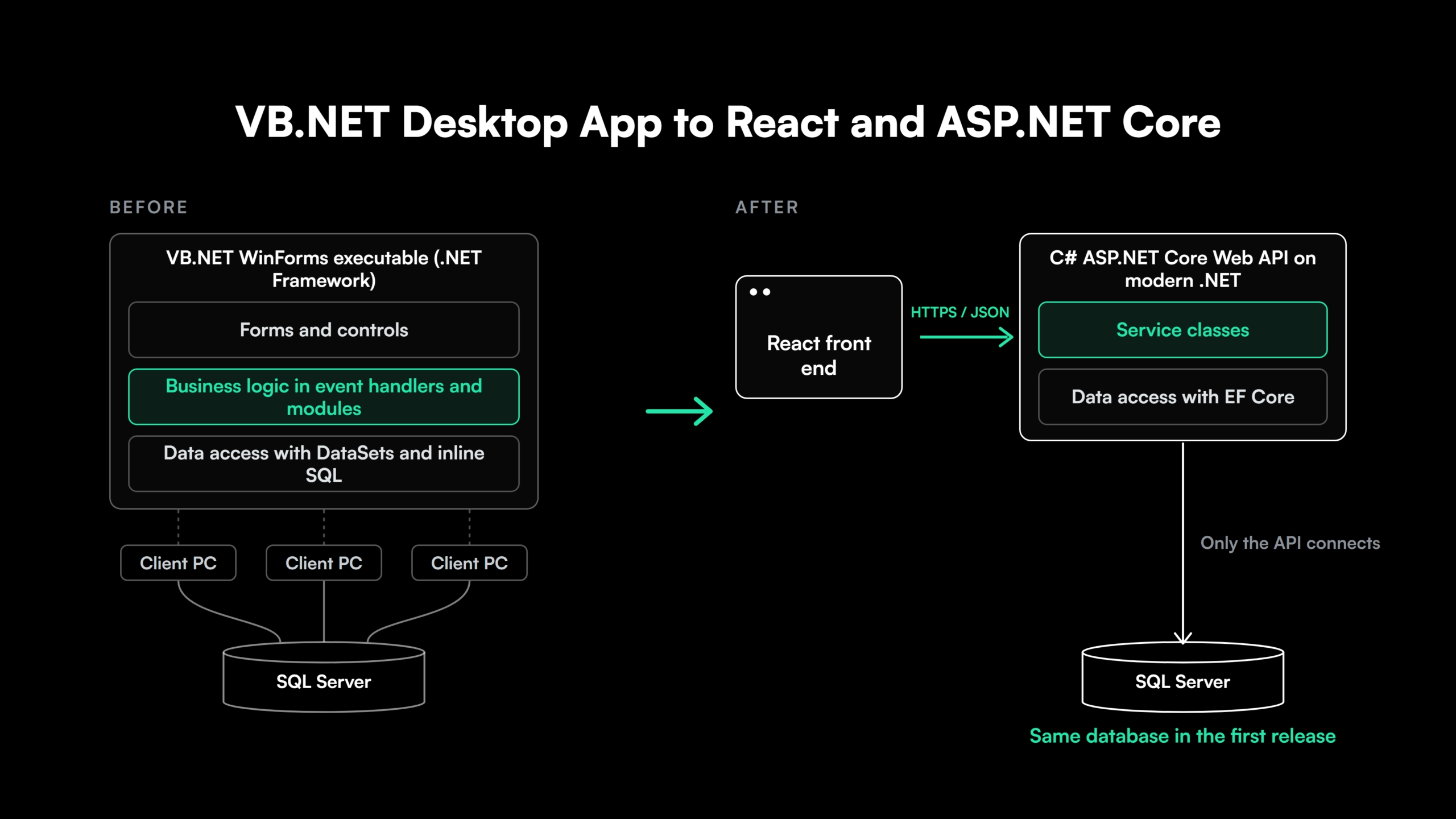
A typical VB.NET line-of-business application runs as Windows Forms on .NET Framework. The user interface, the business rules, and the data access code ship in one executable, and every installed copy connects straight to the database.
The web version separates those concerns into tiers. React renders the interface in the browser. A C# ASP.NET Core Web API on modern .NET holds the business logic in service classes and owns all database access. The database usually stays the same in the first release.
Visual Studio’s React and ASP.NET Core template creates this shape as a starting point. It generates a React project for the UI and an ASP.NET Core project as the API back end [3].
Teams asking how to convert a C# desktop application to a web application land on the same target. The original language changes little about the architecture.
Layer Responsibilities in a React and ASP.NET Core Web App
| Layer | Desktop (VB.NET WinForms) | Web (React and ASP.NET Core) | Ownership in the web version |
| Interface | Forms, controls, designer files | React components and routes | Rendering, input, usability checks |
| Business logic | Event handlers, modules, form code | C# service classes behind the API | Rules, calculations, workflow, authoritative validation |
| Data access | DataSets, TableAdapters, inline SqlCommand | EF Core or Dapper in the API | All reads, writes, and transactions |
| Database | Opened by every client install | Reached only through the API | Data, plus stored procedures during transition |
| Deployment | Installer or ClickOnce per machine | Browser plus a hosted API | One release for all users |
Design the API around business operations. Endpoints such as “approve purchase order” or “post payment” serve any future screen. An endpoint per form copies the desktop layout into the back end and ties it to screens React will redesign.
Data access built on DataSets usually moves through an ADO.NET to EF Core migration as part of the API build.
Extracting Business Logic from VB.NET Windows Forms
In a VB.NET desktop application, business logic is spread across six places. Each one has to be found before it can move.
- Event handlers. Methods wired with
Handles btnSave.ClickorHandles MyBase.Loadcalculate totals, apply discounts, check permissions, and pick the next workflow step. - Control validation. Rules sit in
Validatingevents,CellValidatingon DataGridView columns, and property setters on custom controls. They fire on focus changes a web page never raises. - Data binding. Designer-generated typed DataSets and TableAdapters write straight to the database through
UpdateAll, with constraints and defaults defined in the .xsd file. - SQL in form code.
SqlCommandstrings built inside button handlers hold queries, filters, and business rules written as SQL. - Shared modules and global state. VB
Modulemembers,Sharedfields, andMy.Settingsvalues carry state across forms, such as the current user, the selected company, or cached lookup data. - Stored procedures. Forms call procedures that hold pricing, posting, or approval rules. Stored procedures need their own conversion plan when the database platform also changes.
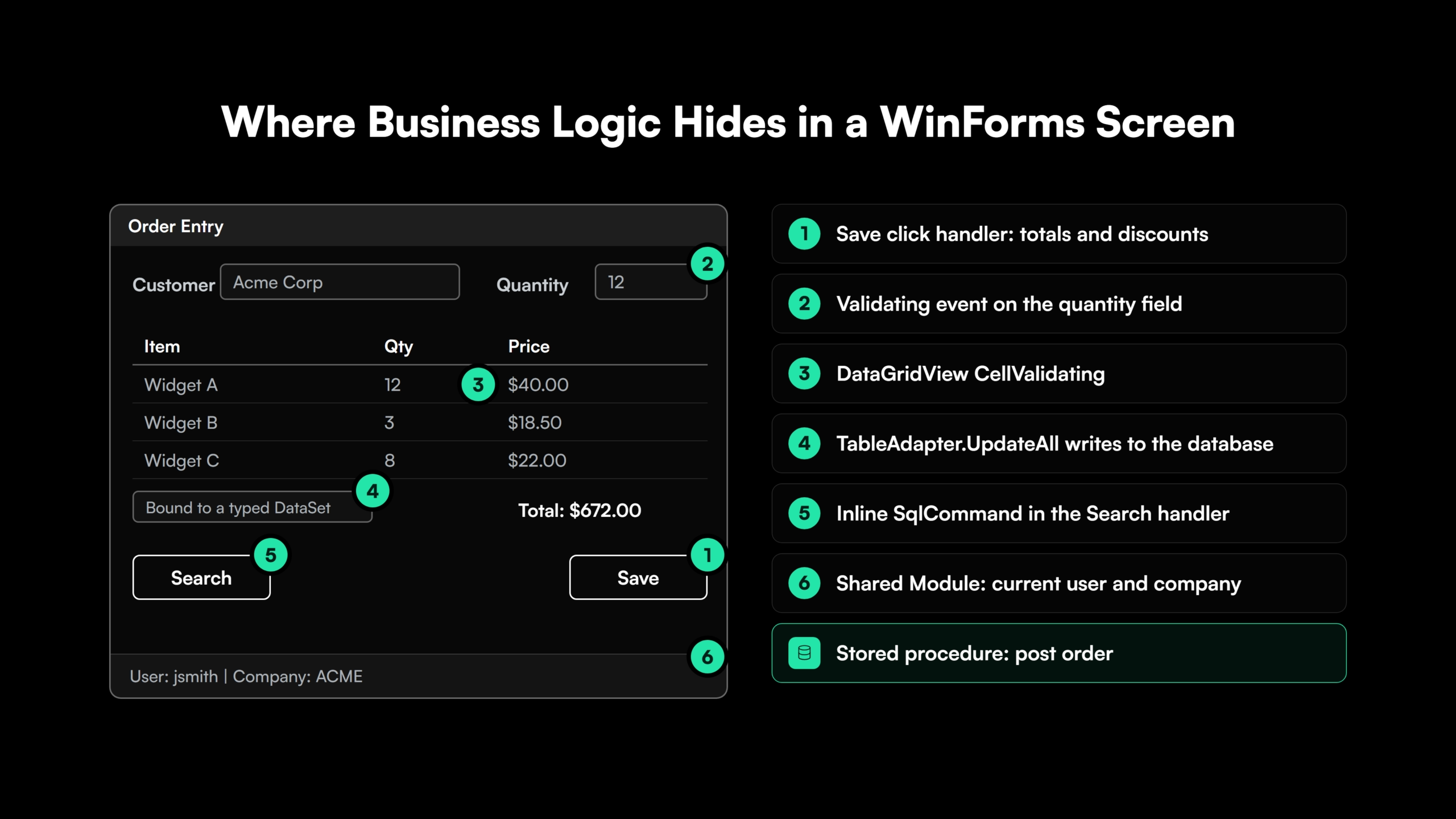
Each rule is extracted into a service class, covered by tests that pin its current behavior, and exposed through the API. React screens come after that. Teams that build screens first find the missing rules in user acceptance testing, at the cost of a rework cycle each.
A single rule can start in a click handler and finish in a stored procedure, which is why legacy code modernization treats code and data as one problem.
Locate the Business Logic Before Planning the React Build


 +more
+moreSteps to Convert a VB.NET Desktop App to a React Web App
Converting a VB.NET desktop app to a web app follows seven steps, whether the application moves at once or module by module.
- Inventory forms and logic. List every form, report, module, and stored procedure, with the business rules each one carries.
- Separate the logic. Extract rules from forms into service classes and pin their behavior with tests.
- Build the C# API. Expose the services through an ASP.NET Core Web API designed around business operations.
- Build the React screens. Recreate each workflow in React against the API.
- Run old and new side by side. Users work in both versions as the web version covers more of the application.
- Validate parity. Compare inputs, outputs, database writes, and reports between the two versions.
- Cut over. Retire each desktop module once its web replacement passes.
Migrating a VB.NET Desktop App to React in Stages
The staged path rests on a supported combination. Visual Basic on modern .NET supports class library projects [4], and a .NET class library can be used from any .NET language [5]. A new C# API can host the existing VB.NET business logic during the front-end move.
Stage 1 assumes the logic already sits in class libraries. When it lives inside the forms, it has to be extracted first, the usual starting point in tightly coupled application modernization.
| Stage | What changes | What keeps running |
| 1. Wrap | VB.NET logic libraries retargeted to modern .NET and called from a new C# ASP.NET Core API | The full desktop application |
| 2. Rebuild | React screens built against the API, one module at a time | Desktop modules not yet moved |
| 3. Convert | VB.NET libraries converted to C# behind the API | React screens and API contracts |
| 4. Retire | Desktop application removed | Web application only |
Libraries both versions need during the transition can target .NET Standard 2.0, which loads in .NET Framework 4.7.2 and in modern .NET. Stage 3 is the language work of converting VB.NET to C#, and running old and new together follows the strangler fig approach.
When to Rebuild a VB.NET App in a Single Release
The staged path suits large applications with many forms and active users. A small application with a few dozen forms and thin logic is often faster to rebuild in one pass. For that size, coexistence work such as shared data ownership, two deployments, and a second login path costs more than it saves.
Handling Desktop State, Printing, Authentication, and Offline Use in a Web App
Some of the hardest work in a desktop to web conversion sits outside the business logic. Windows Forms gives an application capabilities that a browser restricts or handles differently.
| Desktop behavior | On the desktop | On the web | Common web approach |
| State | Form fields and module variables persist between clicks | Each API request stands alone | React state for the session, database or cache for shared data |
| Local files and hardware | Direct access to file paths, scanners, serial devices, label printers | The browser sandboxes the local machine | Upload and download for files, a small local agent for devices |
| Printing and reports | PrintDocument plus embedded ReportViewer or Crystal Reports controls | No direct printer or viewer control | Server-generated PDFs and a web reporting service |
| Keyboard data entry | Tab order, shortcut keys, fast grid editing | Browser defaults slow heavy keyboard users | Explicit focus management and a keyboard-first data grid |
| Multiple windows | MDI child forms and several open windows | One page per browser tab | Tabs, split panes, and routes that keep context |
| Authentication | Windows login identifies the user | Every request is authenticated | Windows Authentication on an intranet, or OIDC through Microsoft Entra ID |
| Offline use | Works on a disconnected laptop | Needs a connection by default | A progressive web app with local storage and sync |
Data-entry speed is the item users notice first. Time the busiest workflows in the desktop version and set the same target for the React screens before design starts.
Modules that must stay on the desktop for hardware or offline reasons can follow a WinForms to .NET MAUI path.
See How a VB.NET Desktop App Splits Into React and a C# API
See how the platform splits a VB.NET desktop application into a React front end and a C# API. Every change is reviewed by an engineer.
React vs. Blazor for a VB.NET Web App
Blazor is Microsoft’s .NET front-end web framework. It supports server-side rendering and client interactivity in one programming model, with the UI written in C# [6]. For a .NET team, it keeps the whole stack in one language. React keeps the front end independent of .NET and draws on a larger developer pool.
| Factor | React | Blazor |
| Team skills | Adds JavaScript or TypeScript to the team | Uses the team’s existing C# skills |
| UI richness | Largest component ecosystem for complex grids, charts, and dashboards | Smaller component ecosystem, strong for forms-based screens |
| Hosting model | Static files plus a separate API | Server, WebAssembly, or both, hosted by ASP.NET Core |
| Hiring pool | Used by 46.9% of professional developers [2] | Used by 7.6% of professional developers [2] |
| Long-term fit | Front end can outlive or change its back end | Front end and back end share the .NET release cycle |
Blazor fits internal tools with form-heavy screens, a C#-only team, and no plan to share the front end outside .NET. React fits applications with rich, data-dense interfaces, teams that hire front-end specialists, and organizations already running React elsewhere. Both sit on the same ASP.NET Core API, so the back-end design in this guide holds for both.
Using React with ASP.NET Web Forms
Some VB.NET applications already run in a browser on ASP.NET Web Forms. Web Forms is a .NET Framework technology with no version on .NET Core or later [4], so these applications need the same split. Logic in code-behind files, page events, and ViewState handling moves into the C# API, and the pages are rebuilt in React.
React with ASP.NET Web Forms works as a transition in two ways.
- Page by page. A React component mounts into a container element on an existing .aspx page and calls JSON endpoints, so individual pages change without touching the rest of the site.
- Route by route. A reverse proxy such as YARP sends migrated routes to the new React and ASP.NET Core application and the rest to the Web Forms site, until no routes remain.
Teams that want a C# UI can follow the Web Forms to Blazor migration path on the same API design.
Validating Behavior Parity in an AI-Assisted VB.NET to React Migration
Parity validation proves the web application does what the desktop application did. It starts from a record of each screen’s current behavior, captured before any conversion.
- Screen records. For each form, the inputs it accepts, the outputs it shows, the database writes it makes, and the reports it produces.
- API tests first. Each endpoint is tested against those records before its React screen exists, so logic errors surface in the back end.
- Side-by-side workflow tests. Users and automated end-to-end tests run the same workflows in the desktop app and the browser, and the results are compared.
- Database comparison. Rows written by the new API are compared with rows written by the desktop app for the same transactions, the same discipline used in data migration validation.
AI-assisted conversion raises the volume of changed code each week, and hand-written tests fall behind that pace. Generated test suites, the Gen AI safety nets of a modernization program, keep coverage in step with the conversion, and every generated test is reviewed like any other code.
How Legacyleap’s AI Agents Migrate VB.NET Desktop Apps to React
Legacyleap is a Gen AI-powered legacy application modernization platform built on multi-agent orchestration. Five specialized agents take a VB.NET desktop application through the Assess, Comprehend, Modernize, Validate, and Deploy lifecycle, following the same split this guide lays out.
- Assessment Agent. Inventories forms, modules, data access, and dependencies, and produces the effort and timeline estimate.
- Documentation Agent. Reconstructs business logic from event handlers, validation code, inline SQL, and stored procedure calls, along with data flows and API specs.
- Recommendation Agent. Sets the target architecture, the API boundaries, and the order in which modules move.
- Modernization Agent. Decomposes the desktop application into a React front end and C# REST services, delivered as diff-based pull requests with TODO markers on low-confidence areas. About 70% of the modernization work is automated.
- QA Agent. Generates unit, integration, regression, API, and functional tests, and validates parity against the desktop baseline.
Every pull request goes through engineer review before it merges. The agents cannot merge, deploy, or execute code, and the platform runs entirely inside the client’s environment, so source code never leaves it.
Programs run 50-70% faster than manual modernization, with 100% functional parity validated before deployment. Texas-based Legacyleap has completed more than 150 production-grade assessments. Turnkey Modernization Services hand the full migration to Legacyleap’s team, and Platform Licensing gives internal or SI teams the platform to run themselves.
For a .NET leader choosing a modernization partner for this move, the $0 Modernization Assessment produces the logic map, target architecture, and estimate before any commitment.
Next Steps for a VB.NET to React Migration
Converting a VB.NET desktop application to a web application is an architecture change. Business logic moves into a C# API on modern .NET, and the forms become React screens.
The move succeeds when hidden logic is found before screens are built, desktop behaviors get a web design, and parity is proven module by module. The same API-first method carries over to an Angular to React move for applications already on the web.
Start with a $0 Modernization Assessment. It maps the VB.NET codebase, its forms, its data access, and its risk areas. The output is a migration plan and estimate for one representative application in 3 to 5 days, at no cost, run entirely inside your environment. To see the platform first, Book a Demo.
Start the Migration With a Map of Your VB.NET Logic
A $0 Modernization Assessment maps one representative VB.NET application, its forms, data access, and risk areas, and returns a migration plan and estimate in 3 to 5 days, inside your own environment.
FAQs
Automated converters can generate a web front end from WinForms code, and their output keeps the desktop screen layout and needs manual cleanup. They suit a goal of browser access with minimal redesign.
VB.NET libraries can run behind an ASP.NET Core API on modern .NET. ASP.NET Core ships no Visual Basic project templates, so the API project itself is written in C#.
Usually not in the first release. A stable schema gives parity tests a fixed reference, and schema changes follow once the desktop application is retired.
Yes, when each table has one writer at a time. A module’s writes move to the API in the same release as its screens, which prevents conflicting updates from the two versions.
Only when the desktop version must run for years during a long staged migration. Windows Forms in Visual Basic runs on modern .NET [4], which keeps the desktop version supported through the transition.
AI coding assistants convert individual files within one session’s context. Splitting logic out of forms, designing the API, and proving app-wide parity need full-codebase context and generated test suites.
References
[1] Microsoft Learn, “Visual Basic language strategy.”
[2] Stack Overflow Developer Survey 2025, Technology.
[3] Microsoft Learn, “Tutorial: Create an ASP.NET Core app with React in Visual Studio.”
[4] .NET Blog, “Visual Basic support planned for .NET 5.0.”
[5] Microsoft Learn, “Language independence and language-independent components.”