
TL;DR
- .NET 8 and .NET 9 both lose support on the same date: November 10, 2026. .NET 10 LTS, released November 2025, becomes the next long-term anchor supported through November 2028, so a .NET 8 migration needs a follow-on upgrade plan built in from the start.
- The free .NET Upgrade Assistant is gone, replaced by a paid Copilot tool with reported reliability gaps. Developer feedback says GitHub Copilot App Modernization produces unreliable results on large, undocumented legacy codebases, sometimes flagging dependencies that do not actually exist.
- VB6 and Web Forms specialists now take over 90 days to hire in many US markets. That talent scarcity compounds with COM and ActiveX dependencies that surface late in VB6 migrations and blow up project timelines if not caught by automated discovery upfront.
- .NET 8’s native AOT compilation can cut startup time by up to 80% for eligible workloads. Combined with 30-50% lower infrastructure costs from cloud-native scaling, this forms the core of the financial case enterprises take to leadership for migration budget.
- A semiconductor manufacturer modernized VB6 to .NET with zero production disruption. Legacyleap’s approach automated 70% of manual processes and improved application speed by 40% while preserving exact real-time hardware communication behavior throughout cutover.
Why US Enterprises Cannot Afford to Delay .NET Migration Past 2026
In the past two years, Microsoft’s release cadence and support timelines have made modernization planning a boardroom topic. The long runway many US enterprises assumed they had is shrinking:
- .NET 6 (LTS) reached the end of support on November 12, 2024 [1], and .NET 7 (STS) went out of support in May 2024 [2].
- .NET 8 (LTS), released in November 2023, reaches end of support on November 10, 2026, the same date as .NET 9. .NET 10 LTS, released in November 2025, is now the next long-term anchor, supported through November 2028. For enterprises on .NET Framework or VB6, the recommended path is to target .NET 8 as an immediate stabilization step, then plan the upgrade to .NET 10 before November 2026. Starting a migration today and treating .NET 8 as the final destination is not sufficient planning.
- .NET Framework 4.8 will be supported only as long as the Windows OS it runs on. While it will receive security updates, it is feature-frozen, meaning no new APIs, no performance enhancements, and no cross-platform capabilities. Remaining on .NET Framework is not primarily a support question. It is a competitive disadvantage that compounds every quarter.
For US enterprises, the risks of staying put are now quantifiable:
- Operational risk: An industry analysis found that outdated frameworks were linked to revenue-impacting incidents such as downtime, security breaches, and missed scaling opportunities.
- Security exposure: Unsupported runtimes receive no vulnerability patches, making compliance with HIPAA, SOX, GxP, or GDPR more difficult.
- Talent attrition: The average time to hire for VB6 and ASP.NET Web Forms specialists now exceeds 90 days in many US markets, with shrinking candidate pools.
All this means migration is now a non-negotiable move to secure systems, control operational risk, and keep development capacity aligned with the market.
In the sections that follow, you’ll find:
- A stack-by-stack migration map with recommended targets, alternatives, and pitfalls.
- Economic impact data to frame the business case.
- A decision framework for choosing the right migration path for your organization.
- Risk and compliance triggers that demand immediate attention.
- How Gen AI and automation can reduce migration timelines by months while improving verification.
- Case metrics from enterprises that have already made the move.
By the end, you’ll have a fact-based view of what migrating to modern .NET involves, what it delivers, and how to approach it with minimal risk.
Applicability to .NET Framework 4.x Applications
This guide also applies to enterprises running applications on .NET Framework 4.6.2, 4.7, 4.7.2, and 4.8. While these versions remain widely deployed, they are tied to Windows lifecycle constraints and do not benefit from modern .NET performance, security, or cloud-native capabilities.
In 2026, organizations on .NET Framework should plan a structured migration to .NET 8 (LTS) as an immediate stabilization step, followed by a .NET 10 upgrade roadmap before November 2026. The migration considerations outlined in this guide remain relevant across both legacy VB6 and .NET Framework estates.
.NET 8 or .NET 10: Which Target Should Your US Enterprise Choose in 2026?
For enterprises migrating from legacy stacks today, .NET 8 is the recommended immediate target. It is production-stable, has broad library support, and gets your systems off unsupported infrastructure fast.
.NET 10 LTS (released November 2025, supported through November 2028) is the strategic next step. Enterprises completing a .NET 8 migration must plan the .NET 10 upgrade before November 10, 2026, when .NET 8 support ends.
| .NET 8 LTS | .NET 10 LTS | |
| Released | November 2023 | November 2025 |
| End of Support | November 10, 2026 | November 2028 |
| Best For | Enterprises migrating from legacy stacks that need immediate stabilization | Enterprises on .NET 8 are ready for the next LTS hop, or simpler stacks migrating directly |
| Tooling | Fully mature, broad library and NuGet support | Requires Visual Studio 2026 for full .NET 10 targeting |
| Gen AI Support | Full Legacyleap assessment and migration support | Full Legacyleap assessment and migration support |
Legacyleap’s Gen AI migration platform supports both .NET 8 and .NET 10 as targets with no change to the assessment, comprehension, or automated conversion workflow.
The Business Case for .NET Migration: Cost, ROI, and Risk in 2026
For US leadership teams, modernization initiatives compete with every other capital and operational expense. A credible business case for .NET migration must be clear, quantified, and defensible.
Migrating to modern .NET isn’t a single metric decision. It affects the full cost and capability ecosystem around your applications, from infrastructure spend and developer efficiency to compliance risk and end-user performance.
The five most measurable areas of impact:
| Area | Pre-Migration Reality | Modern .NET Outcome | Why It Matters |
| Infrastructure Cost | Over-provisioned servers and high VM/instance counts to compensate for inefficiencies | 30–50% lower running costs through better runtime performance and cloud-native scaling | Frees budget for innovation instead of maintenance. |
| Application Performance | Long startup times, heavier memory use | Up to 80% faster startup with .NET 8 native AOT for eligible workloads | Improves user experience and system throughput. |
| Security & Compliance | Unsupported runtimes with unpatched vulnerabilities | Actively patched, standards-compliant frameworks | Reduces breach risk and ensures audit readiness (HIPAA, SOX, GxP, GDPR). |
| Talent Availability | Shrinking pool for VB6/Web Forms specialists; >90-day hiring cycles in many US markets | Access to a larger, current developer base | Avoids delivery bottlenecks and skill attrition. |
| Developer Productivity | Manual builds, limited test automation, outdated tooling | Modern CI/CD (GitHub Actions/Azure DevOps), automated testing (xUnit, Playwright) | Shorter release cycles and higher feature velocity. |
These are the levers that matter when .NET migration proposals go in front of finance and leadership teams.
Migration Map from Legacy Microsoft Stacks to Modern .NET
Every migration decision, whether to migrate VB6 to .NET, modernize ASP.NET Web Forms, or replace WCF with REST or gRPC, starts with knowing exactly what you run today, when its support window closes, and what you stand to gain by moving.
This table distills that into a quick-reference view: legacy stacks, their modern .NET targets, end-of-life timelines, known pitfalls, the business outcomes you can expect, and the ROI levers that matter most to leadership.
It also covers ASP.NET Framework applications, including ASP.NET MVC and Web Forms, which are typically modernized to ASP.NET Core or Blazor as part of a .NET 8 migration strategy.
| Legacy Stack | Modern Target Stack | EOL Date* | Key Pitfalls | Primary Outcomes of Migration | ROI Levers |
| VB6 (Visual Basic 6) | .NET 8 (immediate target), .NET 10 LTS (strategic target, supported through Nov 2028) | Runtime tied to OS lifecycle (Windows 10 support ends Oct 2025; Windows 11 TBD) | Heavy UI/business logic coupling, COM dependencies, lack of automated tests | Maintainable, supported codebase; modern UI frameworks; cross-platform potential | Lower maintenance cost; access to modern developer talent |
| Classic ASP | ASP.NET Core (Razor/MVC) | Support tied to OS; feature-frozen | Script-based pages hard to test; security vulnerabilities in legacy authentication | Structured, secure MVC framework; cross-platform hosting | Reduced security risk; easier integration with modern APIs |
| ASP.NET Web Forms | ASP.NET Core MVC or Blazor (.NET 8 immediate, .NET 10 LTS strategic target) | Web Forms support tied to .NET Framework lifecycle | State-heavy pages; no direct migration tooling | Component-based UI; better separation of concerns | Improved scalability; easier maintainability |
| ASP.NET MVC (Framework) | ASP.NET Core MVC | Tied to .NET Framework lifecycle | Namespace and API differences; third-party lib compatibility | Cross-platform; higher performance | Reduced hosting cost; improved response times |
| WCF | gRPC (preferred) or ASP.NET Core Web API | Not available in .NET 5+ | Loss of SOAP/WS-* features; client compatibility | High-performance RPC over HTTP/2; REST for broad compatibility | Faster API response; reduced latency |
| Windows Forms (WinForms) | .NET MAUI or WPF (.NET 8) | Tied to .NET Framework lifecycle | UI logic refactor needed; MAUI maturity considerations | Cross-platform (MAUI); modern desktop capabilities | Consolidated codebase; improved UX |
| Silverlight | Blazor / React.js / Angular | Silverlight support ended Oct 2021 | Complete rebuild required; no direct migration | Standards-based, cross-browser apps | Long-term maintainability; no plugin dependencies |
| SharePoint Server (custom) | SharePoint Online / .NET Core apps | SharePoint 2016 mainstream ended Jul 2021; 2019 mainstream ends Jul 2026 | Custom feature migration; API differences | Cloud-hosted collaboration; better integration | Lower infra costs; improved availability |
| COM / COM+ Components | .NET libraries / REST APIs | Depends on OS | Complex refactoring for binary interfaces | Service-oriented, reusable components | Easier integration; reduced deployment complexity |
| ADO.NET-heavy DAL | Entity Framework Core 8 | N/A | Code-first only; no EDMX designer | Modern ORM; better LINQ support; higher performance | Faster dev cycles; maintainable data access |
| SQL Server 2008/2012 | Azure SQL / SQL Server 2022 | SQL 2008 support ended Jul 2019; 2012 ended Jul 2022 | Schema/compatibility changes | Cloud-ready DB; advanced performance features | Lower DB admin cost; auto-scaling |
| MS Access | Azure SQL / SQL Server Express | N/A | Schema redesign; migration complexity for large datasets | Enterprise-grade RDBMS; multi-user support | Reduced corruption risk; better reporting |
| log4net / Trace Logging | Serilog / NLog / Azure App Insights | N/A | API changes; instrumentation refactor | Structured, searchable logging | Faster issue resolution; improved observability |
| TFS (Team Foundation Server) | Azure DevOps / GitHub Actions | TFS 2017 mainstream ended Oct 2022 | Pipeline/script rewrites | Cloud-based CI/CD; integrated repos | Faster release cycles; lower pipeline maintenance |
| Manual Build Scripts | MSBuild / GitHub Actions / Azure Pipelines | N/A | Build automation learning curve | Automated build/test/deploy | Reduced deployment errors; faster delivery |
| Windows Authentication | Azure AD / OAuth 2.0 / OpenID Connect | N/A | Rewriting auth flows; federated identity integration | Secure, standards-based identity | Easier compliance; improved user experience |
| On-prem IIS/VM Hosting | Azure App Services / Containers (Docker) | N/A | Networking/security model changes | Elastic scaling; integrated monitoring | Lower infra costs; higher uptime |
EOL dates per Microsoft lifecycle.
.NET 8 LTS and .NET 9 STS both reach end of support on November 10, 2026. .NET 10 LTS (released November 2025) is the current long-term target, supported through November 2028.
Note: The .NET Upgrade Assistant has been officially deprecated. Microsoft now recommends the GitHub Copilot app modernization agent for version upgrades, though it requires a paid Copilot subscription and has documented limitations on large, undocumented legacy codebases.
Key Risks of Enterprise .NET Migration in 2026 and How to Address Them
Even with a strong business case, .NET migrations can stall or fail when certain risks are overlooked. These are the risks most likely to impact cost, timeline, or compliance, and what they mean for your modernization initiative.
- Hidden Dependencies: Legacy DLLs, COM components, or untracked API calls can surface late in the migration, causing unplanned rework. Early, automated dependency discovery is essential to avoid cascading delays.
This risk spikes in VB6 estates, where COM/ActiveX components and undocumented coupling often surface late and blow up timelines. See how Legacyleap’s VB6 to .NET migration services reduce this with automated dependency discovery, Gen AI–assisted comprehension, and parity-focused validation before cutover. - Library and Driver Incompatibility: Some NuGet packages, EF6 features, or API calls have no direct equivalents in .NET 6/7/8, leading to functional gaps if replacements aren’t planned upfront.
- UI Parity Assumptions: Moving from Web Forms or VB6 to modern frameworks can introduce subtle changes in workflows and layouts that frustrate end users if not validated early.
- Compliance Gaps: In regulated industries, losing audit trails, system logs, or validation artifacts during migration can trigger costly re-certifications or audit failures.
- Insufficient Test Coverage: Without robust unit, integration, and UI testing, defects slip into production and extend stabilization time post-launch.
- DevOps Transition Risk: Shifting CI/CD from legacy pipelines to newer platforms can disrupt release cadence if not managed in parallel during cutover.
- Over-Optimistic Timelines: Underestimating the complexity of interdependent systems can lead to budget overruns, developer burnout, and technical shortcuts that create long-term debt.
- Tooling Dependency Risk: The free .NET Upgrade Assistant was officially deprecated in late 2025 and replaced by GitHub Copilot App Modernization, which requires a paid subscription. Developer community feedback has documented that the Copilot-based tool produces unreliable results on large, undocumented legacy codebases, in some cases, flagging dependencies that do not exist in the actual codebase. US enterprises planning to use free tooling for a complex legacy migration face a significant gap between what available tools can handle and what their actual codebase requires.
For leadership, the takeaway is simple: these risks directly translate into financial variance, regulatory exposure, and competitive delays.
Addressing them in the planning stage rather than in mid-project firefighting is what keeps modernization predictable and defensible.
Best Practices for a Successful .NET Migration
Modernizing legacy Microsoft stacks demands precise planning, validation, and phased execution. Based on enterprise projects across VB6, ASP.NET, and WCF workloads, here are proven best practices:
- Establish a verified system baseline: Automate discovery of dependencies, APIs, and configuration links before migration. Avoid assumptions based on outdated documentation as 30–40% of real dependencies are often untracked until code analysis.
This baseline step is especially critical for .NET Framework applications, where runtime behavior, deprecated APIs, and third-party dependencies often differ significantly from modern .NET. Legacyleap’s .NET Framework migration services operationalize this discovery phase using automated dependency analysis and parity validation to ensure migrations start from a verified, risk-aware foundation. - Prioritize by business impact, not code volume: Migrate high-value, low-dependency modules first. This helps deliver quick wins while validating modernization tools and governance.
- Maintain functional parity checkpoints: Use automated regression suites and service stubs to ensure parity after each iteration. This minimizes downtime and rollback risk.
- Apply the strangler pattern for incremental rollout: Replace legacy modules progressively while keeping the rest of the system operational. This is especially critical for high-availability enterprise apps.
- Adopt modern DevOps and CI/CD workflows: Integrate build, test, and deploy pipelines early. Continuous validation keeps .NET 8 builds aligned with production configurations.
- Align modernization with security and compliance goals: Audit third-party libraries and authentication flows. Migrations are opportunities to embed zero-trust principles, encryption, and observability.
- Combine automation with human validation: Use AI-assisted tools for code mapping and transformation, but keep engineers in the loop for domain logic and performance-critical modules.
.NET Migration Checklist
Before starting your .NET migration, ensure each of these boxes is checked. They’ll help minimize disruption and improve project predictability.
Pre-Migration Planning
- Confirm business goals: modernization for cost, performance, or cloud adoption.
- Identify legacy stack (VB6, Web Forms, WCF, etc.) and target equivalent in .NET 8.
- Audit Microsoft’s support timelines. .NET 8 LTS ends November 10, 2026. .NET 10 LTS (released November 2025) is supported through November 2028. Plan migration to reach .NET 8 immediately, with a .NET 10 upgrade roadmap before year-end 2026.
- Catalog dependencies, APIs, COM objects, and database connectors using automated analysis tools.
Architecture & Design
- Map system modules, control flow, and data pathways for accurate scope definition.
- Decide migration pattern (refactor, rehost, or re-architect) based on workload type.
- Validate third-party libraries and external integrations for .NET 8 compatibility.
- Define interface and data contract strategies (e.g., gRPC, REST, CoreWCF).
Execution & Validation
- Set up parallel environments for testing migrated components.
- Automate regression testing for parity after each iteration.
- Use the strangler pattern for phased rollouts to maintain uptime.
- Track key metrics: performance, security compliance, and developer productivity.
Governance & Deployment
- Enforce human-in-the-loop reviews for all AI-driven refactoring.
- Integrate CI/CD pipelines for continuous validation and deployment.
- Ensure compliance with enterprise data privacy, encryption, and access policies.
- Document architecture updates and maintain audit trails for traceability.
Legacyleap’s assessment and modernization workflow automatically covers most of this checklist, from dependency discovery to regression validation, giving teams a verified head start.
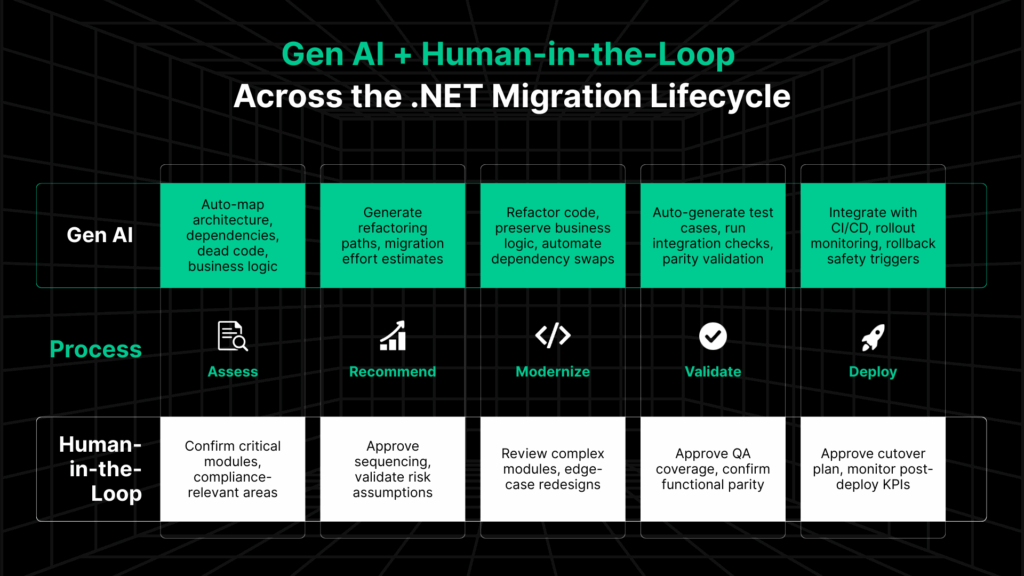
How Gen AI Automates Enterprise .NET Migration from Assessment to Deployment
Enterprise-scale .NET migration fails most often because of incomplete discovery, missed dependencies, unverified changes, and risky cutovers. Bad code is just one part of that puzzle.
Legacyleap’s platform addresses those gaps by embedding compiler-grade Gen AI capabilities into every phase of the modernization process, without disrupting the workflows your teams already follow.
| Phase | Traditional Challenges | Legacyleap Gen AI Capability | Business Impact |
| 1: Comprehend & Assess | Manual code reviews, tribal knowledge gaps, undocumented dependencies. | Codebase comprehension agents map architecture, dependencies, unused code, and business logic across VB6, ASP.NET, WCF, EF6, and more. | Cuts discovery from weeks to days; eliminates hidden dependency surprises. Unlike general-purpose AI coding tools that lose context between sessions, Legacyleap’s agents maintain persistent understanding across the full codebase throughout the migration. |
| 2: Recommend | Estimates based on assumptions; risks surface mid-project; vague timelines. | Automated refactoring path generation with quantified risks, test coverage analysis, and migration-ready code suggestions. | Data-backed budget/timeline forecasts; early mitigation of blockers. |
| 3: Modernize | Rewrite-heavy approach; developer fatigue; unclear change tracking. | Refactoring workflows that preserve business logic while applying target framework patterns; developer-in-the-loop oversight for critical changes. | Faster code delivery with controlled AI intervention; higher developer confidence. |
| 4: Validate | Limited automated testing; manual QA prone to misses; post-deploy defects. | AI-generated unit, integration, and UI tests plus automated parity checks across critical workflows. | Near-complete verification before cutover; reduced defect rates post-launch. |
| 5: Deploy | Risky big-bang releases; incomplete rollback planning; slow stabilization. | CI/CD-integrated rollout controls with live monitoring, automated rollback triggers, and performance benchmarking. | Safer cutovers; measurable stability and performance improvements. |
Also read: How Can Gen AI Drive Every Step of Your Modernization Journey?
Why this matters for executives:
Instead of adding another “tool” to manage, Legacyleap’s platform functions as an efficiency and assurance layer across your existing modernization process.
The result:
- Timelines that can be defended in budget and board reviews.
- Lower post-cutover remediation costs.
- Migration outcomes that are verifiable and auditable.
Enterprise .NET Migration: Real-World Outcome from a Production Deployment
Client: A global semiconductor manufacturing leader
Situation: A fragmented VB6-based software stack was causing inefficiencies across automation workflows and real-time hardware communication systems. Legacy constraints were blocking both performance improvements and operational scaling.
Challenge: Tightly coupled VB6 code with precision motor control dependencies and real-time hardware interfaces that could not tolerate disruption. Any migration had to preserve exact hardware communication behavior while eliminating legacy constraints, with no tolerance for production downtime.
Legacyleap approach: Gen AI-powered codebase comprehension mapped the full VB6 architecture and identified hardware interface dependencies before a single line was changed. Automated dependency mapping surfaced COM and hardware bindings early. Parallel test generation ensured parity at each migration stage, with phased cutover and automated validation at every step.
Outcome: VB6 modernized to .NET, 70% of manual processes automated, application speed improved by 40%, and seamless hardware communication maintained throughout — with zero production disruption during cutover.
See how Legacyleap approached this migration in detail →
What to Do After Migration
Modernization doesn’t end once the code runs on .NET 8. Post-migration activities determine how well the system performs, scales, and evolves, and this is where Gen AI continues to play a role.
- Continuous performance optimization: Leverage AI-driven telemetry analysis with Azure Application Insights or equivalent observability tools. Gen AI models can detect anomaly patterns, recommend query optimizations, and predict performance regressions before they impact users.
- DevOps pipeline refinement: Reassess CI/CD pipelines to match modern .NET Core standards. Gen AI agents can auto-update build scripts, validate test triggers, and suggest pipeline optimizations for faster deployments.
- Intelligent team enablement: Use AI-assisted documentation and code summarization to retrain teams on new frameworks like Blazor, .NET MAUI, or gRPC. This accelerates developer onboarding and reduces post-migration friction.
- Automated regression and quality assurance: Maintain functional parity with AI-generated regression suites and test case prioritization. Gen AI can identify flake patterns, redundant tests, and coverage gaps across evolving modules.
- Adaptive monitoring and governance: Combine observability data with AI insights to detect drift in architecture or compliance posture. Continuous learning models ensure that governance scales with every code change.
With Legacyleap, Gen AI continuously learns from production data, strengthens quality gates, and sustains modernization value long after deployment.
Which Modernization Paths Fit Your Legacy Microsoft Stack?
Not every migration follows the same route. While the mapping table shows the stack-to-stack path, decision-makers often benefit from seeing migrations grouped by pattern. It makes it easier to forecast timelines, align resources, and set the right expectations for business impact.
Below are the four dominant modernization patterns we encounter, with the challenges they present and how Legacyleap addresses them.
1. UI-Heavy Migrations
Typical stacks: VB6, ASP.NET Web Forms, Silverlight, Windows Forms.
Common challenges:
- State-heavy pages and tightly bound presentation logic.
- Minimal separation between UI and business logic, making automated refactoring harder.
- Risk of degrading user experience during long rewrites.
Legacyleap approach:
- Gen AI-powered UI decomposition to separate presentation and logic without manual reverse engineering.
- Compiler-grade dependency mapping to replace controls and understand upstream/downstream impacts.
- Automated functional parity testing to preserve workflows across releases.
- Incremental rollout model to reduce downtime and adoption friction.
Also read: How To Approach VB6 to .NET Modernization In 2026
2. API & Middleware Migrations
Typical stacks: WCF, COM/COM+, ADO.NET-heavy services.
Common challenges:
- SOAP/WS-* features in WCF don’t directly translate to gRPC or REST.
- Hidden binary dependencies in COM components that surface late in projects.
- Legacy service contracts tied to obsolete frameworks.
Legacyleap approach:
- Automated service contract extraction to target gRPC (preferred) or REST APIs.
- CoreWCF bridging for temporary SOAP support during phased migrations.
- Gen AI-assisted middleware decoupling to rewrite interdependent components with minimal breakage.
- Protocol performance profiling to quantify gains and validate service compatibility.
3. Data Platform Migrations
Typical stacks: EF6, SQL Server 2008/2012, MS Access.
Common challenges:
- EF Core’s code-first approach eliminates EDMX/XML designer workflows.
- Schema redesigns required for large datasets or complex relationships.
- Legacy stored procedures or triggers that rely on deprecated SQL syntax.
Legacyleap approach:
- Automated ORM mapping from EF6 to EF Core 8, retaining critical entity relationships.
- Schema migration orchestration with rollback safety and validation scripts.
- Query performance tuning pre- and post-migration for measurable DB load reduction.
- For EF6 migrations, Legacyleap leverages its EF Core parity tracking, highlighting unsupported features early to prevent rework.
4. Hybrid & Platform Consolidation
Typical stacks: SharePoint Server (custom), on-prem IIS/VM hosting, fragmented logging/monitoring setups.
Common challenges:
- Multiple hosting environments increasing operational overhead.
- Custom SharePoint features needing rewrite for SharePoint Online or decoupled apps.
- Logging and monitoring scattered across outdated or incompatible tools.
Legacyleap approach:
- Containerized infrastructure deployment or migration to Azure App Services for elastic scaling.
- Unified observability setup (App Insights, Serilog/NLog) for centralized diagnostics.
- Phased cutovers with rollback to avoid operational disruption.
- Where SharePoint is business-critical, Legacyleap uses its workflow migration playbooks to preserve governance and compliance rules in the target environment.
Why this matters for executives:
Grouping migrations by pattern converts a long list of technical upgrades into a manageable portfolio view. This lets leadership:
- Forecast costs and timelines for similar workloads together.
- Allocate the right teams and tools for each capability cluster.
- Prioritize streams based on business impact and compliance urgency.
See exactly how Legacyleap’s Gen AI-driven approach applies to each type of migration, building confidence in delivery outcomes.
How Legacyleap Keeps Gen AI-Driven .NET Migration Secure and Compliant for Regulated Industries
We recognize that introducing AI into mission-critical modernization raises valid concerns about data security, compliance, and IP control. But embedding Gen AI into .NET migration doesn’t mean compromising on anything.
Legacyleap’s architecture is designed to operate inside enterprise-grade guardrails:
- AI Gateway Control Layer: All AI interactions are routed through a secure, private AI gateway that enforces authentication, authorization, and request filtering before any model call is made. No customer code or data is ever sent to unmanaged public endpoints.
- Data Residency & Isolation: Models run within your chosen cloud region, with tenant isolation to ensure no cross-project data leakage.
- Encryption at Every Stage: All data in transit and at rest is encrypted using enterprise-approved protocols (TLS 1.2+, AES-256).
- Regulatory Compliance Alignment: Workflows are validated against HIPAA, SOX, GxP, and GDPR requirements, with change logs and audit trails automatically maintained.
- Human-in-the-Loop Governance: AI output is never auto-merged; engineers remain accountable for code acceptance, ensuring accuracy and adherence to internal coding standards.
- Granular Data Minimization: Only the specific code segment or metadata needed for a given AI task is processed, minimizing data exposure risk.
Bottom line: AI here isn’t an uncontrolled assistant. It’s a controlled augmentation layer, governed by the same security, privacy, and compliance standards as your core systems.
Click here to read more on how Legacyleap is built with security & privacy principles from the get-go.
Start Your .NET Migration: Move from Legacy Systems to AI-Ready Infrastructure
Migrating to modern .NET is no longer a cosmetic refresh. Today, it’s a prerequisite for AI-readiness.
In a world where AI is rapidly reshaping industries, US enterprises running on legacy systems that can’t reliably handle modern APIs, let alone AI workloads, are already losing ground.
To meet and beat the competition, your applications must be capable of integrating, scaling, and securing AI-driven capabilities from day one.
The patterns, risks, and ROI levers outlined here give you the framework to plan at the portfolio level, while Legacyleap’s Gen AI-driven approach ensures faster delivery, lower risk, and verifiable outcomes without disrupting your existing processes.
If you’re running on .NET Framework, VB6, Web Forms, WCF, or any other legacy Microsoft stack, the clock on support and talent availability is already ticking. The right time to act is before those pressures force reactive, high-cost decisions.


FAQs
Yes. Enterprises can migrate directly from .NET Framework 4.6.2, 4.7, 4.7.2, or 4.8 to .NET 8 (LTS). However, this is not an in-place upgrade. It requires targeted refactoring to address framework differences, dependency compatibility, and runtime behavior changes. A structured assessment is critical to identify blockers early and avoid rework.
For most US enterprises migrating from legacy stacks today, .NET 8 is the right immediate target as it is production-stable and gets you off unsupported infrastructure quickly. However, .NET 8 support ends November 10, 2026, the same date as .NET 9. .NET 10 LTS (released November 2025) is supported through November 2028 and should be your strategic follow-on upgrade. If your timeline allows, simpler stacks can target .NET 10 directly.
Cost varies with application size, UI complexity, database design, and compliance needs. To make this decision easier, Legacyleap’s $0 Assessment provides a tailored, line-item plan with risk and savings estimates.
Delaying migration increases security exposure, compliance risk, and long-term cost. Older frameworks receive limited security updates, depend on shrinking talent pools, and restrict performance and cloud optimization options. As support windows narrow, remediation becomes more expensive and disruptive, often forcing rushed modernization under audit or incident pressure.
Business continuity relies on a phased, well-governed approach. Critical workloads are migrated incrementally using strangler patterns and parallel environments to minimize disruption. AI-assisted impact analysis and automated testing ensure functional parity across versions, while rollback checkpoints and human-in-the-loop oversight preserve operational stability throughout the modernization cycle.
For simple, well-documented codebases, GitHub Copilot App Modernization can handle straightforward version upgrades. However, US enterprise teams migrating large, undocumented legacy systems such as VB6, Web Forms, and complex WCF services have widely reported that the tool produces unreliable results on complex codebases, including flagging dependencies that don’t exist. Enterprise-grade migration requires persistent codebase context, compiler-grade analysis, and validated parity checks across the full system, capabilities that go well beyond what a general-purpose coding copilot provides.
References
[1] Microsoft — .NET 6 End of Support:https://devblogs.microsoft.com/dotnet/dotnet-6-end-of-support/
[2] Microsoft — .NET 7 End of Support:https://devblogs.microsoft.com/dotnet/dotnet-7-end-of-support/