TL;DR
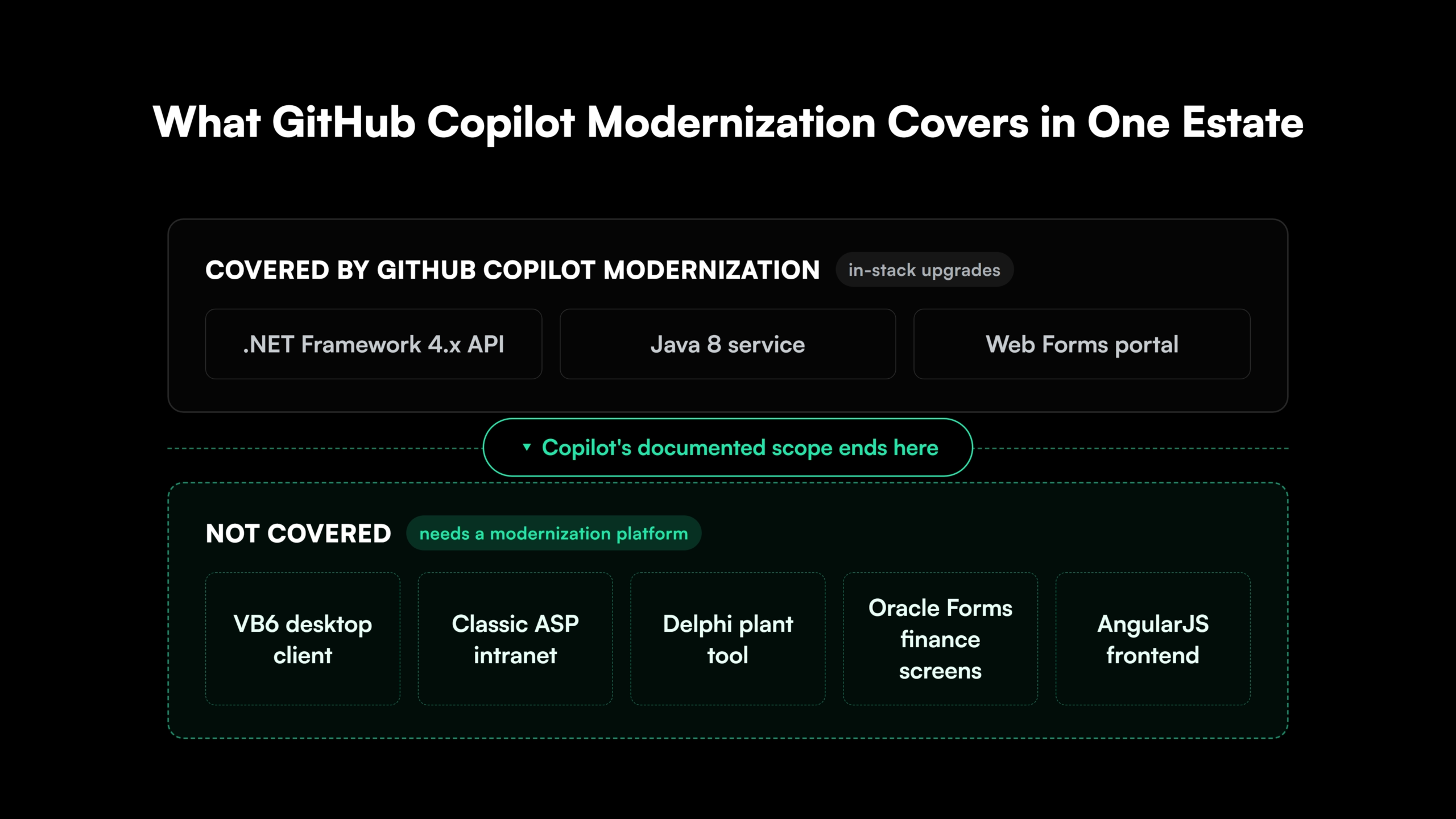
- GitHub Copilot modernization is a strong choice for in-stack .NET and Java upgrades. It takes .NET Framework apps to .NET 8 or later and Java 8 apps up to Java 25, and Microsoft lists those IDE upgrades as generally available.
- GitHub Copilot modernization doesn’t cover VB6, Delphi, Classic ASP, Oracle Forms or PHP. None of those stacks appears in Microsoft’s documentation, and the tool doesn’t rewrite applications into another language.
- Copilot’s testing assumes the code stays in one stack. It builds the project and runs or generates unit tests in the same language. A VB6 app rebuilt in React and .NET has to be checked against the behavior of the running VB6 app.
- Copilot’s migration path ends on Azure and runs through GitHub’s cloud. Applications headed for AWS, on-premises servers or an air-gapped network need a different route.
- A mixed .NET estate usually needs both tools. GitHub Copilot modernization handles the in-stack upgrades, a modernization platform handles the rewrites, and Copilot can keep the rewritten apps current afterward.
GitHub Copilot is now a modernization tool as well as a coding assistant. GitHub Copilot modernization assesses Java, .NET and C++ applications, upgrades them and migrates supported Java and .NET apps to Azure. For a team that already has GitHub Copilot licenses, it’s the natural first tool to try on a legacy estate.
So when does a GitHub Copilot alternative make sense? For in-stack upgrades, such as .NET Framework to .NET 8 or Java 8 to Java 21, it usually doesn’t. That changes with applications built on stacks Microsoft doesn’t support, like VB6 or Classic ASP, with rewrites into a different language, and with deployments that can’t go to Azure.
Those applications need a platform that assesses them, rewrites them and proves the new version behaves like the old one.
GitHub Copilot vs. Legacyleap at a Glance
Here’s how GitHub Copilot modernization and Legacyleap compare on the points that decide a legacy modernization project:
| GitHub Copilot modernization | Legacyleap | |
| Built for | Upgrading .NET, Java and C++ apps within their stack, and migrating them to Azure | The full modernization lifecycle, including rewrites into a new stack |
| Legacy stacks covered | .NET Framework, VB.NET, Web Forms, server-side WCF, Java 8 and later, Spring, Java EE, C++ | .NET Framework, VB.NET, Web Forms, WCF, Java EE and Java version upgrades, plus VB6, Classic ASP, Delphi, Oracle Forms and PL/SQL, PHP, AngularJS, Struts and EJB |
| Rewrites into another language | Not in Microsoft’s documentation | VB6 to React and .NET, Delphi to .NET, PHP to Node.js or Python, Oracle Forms to Java or .NET |
| Testing | Builds, migrated or generated unit tests, CVE scans | 70-80% of test cases generated, with behavior parity checked against the legacy app |
| Deployment targets | Azure App Service, Azure Container Apps, AKS | Any cloud or on-premises |
| Where code is processed | GitHub Copilot’s cloud, with an internet connection required | Inside your own environment, with no outbound calls required |
| How changes land | Committed task by task in your repository | Diff-based pull requests that engineers review; the AI can’t merge, deploy or execute code |
| Way to start | Included in every GitHub Copilot plan | A $0 Modernization Assessment on one codebase |
In short, GitHub Copilot modernization fits applications that stay in their stack and land on Azure. Legacyleap fits applications that change stack, run on a stack Microsoft doesn’t support, or can’t leave your network.
GitHub Copilot Modernization: What It Does Well
GitHub Copilot modernization is a capable, well-documented tool for the upgrade work sitting in most .NET and Java backlogs, and every team with a GitHub Copilot license already has access to it. It runs inside Visual Studio, VS Code, the GitHub Copilot CLI and GitHub.com. Its earlier name, GitHub Copilot app modernization, still appears across Microsoft’s documentation.
Here’s what it covers:
- Java: Upgrades from JDK 8 up to JDK 25, Spring Boot up to 3.5, Spring Framework up to 6.2, and javax to Jakarta EE 10, for backend applications built with Maven or the Gradle Wrapper.
- .NET: Any .NET Framework version to .NET 8 or later, C# and VB.NET projects, ASP.NET MVC and Web API to ASP.NET Core, Web Forms to Blazor Server, and server-side WCF to CoreWCF.
- C++ and JavaScript: C++ projects moved to newer MSVC Build Tools, and npm, pnpm or yarn package upgrades.
- Portfolio scale: The GitHub Copilot modernization agent runs an Assess, Plan, Execute sequence across multiple repositories at once, including unattended runs in CI/CD pipelines.
Microsoft lists the IDE upgrades for .NET, Java and C++, the IDE migration scenarios for .NET and Java, and the agent’s command-line assessment and planning as generally available.
For a .NET Framework 4.x application headed to .NET 8 on Azure, or a Java 8 service moving to Java 21, GitHub Copilot modernization is the sensible place to start.
Where GitHub Copilot Modernization Reaches Its Limit
GitHub Copilot modernization upgrades an application within its current language and framework, then moves it to Azure. Legacy projects that don’t fit that pattern run into four limits:
- Unsupported legacy stacks: Microsoft’s documentation doesn’t list VB6, Delphi, Classic ASP, Oracle Forms or PHP. GitHub Copilot modernization supports VB.NET projects, but VB6 is a separate, older runtime that it doesn’t cover.
- No rewrites into another language: Microsoft doesn’t describe the tool converting an application into a different language. A VB6 desktop app can’t become a React and .NET web app through GitHub Copilot modernization.
- Testing that stays in one stack: GitHub Copilot modernization builds the project, runs or generates unit tests and scans for CVEs after each change. Microsoft’s training module even recommends generating tests first for code with little coverage. Those tests work when the code stays in C# or Java, and they can’t run against a React screen that replaced a VB6 form.
- Azure and GitHub’s cloud: The migration path targets Azure App Service, Azure Container Apps and AKS. Microsoft’s .NET FAQ also says the agent needs an internet connection and GitHub Copilot’s cloud to run, which rules it out for code that has to stay on an air-gapped network.
One application can hit these limits partway through. A medical imaging platform Legacyleap modernized had a .NET Framework 4.7.2 backend and an AngularJS 1.8.3 frontend, across 800,000+ lines of code. Moving the backend to .NET 9 was an in-stack upgrade that GitHub Copilot modernization covers. Moving the frontend to React 18 and TypeScript was a rewrite that it doesn’t, and both happened in the same nine-month program.
Find out what modernizing one of your VB6, Classic ASP or Delphi applications involves. Legacyleap’s $0 Modernization Assessment maps its dependencies, risks and modernization plan in 3-5 days, inside your infrastructure.

 +more
What Legacyleap Adds as a GitHub Copilot Alternative
Legacyleap covers the applications GitHub Copilot modernization doesn’t. It’s a modernization platform built on specialized agents that assess an application, rewrite it into the target stack, test that it behaves the same and prepare it for deployment, with engineers reviewing each change.
Legacyleap Supports VB6, Delphi, Classic ASP and Other Legacy Stacks
Legacyleap’s supported sources include VB6, Classic ASP, Web Forms, WCF, Delphi (including Delphi 2007), Oracle Forms and PL/SQL, PHP, ColdFusion, AngularJS, Struts, EJB and Java EE, alongside .NET Framework and VB.NET. Common paths include VB6 to .NET migration, VB6 to React and .NET, Classic ASP to ASP.NET Core, Delphi modernization to .NET or React, and Oracle Forms to Java or .NET.
Before any code changes, Legacyleap’s Assessment Agent reads the whole codebase and maps its dependencies, risks and effort. For a VB6 client, that map includes every COM reference and Win32 API call the rewrite has to replace.
Legacyleap’s Modernization Agent then converts the application into the target architecture, splitting a desktop app into a web UI and REST services where the plan calls for it. About 70% of the modernization is automated, with engineers in the loop for 20-25% of the effort, or up to about 30% on complex codebases.
How Legacyleap Tests a Rewrite Against the Legacy App
Legacyleap’s QA Agent generates 70-80% of the test cases, including functional, regression, API and Gherkin end-to-end tests, and runs them against live servers. It checks the new application’s behavior against the legacy app’s, so the screens, outputs and stored data have to match before cutover. That matters most for legacy apps that have no tests to start from.
A North American airline’s audit-flagged VB6 flight-operations application had 2,588 COM references, 195 Win32 API calls across 8 libraries, zero documentation and zero automated tests. Legacyleap re-platformed it to React and .NET Core with 60-65% of the conversion automated, reaching UAT readiness in 8 weeks against a 14-16 week manual estimate, at 50% lower cost than that estimate.
The airline application started with zero tests and zero documentation, so there was nothing for an upgrade tool to migrate. Legacyleap delivered automated unit and functional test suites for the new React and .NET application as part of the same program.
Legacyleap Runs Inside Your Own Environment
Legacyleap runs entirely inside the customer’s environment, on its own hardware or in its own cloud account, with no outbound calls required. Source code never leaves that environment, and the modernized application can deploy to any cloud or on-premises.
Each change arrives as a diff-based pull request for engineers to review. The AI can’t merge, deploy or execute code, and each AI action is logged from the original code to the modernized version. Deployment artifacts come out CI/CD-ready, with a phased cutover, so an application can move module by module.
Teams can license the platform and run it with their own engineers or an SI, or hand the whole project to Legacyleap’s team. The zero-dollar modernization assessment shows the fit on one application before any commitment.
How to Split the Work Between GitHub Copilot and Legacyleap
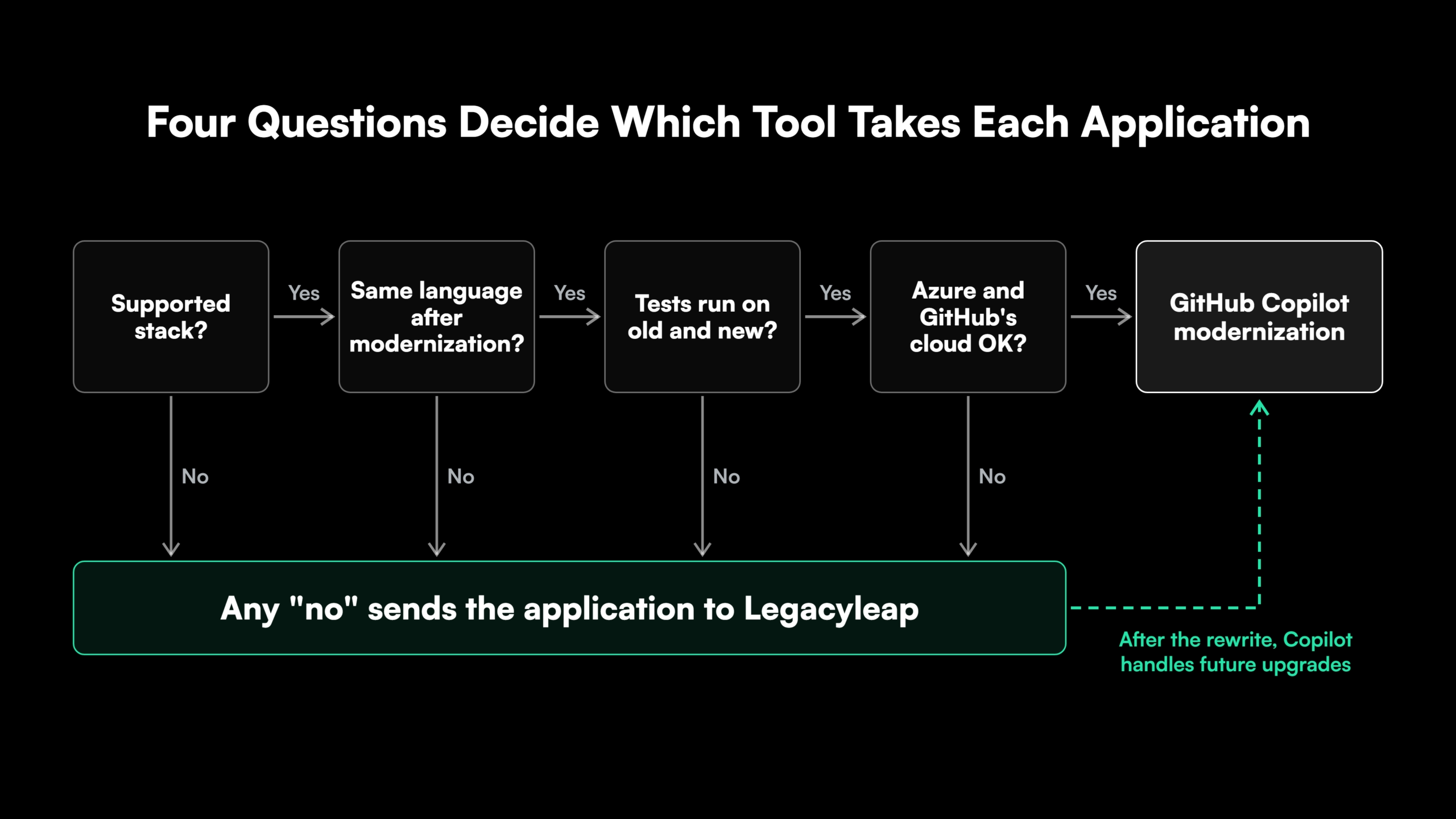
For each application in the portfolio, four questions decide which tool takes it:
- Stack: Is the application built on a stack GitHub Copilot modernization supports, such as .NET Framework, Java 8 or later, or C++?
- Target: Will the application stay in the same language after modernization?
- Testing: cCn the existing or generated tests run on both the old and the new version?
- Deployment: Is the target Azure, and can the code be processed in GitHub Copilot’s cloud?
Four yes answers mean GitHub Copilot modernization can handle the application. A single no means it needs a modernization platform, and that’s where a Copilot alternative belongs in the plan.
Take an insurer with a .NET Framework 4.6 claims API headed for AKS and a VB6 underwriting client that calls it. The claims API passes all four questions and goes to GitHub Copilot modernization. The VB6 client fails the first question and goes to Legacyleap.
The two tools also work one after the other. After Legacyleap moves a VB6 client to React and .NET 8, the application is inside GitHub Copilot modernization’s scope, and Copilot can handle its future .NET upgrades. Legacyleap’s .NET Framework migration projects land on the same .NET 8 targets.
WCF needs a closer look. GitHub Copilot modernization moves server-side WCF services to CoreWCF, so an application that consumes WCF services still needs its own WCF to REST or gRPC migration plan.
Use GitHub Copilot and Legacyleap Together
A GitHub Copilot alternative isn’t needed for every legacy application. For in-stack .NET and Java upgrades headed to Azure, GitHub Copilot modernization does the job. For VB6, Delphi, Classic ASP, Oracle Forms and PHP applications, rewrites into a new stack, and deployments outside Azure, Legacyleap covers what Copilot doesn’t.
Start with a $0 Modernization Assessment on one application. In 3-5 days, inside your infrastructure, it returns documentation, architecture diagrams, a dependency map, a risk heatmap and a modernization plan. To see Legacyleap’s agents work on a codebase like yours, book a Technical Demo.
FAQs
No. Microsoft’s documentation covers VB.NET projects (.vbproj files), and VB6 projects (.vbp files) don’t appear on its list of supported project types.
All of them. Microsoft lists Copilot Free (from Visual Studio 2026 version 18.1), Pro, Pro+, Business and Enterprise.
GitHub Copilot upgrade for .NET runs version and framework upgrades inside the IDE. The GitHub Copilot modernization agent handles assessment, planning and Azure migration, and can run from the CLI or a CI/CD pipeline.
Microsoft says no. The .NET agent never stores the codebase or uses it to train models, deletes session data when an upgrade completes, and changes only the workspace and the .github/upgrades folder.
No. Legacyleap’s graph, agents and workflows run inside Cursor and Claude Code in a pilot program. With GitHub Copilot, the two tools split the estate by application.
References
- Microsoft Learn, “GitHub Copilot modernization.”
- Microsoft Learn, “GitHub Copilot modernization FAQ.”
- Microsoft Learn, “.NET scenarios and skills.”
- Microsoft Learn, “Languages and frameworks supported by GitHub Copilot modernization.”
- Microsoft Learn, “GitHub Copilot modernization agent overview.”
- Microsoft Learn, “How the modernization workflow works.”
- Microsoft Learn, “GitHub Copilot upgrade FAQ.”