TL;DR
- Decide on Aurora by I/O pattern and failover needs. I/O-Optimized fits once I/O reaches a quarter of Aurora spend. A steady single-instance workload can cost less on RDS for MySQL.
- Pick the migration method by source. RDS for MySQL moves by snapshot or Aurora read replica. Self-managed MySQL moves by mysqldump, Percona XtraBackup through Amazon S3, or AWS DMS.
- Plan the 5.7 to 8.0 upgrade as part of the move. MySQL 5.7 runs on paid Extended Support on RDS and Aurora, and Aurora MySQL 2 can’t upgrade straight to 8.4.
- Change the application to get Aurora’s benefits. Reader endpoints, topology-aware drivers, connection pooling, and code that depends on SUPER or MyISAM all need work before cutover.
- Rebuild what the restore leaves behind, then validate. Recreate users, routines, time zone data, and parameters, then compare query results and performance on both systems.
What a MySQL to Aurora Migration Involves
A MySQL to Aurora migration moves a MySQL database onto Amazon Aurora MySQL, a managed AWS engine that runs the same SQL and client protocol. The data move is well documented and largely automated. The application changes, the MySQL 5.7 to 8.0 upgrade that 5.7 estates carry, and validation decide whether the move pays off.
AWS states that the code, tools, and applications used with MySQL today can be used with Aurora [1]. Getting Aurora’s faster failover and read scaling into production takes changes to endpoints, drivers, connection handling, and privilege-dependent scripts.
This guide covers moves from RDS for MySQL and from self-managed MySQL. Both are a form of application replatforming, one of the core cloud modernization strategies. Engine-changing moves such as an Oracle to PostgreSQL migration, a SQL Server to PostgreSQL migration, and a Db2 to PostgreSQL migration use the same validation discipline.
When to Move MySQL to Aurora Based on Cost, Read Scaling, and Failover
Aurora pays off when a workload uses what the platform adds. For Aurora vs. RDS for MySQL, the I/O pattern, the need for read replicas, and the failover target decide it.
| Input | Aurora MySQL | RDS for MySQL | Self-Managed MySQL |
| Storage and I/O billing | Standard bills per I/O request. I/O-Optimized drops I/O charges for higher instance and storage rates | Provisioned storage and IOPS | Hardware or VM cost |
| Read scaling | Up to 15 Aurora Replicas on shared storage, behind one reader endpoint | Read replicas, each with its own storage | Team-run replication |
| Failover | Promotes an Aurora Replica with no data copy | Multi-AZ standby failover | Team-run failover |
| Fits best | I/O-heavy or read-heavy workloads with tight failover targets | Steady, moderate workloads on one instance | Licensing, residency, or control constraints that rule out managed services |
Storage billing changes the cost comparison most. AWS’s guidance is to use I/O-Optimized once I/O reaches 25% or more of total Aurora spend, and Standard below that [2].
AWS states that Aurora delivers up to 6x the throughput of stock MySQL on similar hardware [1]. A workload’s gain depends on its concurrency and I/O profile.
Aurora is the weaker choice in three cases.
- Steady, low-I/O workloads on one instance. RDS for MySQL on version 8.4 can cost less and needs no Aurora-specific application changes.
- Databases built on MyISAM or compressed tables. RDS for MySQL runs them as they are, and Aurora requires conversion first.
- Estates with an exit or multi-cloud requirement. Aurora’s storage layer and drivers are AWS-specific, so exit cost grows with each Aurora feature adopted.
How to Migrate MySQL to Aurora From RDS or Self-Managed MySQL
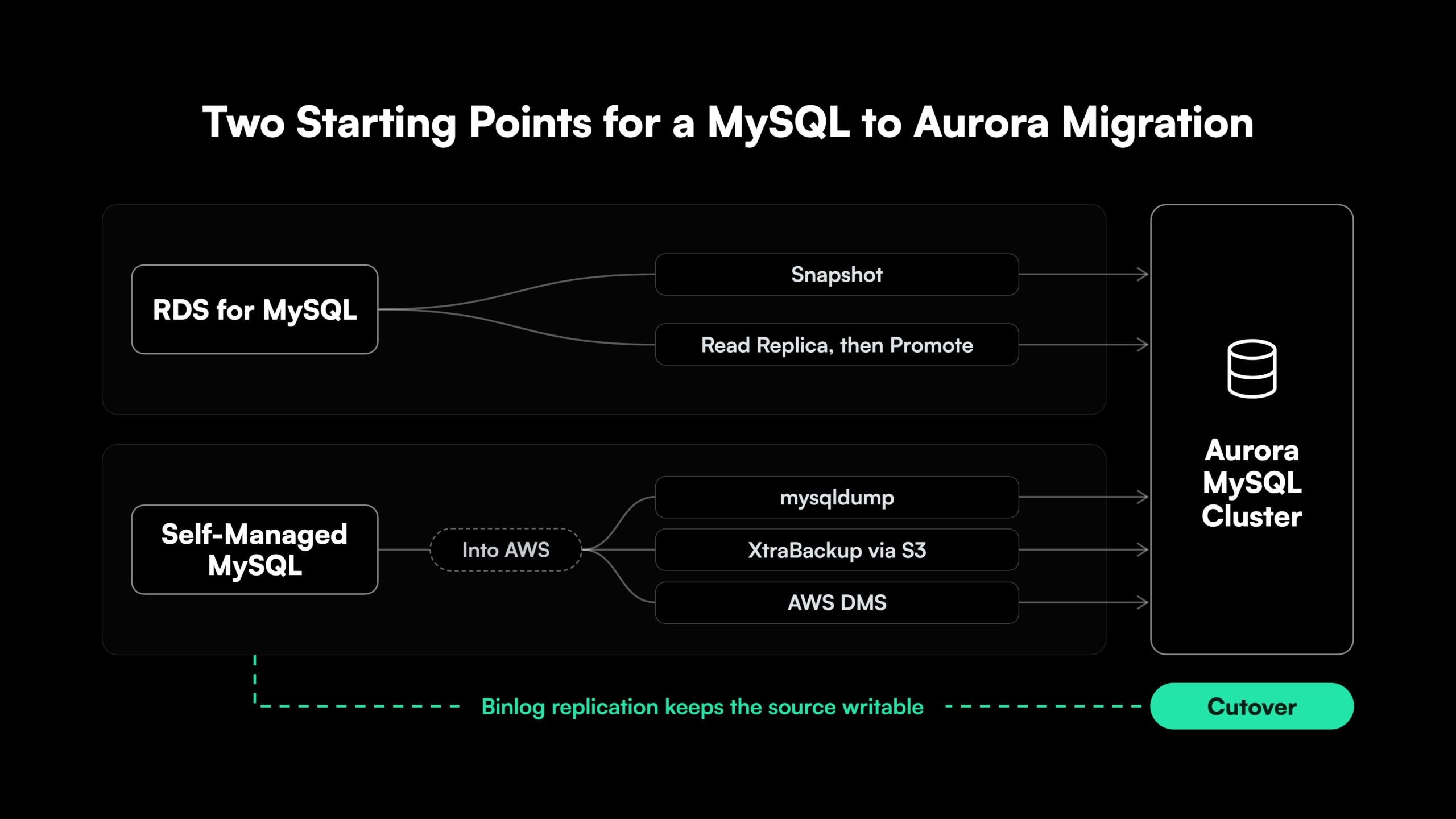
To migrate MySQL to Aurora, pick the method by where the source runs and how much downtime the business accepts. AWS documents each method step by step, and the table summarizes the choice.
| Source | Method Options | Typical Downtime | Key Prerequisite |
| RDS for MySQL | Snapshot migration, or an Aurora read replica that is then promoted | Snapshot stops writes for the whole copy. Read replica stops writes until replica lag reaches zero | A source version with a compatible Aurora MySQL version, and no cross-Region read replica on the source for the replica method |
| Self-managed, on-premises, or other-cloud MySQL | mysqldump, Percona XtraBackup through Amazon S3, or AWS DMS, each with optional binlog replication | A dump or restore alone stops writes for the full copy. Binlog replication or DMS change capture cuts it to the final catch-up | A network path to AWS, binlog_format=ROW for replication, and a MySQL 5.7 or 8.0 source for the S3 restore |
One version prerequisite applies to the snapshot, read replica, and physical restore paths. Sources on MySQL 8.0.11, 8.0.13, or 8.0.15 can’t migrate to Aurora MySQL 3.05 or higher, and AWS recommends upgrading to 8.0.28 first [3].
How to Migrate RDS MySQL to Aurora
To migrate RDS MySQL to Aurora, AWS offers two console-driven methods. A snapshot migration restores an RDS snapshot into a new Aurora cluster and suits databases that can stop writes for the copy.
An Aurora read replica copies the RDS instance and replicates changes through the binary log. At cutover, writes stop, replica lag drops to zero, and the replica is promoted, so the write outage equals the catch-up time.
Each RDS instance supports one Aurora read replica, and an instance that feeds a cross-Region read replica can’t use this method. Writes to the Aurora replica before promotion break replication and force a rebuild.
How to Migrate Self-Managed or On-Premises MySQL to Aurora
Self-managed sources get the data into AWS first. Three methods cover most cases.
- mysqldump. A logical export and import that fits smaller databases and partial migrations by schema or table.
- Percona XtraBackup through Amazon S3. A physical backup restored into a new Aurora cluster, which AWS describes as considerably faster than mysqldump. It accepts MySQL 5.7 and 8.0 sources, excluding Percona Server for MySQL.
- AWS DMS. Full load plus change data capture, with
binlog_format=ROWandbinlog_row_image=FULLon the source. DMS doesn’t carryAUTO_INCREMENTattributes, so table definitions come from a schema export.
The first two pair with binlog replication into Aurora, which keeps the source writable until cutover and supports a zero-downtime migration.
How to Sequence the MySQL 5.7 to 8.0 Upgrade With an Aurora Migration
For estates on MySQL 5.7, a MySQL to Aurora migration is an upgrade plus a move. The support dates set the sequencing.
- Aurora MySQL 2 (5.7). Standard support ended 31 October 2024. RDS Extended Support runs to 30 June 2029 at an additional cost [4].
- Aurora MySQL 3 (8.0). Standard support runs to 30 April 2028 [4].
- Aurora MySQL 8.4. Standard support runs to April 2032 [4].
- RDS for MySQL 5.7 and 8.0. Standard support ended 29 February 2024 and 31 July 2026 respectively, and both now run on paid RDS Extended Support [5].
A 5.7 estate moving to Aurora MySQL 3 now plans a second upgrade to 8.4 before 2028. Aurora MySQL 2 can’t upgrade directly to 8.4.
Three sequences work, each with its own risk.
- Upgrade first, then migrate. Upgrade the source to 8.0.28 or later, stabilize the application, then migrate to Aurora MySQL 3. A regression points to one cause, and the program runs two cutovers.
- Migrate to Aurora MySQL 2, then upgrade. Move the 5.7 database as it is, then upgrade in place with downtime or through Aurora Blue/Green Deployments. Extended Support charges run until the upgrade completes.
- Upgrade and migrate in one step. A logical copy with mysqldump or DMS moves a 5.7 source straight into Aurora MySQL 3. One cutover carries both sets of changes, which makes regression triage slower.
Aurora releases follow community MySQL releases, so a recent community version may have no Aurora match yet.
MySQL 8.0 Changes That Affect Application Code
MySQL’s upgrade notes document six changes that reach application code.
- Authentication. Community MySQL 8.0 defaults to
caching_sha2_password, and Aurora MySQL 8.4 uses it for new accounts. Older connectors fail against those accounts until they’re upgraded. - Character set and collation. New tables default to
utf8mb4withutf8mb4_0900_ai_ci(previouslylatin1), which changes comparisons, sort order, and index key lengths. GROUP BYordering. 8.0 removed implicit sorting forGROUP BY, so queries that relied on it need anORDER BY.- Reserved words. New reserved words such as
RANK,GROUPS, andWINDOWbreak unquoted identifiers. - SQL modes.
NO_AUTO_CREATE_USERand older compatibility modes were removed, so sessions that set them fail. - Query cache. Removed in 8.0, so workloads tuned around it need a new performance baseline.
Application Changes for Aurora: Endpoints, Failover, Drivers, and Privileges
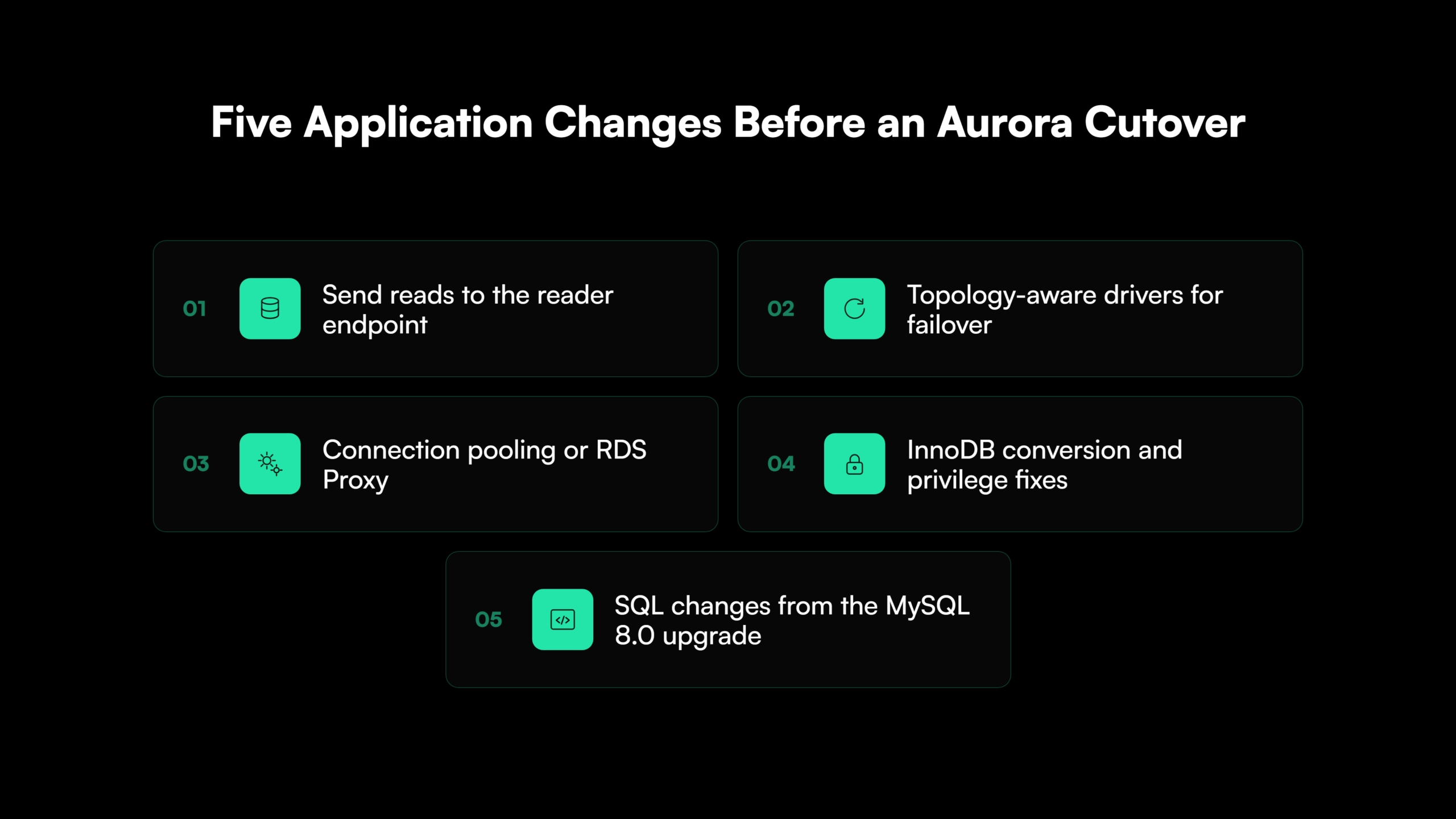
Five application areas decide whether Aurora’s failover speed and read scaling reach production.
| Area | If the Application Doesn’t Change | What to Change |
| Endpoints | All traffic hits the writer through the cluster endpoint, and replicas sit idle | Send reads to the reader endpoint and split read and write traffic in the data access layer |
| Failover | Open-source drivers wait on DNS, and reconnection takes tens of seconds | Use an AWS driver or wrapper that tracks cluster topology, and retry dropped connections |
| Drivers | MariaDB Connector/J 3.0.3 and later drop Aurora cluster support | Move Java services to an AWS JDBC driver and check every service’s connector version |
| Connection pooling | Connection storms follow failover and scale-out | Pool connections in the application or through Amazon RDS Proxy |
| Engines and privileges | MyISAM tables need conversion to InnoDB, and scripts that use SUPER or FILE fail | Convert tables to InnoDB and move admin tasks to Aurora’s stored procedures and parameter groups |
AWS’s drivers monitor cluster status and topology, which reduces switchover and failover times to single-digit seconds, compared to tens of seconds for open-source drivers [6]. AWS also states that MariaDB Connector/J 3.0.3 drops support for Aurora clusters [6], so Java services on that connector need a driver change before cutover.
InnoDB is the one table engine Aurora MySQL supports, and accounts holding SUPER, FILE, SHUTDOWN, or CREATE TABLESPACE import without those privileges [7]. Code that reads or writes server-side files with LOAD DATA INFILE or SELECT ... INTO OUTFILE moves to Aurora’s Amazon S3 variants. SET GLOBAL calls from application accounts move to parameter groups.
RDS Proxy keeps client connections open through a failover, which suits applications that open many short-lived connections.
The effort grows with the age of the application stack. MySQL estates held on 5.7 often sit behind PHP, Java EE, Perl, ColdFusion, or Ruby on Rails applications that pin old connector and ORM versions.
In those applications, connectors that predate caching_sha2_password, identifiers that became 8.0 reserved words, and data access layers with no retry logic turn the upgrade and the move into application modernization work.
How Gen AI Finds MySQL Dependencies in Application Code
Gen AI code analysis reads whole repositories and flags MySQL touchpoints in code, configuration, and scripts.
- Connection strings, driver versions, and pool settings in code and configuration.
- Queries that depend on
GROUP BYordering, new reserved words, orlatin1comparisons. - Server-side file operations,
SET GLOBALcalls, and scripts that assume SUPER. - Missing retry and reconnect logic around database calls.
Each flagged change goes through human code review and a test against the Aurora cluster before merge.
Map the Application Code Before an Aurora Migration

 +more
+moreWhat Doesn’t Carry Over to Aurora MySQL Automatically
AWS states that Aurora MySQL doesn’t restore everything from a source database, and it names user accounts, functions, stored procedures, and time zone information as items to re-add [3]. The checklist adds the configuration around them.
- Users and grants. Export and recreate them on Aurora. Unsupported privileges drop on import.
- Stored procedures, functions, triggers, and events. Export them with the schema and confirm every DEFINER account exists on Aurora. Objects owned by
rdsadminaren’t imported. - Time zone data. Load time zone tables where the application passes named time zones to
CONVERT_TZ. - Server configuration. Map
my.cnfsettings to DB cluster and DB instance parameter groups. Some settings have no equivalent, and Aurora fixes others. - The
mysqlschema and plugins. User-created tables in themysqlschema aren’t restored, and memcached has to be removed before migration. - Scheduled jobs and ops scripts. Cron jobs, backups, and monitoring agents on the source host need a replacement on AWS.
How to Validate an Aurora MySQL Migration Before and After Cutover
Validation for an Aurora MySQL migration runs at four levels before cutover.
- Data. Row counts per table, then checksums per table or chunk once replica lag reaches zero.
- Query results. Capture production queries from Performance Schema digests or the slow query log, run them on both systems, and compare results, including sort order.
- Application behavior. Run the test suite against the Aurora endpoints and force a failover mid-run to test reconnection.
- Performance. Record latency percentiles, throughput, and top queries on the source, then compare on Aurora under the same load.
The first 30 days after cutover carry two more checks. Performance baselines catch plan changes and cache warm-up effects, and cost monitoring shows where I/O spend sits against the 25% line.
Growing replica lag during catch-up points to long transactions, large DDL, or an undersized Aurora instance. Data-level checks follow the same techniques as any data migration validation, and the source stays available as the reference until sign-off.
Set the Validation Scope Before Cutover
The $0 Modernization Assessment maps where application risk concentrates before a MySQL to Aurora migration starts, which sets the scope of validation.
How to Migrate a Fleet of MySQL Databases to Aurora
A fleet migration adds sequencing decisions on top of the per-database method.
- Inventory. List every database with version, size, engine mix, write rate, and connecting applications. A legacy system audit produces the same inventory across the wider estate.
- Segment active from dormant. Large fleets can hold many databases that receive no writes. Dormant databases move by bulk copy on any schedule, and active ones need change capture and a planned cutover.
- Group by shared applications. Databases that serve the same application move together, so no application runs across two platforms.
- Order by upgrade need. 5.7 databases and 8.0 databases on 8.0.11, 8.0.13, or 8.0.15 go into waves that include the upgrade.
- Standardize one runbook per segment. A tested method per segment turns the fleet into repeatable waves.
How Legacyleap’s Gen AI Agents Prepare Applications for Aurora
Legacyleap is a Gen AI-powered legacy application modernization platform built on multi-agent orchestration. In a MySQL-to-Aurora program, AWS tooling moves the data, and Legacyleap’s five agents cover the application code that connects to MySQL, including legacy Java EE, .NET Framework, PHP, Perl, ColdFusion, and Ruby on Rails applications.
The agents run the Assess, Comprehend, Modernize, Validate, and Deploy lifecycle in sequence.
- Assessment Agent. Inventories the applications that call each database, with a dependency map, hotspots such as outdated drivers and privilege-dependent code, and an effort estimate.
- Documentation Agent. Reconstructs data flows and integration maps that show which applications share which databases.
- Recommendation Agent. Produces an ordered migration plan by module that sequences the 8.0 upgrade changes with the Aurora changes.
- Modernization Agent. Delivers diff-based pull requests for driver and endpoint changes, retry logic, and SQL affected by the 8.0 upgrade. Roughly 70% of the work is automated, and engineers review and direct the rest.
- QA Agent. Generates unit, integration, regression, and API tests, with behavior parity validation reports against the pre-migration baseline before cutover.
No agent merges, deploys, or executes code autonomously. Full-codebase grounding reads every service that touches the database, and all processing runs inside the organization’s own infrastructure.
Next Steps for Planning a MySQL to Aurora Migration
A MySQL to Aurora migration is scoped by the application code, the version upgrade, and the configuration around the database. Counting that work before choosing a method gives the program a realistic plan and a defensible cutover.
The $0 Modernization Assessment produces a dependency and module map, a risk and complexity heatmap, and a modernization plan for one representative codebase. It takes 3 to 5 days, runs inside the client’s environment, and draws on more than 150 production-grade assessments.
A technical demo shows how the five agents take an approved plan through code changes and parity validation.
Count the Application Work Before Choosing a Method
A $0 Modernization Assessment produces a dependency and module map, a risk and complexity heatmap, and a modernization plan for one representative codebase in 3 to 5 days, inside your own environment.
FAQ
It is AWS’s own benchmark against stock MySQL on similar hardware. A load test on a production-sized cluster with the planned storage configuration gives the figure for a specific workload.
It means the major version upgrade from Aurora MySQL 2 to 3. Aurora runs prechecks before an in-place upgrade and stops if it finds prepared XA transactions or running DDL.
Yes for connectivity. Java services also need a short JVM DNS cache TTL (networkaddress.cache.ttl), since a cached writer address can outlive a failover.
No. They convert to InnoDB, and AWS advises keeping each MyISAM table under 8 TB for a snapshot migration because the conversion needs extra space.
AWS puts the initial copy to an Aurora read replica at several hours per TiB. Application changes and validation set the total, and a pilot on one application gives the realistic rate.
Yes, on Aurora MySQL version 3 and later, so a 5.7 database completes the 8.0 upgrade first. A cluster can mix a provisioned writer with Serverless v2 readers.
Aurora can cost more for steady, low-I/O workloads on one instance. Aurora bills storage by space used and RDS bills allocated storage, so over-provisioned RDS volumes narrow the gap.
References
[1] AWS, Amazon Aurora User Guide. What is Amazon Aurora?
[2] AWS, Amazon Aurora User Guide. Amazon Aurora storage
[3] AWS, Amazon Aurora User Guide. Physical migration from MySQL by using Percona XtraBackup and Amazon S3
[4] AWS, Aurora MySQL Release Notes. Release calendars for Amazon Aurora MySQL
[5] AWS, Amazon RDS User Guide. MySQL on Amazon RDS versions
[6] AWS, Amazon Aurora User Guide. Connecting to an Amazon Aurora DB cluster
[7] AWS, Amazon Aurora User Guide. Reducing the time for physical migration to Amazon Aurora MySQL