TL;DR
- Treat the 1997 legacy carve-out as closed. It covers only systems running before August 20, 1997 that met predicate rules then and still do. A later change that breaks predicate rule compliance brings Part 11 controls back.
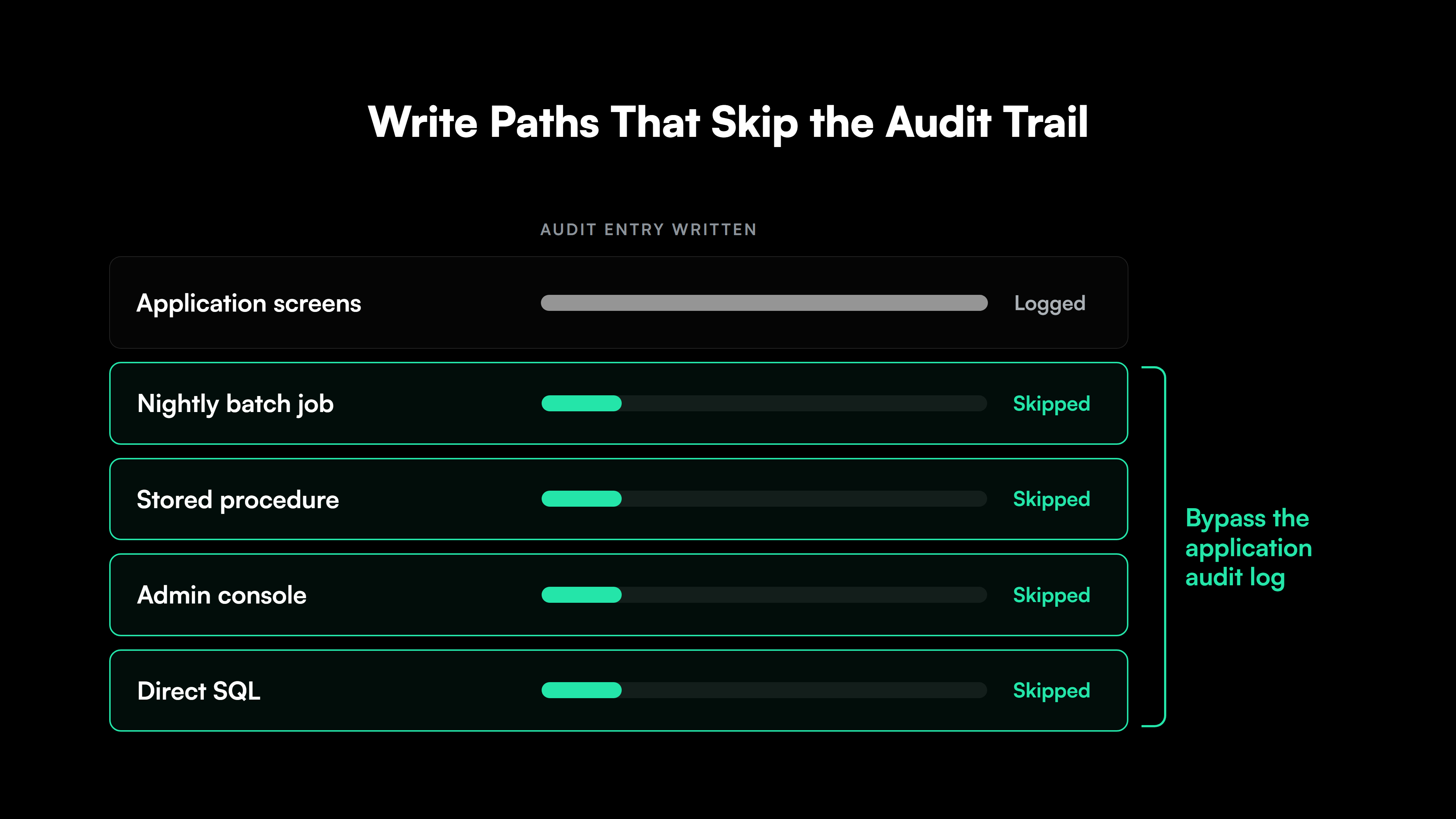
- Look for audit trail gaps in the write paths. Batch jobs, stored procedures and direct database edits can change regulated records without passing through the application’s audit logging.
- Check how each signature is stored. A signature kept as an editable status flag or user ID column can be changed or copied, which fails the record-linking requirement in 11.70.
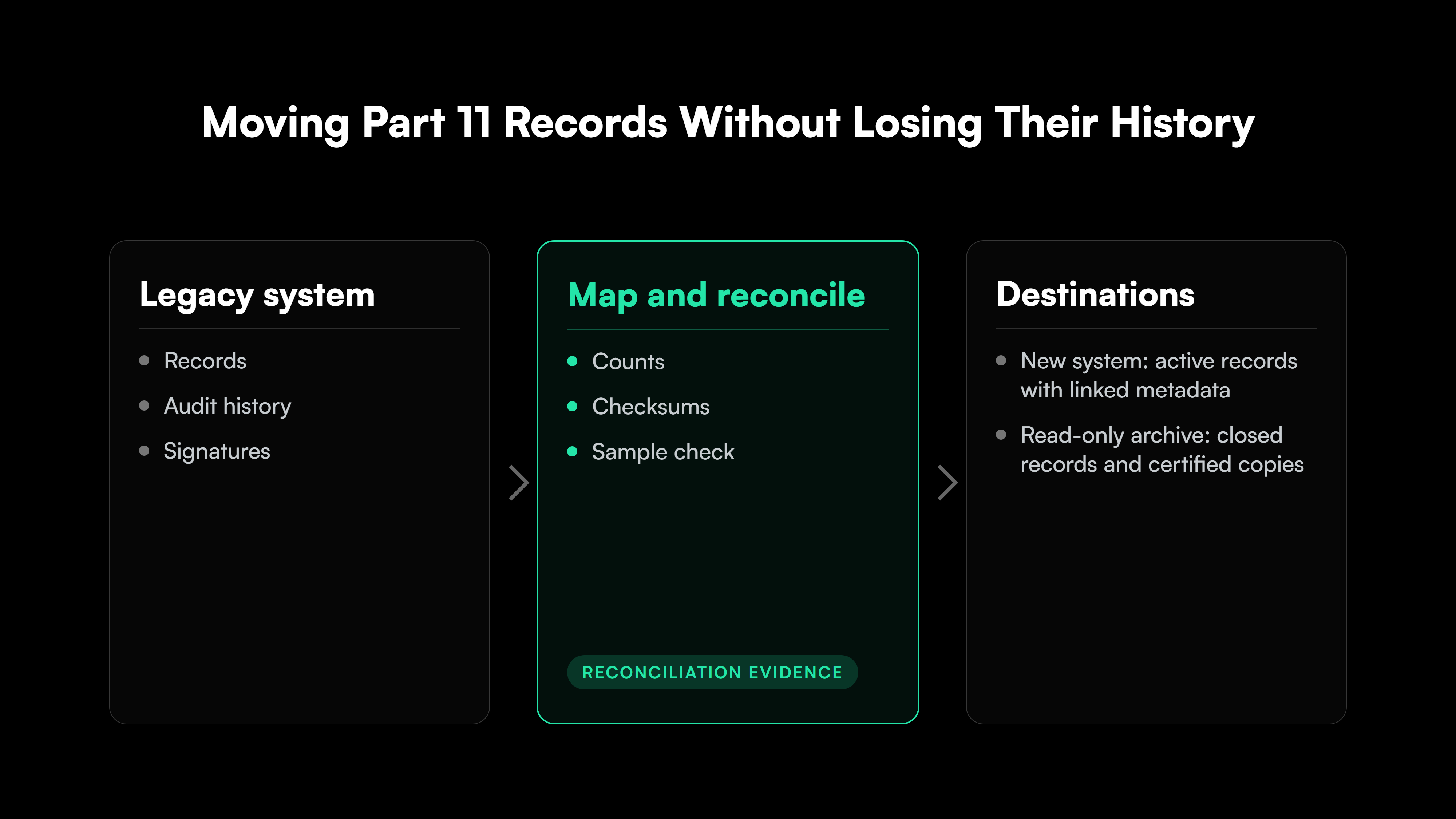
- Move audit history and signatures with the records. At decommissioning, keep each record’s metadata linked to it, or keep the old system read-only with certified copies that carry the metadata.
21 CFR Part 11 compliance decides whether FDA accepts electronic records and signatures in place of paper records and handwritten signatures. The rule has applied since August 1997 to records a predicate rule requires, such as CGMP batch and laboratory records, when they are kept electronically.
In pharma and biotech, regulated records often live in applications that were built or heavily customized in-house years ago, such as LIMS extensions, electronic batch record tools and stability databases. In-house GxP applications often carry audit trail and signature features designed before FDA published its 2018 data integrity guidance for drug manufacturers.
Teams that own legacy GxP applications usually start by asking whether a system’s age earns it any relief under Part 11. System age almost never does. Part 11 gaps in an older GxP application sit in how it records changes, how it stores signatures and what happens to its records when it is replaced.
Which 21 CFR Part 11 Requirements FDA Enforces on Legacy Systems
FDA settled the question of system age in its 2003 Scope and Application guidance, and age alone does not exempt a legacy GxP application from 21 CFR Part 11 compliance. The guidance defines legacy systems as those operational before August 20, 1997, the date Part 11 took effect. A system qualifies for enforcement discretion only when it meets all four of these conditions:
- It was operational before August 20, 1997.
- It met all applicable predicate rule requirements before that date.
- It meets all applicable predicate rule requirements today.
- Documented evidence and justification show it is fit for its intended use.
A system changed since 1997 in a way that would prevent it from meeting predicate rules loses the carve-out as well. A LIMS customized in 2004 or a batch record tool built in 2011 falls under the enforcement policy for all other systems.
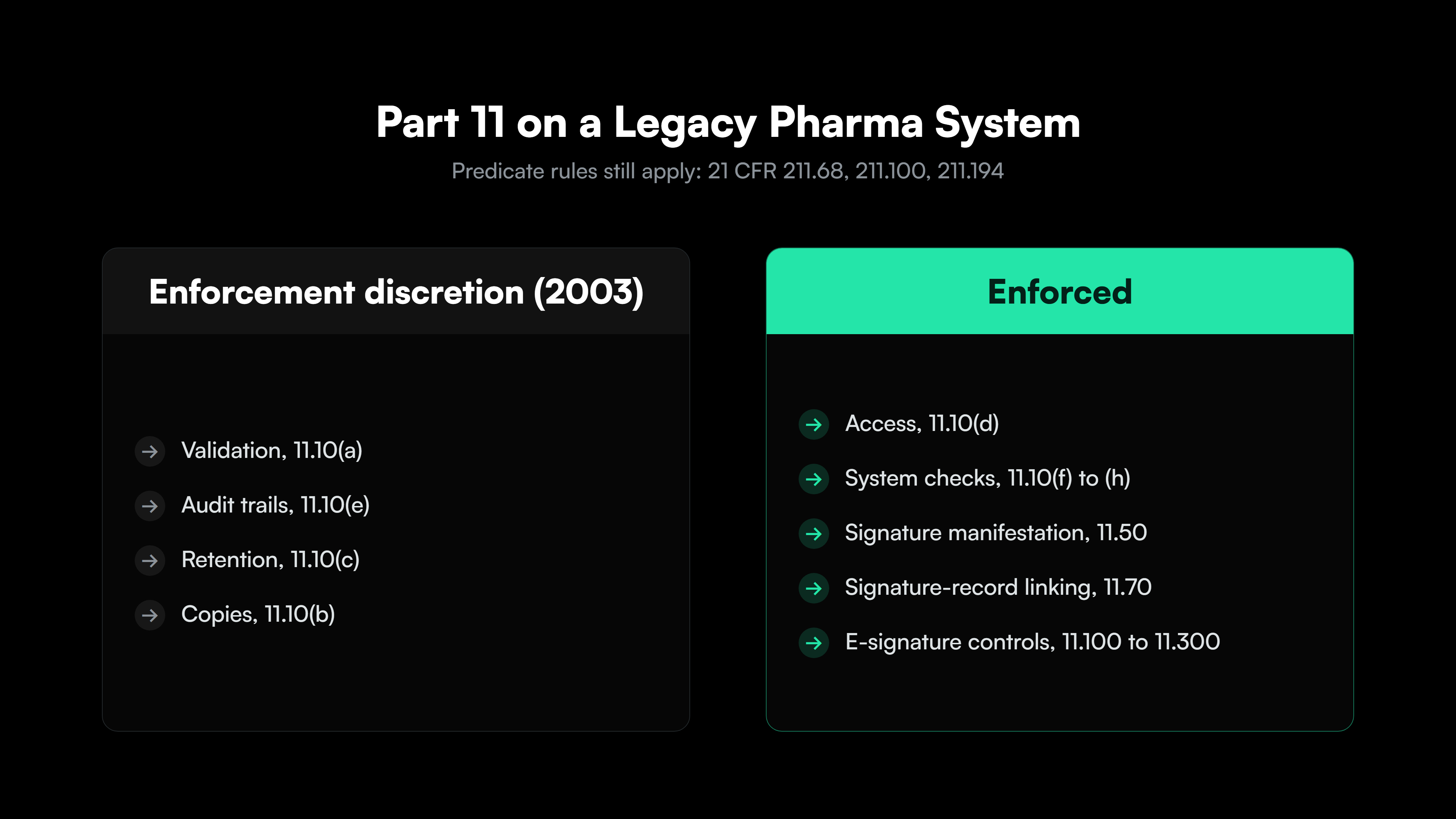
For systems outside the carve-out, FDA’s 2003 guidance narrows what FDA enforces. FDA applies enforcement discretion to Part 11’s validation, audit trail, record retention and record copying requirements. It still enforces the other closed-system controls in 11.10, such as access limits and authority checks, and the electronic signature controls in 11.50, 11.70, 11.100, 11.200 and 11.300.
FDA’s 2003 guidance states that predicate rules still require records of date, time and sequence of events, and that changes must not obscure earlier entries. For drug manufacturers, 21 CFR 211.68(b) requires controls so only authorized personnel change master production and control records, and backups that are exact, complete and secure.
The table shows where each requirement stands for a legacy pharma application:
| Requirement | Part 11 section | Status under FDA’s 2003 guidance | What still applies |
| System validation | 11.10(a) | Enforcement discretion | Predicate rules, including 211.68 for drug CGMP |
| Audit trails | 11.10(e), 11.10(k)(2) | Enforcement discretion | Predicate rules on date, time, sequence and unobscured changes |
| Record protection and retention | 11.10(c) | Enforcement discretion | Predicate rule retention requirements |
| Record copies | 11.10(b) | Enforcement discretion | Copies that preserve content and meaning |
| Access limited to authorized individuals | 11.10(d) | Enforced | Part 11 |
| Operational, authority and device checks | 11.10(f), (g), (h) | Enforced | Part 11 |
| Signature manifestation and record linking | 11.50, 11.70 | Enforced | Part 11 |
| Signature uniqueness, components and credentials | 11.100, 11.200, 11.300 | Enforced | Part 11 |
The table leaves two groups of controls for a legacy pharma application to meet, audit trails under the predicate rules and electronic signatures under Part 11 itself. Part 11 is also one of several enforcement exposures covered in legacy software compliance risk for regulated US firms.
21 CFR Part 11 Audit Trail Requirements and Where Legacy Code Breaks Them
Part 11’s enforcement discretion changes little for drug manufacturers’ audit trails, because CGMP predicate rules and FDA’s 2018 data integrity guidance carry the same expectations. Section 11.10(e) requires secure, computer-generated, time-stamped audit trails that independently record operator entries and actions that create, modify or delete electronic records. Changes must not obscure earlier values, and the audit trail is kept as long as the record. FDA’s 2018 data integrity guidance adds two review duties for drug CGMP:
- Who reviews: The personnel responsible for record review under CGMP review the audit trails that capture changes to that data.
- How often: Review follows the frequency CGMP sets for the data. Where CGMP sets none, a risk assessment covering data criticality, control mechanisms and product impact sets it.
An application can log every change made through its screens and still miss changes made elsewhere. The table lists the legacy patterns to check:
| Legacy pattern | Requirement it breaks | What to check in the code |
| Audit rows stored in tables the application account can update or delete | Secure, independent audit trail (11.10(e)) | Database grants on audit tables and any update or delete statements against them |
| Database triggers that a DBA can disable | Independent recording | Trigger state history and data-load scripts that disable triggers |
| Batch jobs, stored procedures and admin scripts writing to regulated tables | Every change recorded | All write paths to each regulated table outside the user interface |
| Only the new value captured | Changes do not obscure earlier entries | Audit columns for old value, new value, user and reason |
| Timestamps taken from the client workstation clock | Accurate time stamps | Where the timestamp is generated |
| Audit data readable only through raw table queries | Review by record reviewers | Whether reviewers can filter audit entries by record, user and date |
| Shared service or generic user accounts | Attributable entries | Connection strings, service accounts and generic “lab” or “QA” users |
FDA’s April 2026 warning letter to an Illinois drug manufacturer shows how these patterns appear in an inspection. Analysts shared one username and password on HPLC equipment and held administrator rights to modify and delete data. A software update had let users bypass the firm’s access restrictions.
The firm’s FTIR spectrometer audit trail showed no activity from September 23 to 30, 2025, although testing records show the instrument was used in that period. FDA cited 21 CFR 211.68(b) and the absence of a written procedure for reviewing audit trails.
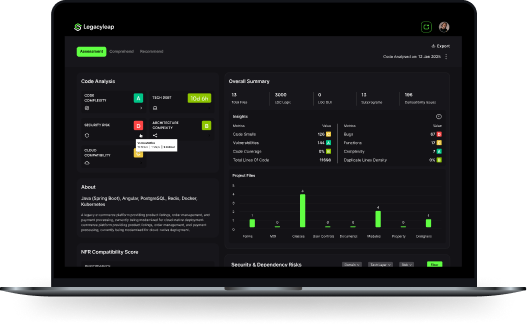
Map every write path and access gap in a legacy GxP application. The $0 Security Assessment ties each security finding to its exact code location with a fix approach, in 3 to 5 days inside your environment.

 +more
Part 11 Electronic Signature Requirements in Legacy Applications
Electronic signatures get none of the enforcement discretion that audit trails get. For any system outside the 1997 carve-out, FDA’s 2003 guidance enforces Part 11’s signature controls as written, and each control maps to a specific check in a legacy application’s code:
- 11.50, signature manifestation: The signed record shows the signer’s printed name, the date and time, and the meaning, such as review or approval. A screen or report that shows only a user ID fails this check.
- 11.70, signature and record linking: Signatures cannot be excised, copied or transferred to falsify a record by ordinary means. A signature stored as an “approved” flag, or as a user ID column an update statement can change, fails this test.
- 11.100(a), uniqueness: Each signature belongs to one individual and is never reused or reassigned. Generic “QA” accounts and user IDs reassigned from departed staff break it.
- 11.200(a), signature components: Non-biometric signatures use at least two distinct components, such as a user ID and password. The first signing in a continuous session uses all components, so a signing step that relies on the session login alone fails.
- 11.300, credential controls: Identification codes and passwords stay unique, are checked or revised periodically and have safeguards that detect attempted misuse, which home-grown authentication tables often lack.
Part 11 also requires a certification to FDA. Under 11.100(c), an organization certifies that its electronic signatures are the legally binding equivalent of handwritten signatures. FDA’s 2024 guidance on electronic systems in clinical investigations calls this a letter of non-repudiation and confirms one letter can cover every electronic signature an organization uses.
Hybrid Paper and Electronic Records in Legacy GxP Systems
When a legacy application cannot meet Part 11’s signature controls, a common fallback is printing the record and signing it by hand. FDA’s 2003 guidance allows hybrid records when predicate rules are met and content and meaning are preserved. The firm decides in advance whether the paper or the electronic record is relied on for each regulated activity and documents that decision in an SOP.
Print-and-sign fails when staff keep working from the screen. If people rely on the electronic record after printing it, FDA may treat the electronic record as the one in use, and Part 11 applies to it.
Dynamic records limit the print-and-sign workaround further. FDA’s 2018 data integrity guidance treats instrument files that can be reprocessed, such as FTIR spectra, as dynamic records that a printout does not preserve. Those electronic files stay in scope whatever the paper process says, so print-and-sign buys time and leaves the underlying application gaps open.
Remediate or Replace a Legacy GxP Application for Part 11
Audit trail and signature gaps leave each legacy GxP application with one decision, whether to fix the controls in place or replace the application. Remediating in place is defensible when the application’s regulated records have a single, controllable write path. Replacement is the safer route when the code cannot enforce the controls. The table sets out the conditions:
| Condition | Remediate in place | Replace |
| Write paths to regulated tables | One application layer, or a few paths that can be routed through it | Spread across clients, stored procedures, scripts and integrations |
| Audit capture | Can move to a tamper-evident log the application account cannot alter | Depends on application code that some writes bypass |
| Signatures | Can be stored as bound records with name, date, time and meaning | Stored as flags or columns with no binding |
| Authentication | Can use the enterprise directory | Home-grown user tables with shared accounts |
| Runtime support | Supported runtime with security patches | End-of-life runtime with no patches |
A legacy system audit that maps every write path and dependency answers the first row before remediation spending starts. Replacement can also run one record class at a time. The strangler fig approach moves each class to the new system and validates it before the next one moves, and each move carries that class’s records, audit history and signatures with it.
How to Migrate Part 11 Records With Audit Trails and Signatures Intact
Replacing a legacy GxP application moves the Part 11 question from the code to the records, because each record’s audit history and signatures have to survive the move. FDA’s 2024 guidance on electronic systems in clinical investigations sets out what FDA expects when a system is decommissioned:
- Sponsors obtain and retain the metadata and keep it linked to each corresponding data element.
- Copies provided for inspection include metadata and audit trail information, and certified copies carry the original record’s metadata.
- Data migration is one of the processes FDA expects to see documented.
FDA’s 2024 guidance covers clinical investigations, and teams migrating manufacturing and laboratory records can use its expectations as a working standard. FDA’s 2003 guidance also allows records to be archived in a standard electronic format or on paper when their content and meaning are preserved.
A migration plan for Part 11 legacy systems runs in seven steps:
- Inventory the record classes: List each record type, the predicate rule behind it and its retention period, such as batch records under 211.188 and laboratory records under 211.194.
- Decide migrate or archive per class: Move active records to the new system. Keep closed records in a read-only legacy instance or a standard archive format when their audit history cannot be mapped cleanly.
- Extract the audit history: Pull every audit entry with its original timestamp, user ID, old value and new value. The new system’s audit trail starts at migration and cannot stand in for that history.
- Map user IDs to people: Resolve retired and reassigned accounts to named individuals, and document any generic account that cannot be resolved.
- Carry signatures with their records: Migrate each signature’s printed name, date, time and meaning, bound to the record it signs. Where the target system cannot hold historical signatures, keep the legacy source read-only and use certified copies.
- Reconcile source and target: Compare record counts, checksums and a risk-based sample of records, audit entries and signatures.
- File the migration as validation evidence: Keep the mapping specification, reconciliation results and deviations in the validation package.
Reconciling Part 11 records applies the techniques of data migration validation to audit and signature tables as well as business data. LIMS replacements add specification libraries and stability data to the migration scope, covered in legacy LIMS modernization for pharma and biotech.
Clinical teams with studies still enrolling can follow the close-out sequence in CTMS modernization for legacy clinical trial systems.
How Legacyleap Rebuilds 21 CFR Part 11 Controls in Legacy GxP Applications
Remediation and replacement both start with knowing every path in a legacy GxP application’s code that writes, changes or signs a regulated record. Legacyleap’s Gen AI agents run that work as one governed program, from assessment through validation and deployment, with each agent handling one stage and engineers approving every change:
- Assessment Agent: Traces the paths that create, change or delete regulated records, including stored procedures, batch jobs and integrations, and ties security findings to their code locations.
- Documentation Agent: Rebuilds data flows, so validation teams can see which code touches which record class.
- Recommendation Agent: Sets refactor, replace or retain decisions per module and orders the migration phases.
- Modernization Agent: Converts and refactors the code to the target design, including authentication and audit logging, as diff-based pull requests engineers review before merge.
- QA Agent: Generates unit, integration, regression and functional tests and parity validation reports, showing regulated calculations behave the same after transformation.
About 70% of the modernization work is automated, and the agents do not merge or deploy code. All processing runs inside the client’s environment, and no source code leaves it.
Legacyleap’s output is evidence a validation team can use, including parity reports, test records and the change history of every pull request, and the quality unit keeps the compliance decision. Legacyleap has also modernized a Delphi 2007 application for a healthcare and life sciences organization to .NET.
Legacyleap’s legacy application modernization services apply the same governed lifecycle to regulated applications in pharma, biotech and other FDA-regulated industries.
Next Steps for 21 CFR Part 11 Compliance on Legacy Systems
21 CFR Part 11 compliance for a legacy GxP application starts with three facts from its code. They are every write path to a regulated record, the way each signature is stored and the location of the audit history.
The $0 Security Assessment maps security findings in a legacy application, including access and authentication gaps, to their exact code locations with a fix approach for each. It takes 3 to 5 days, costs nothing and runs inside your environment. To see the agents work on a codebase first, book a Technical Demo.
FAQs
No software is Part 11 compliant on its own. FDA’s 2018 data integrity guidance treats a spreadsheet used to compute CGMP results as a dynamic record, so its formulas, versions and changes need controlling.
FDA’s February 2026 CSA guidance covers medical device production and quality system software. Drug manufacturers work from 21 CFR 211.68 and FDA’s 2018 data integrity guidance.
FDA’s 2024 clinical investigations guidance recommends keeping audit trails in a searchable and sortable format and protecting them from modification and from being disabled.
FDA’s 2018 data integrity guidance accepts shared read-only accounts that cannot modify data or settings. Accounts that create or change records identify one individual.
FDA’s 2018 data integrity guidance recommends assigning the system administrator role to personnel independent from those responsible for the record content.
Part 11 covers records a predicate rule requires when they are kept electronically in place of paper, or kept in both forms with the electronic version relied on. Electronic records no predicate rule requires are outside Part 11.
References
- Electronic Code of Federal Regulations, “21 CFR Part 11, Electronic Records; Electronic Signatures.”
- U.S. Food and Drug Administration, “Part 11, Electronic Records; Electronic Signatures – Scope and Application.”
- Electronic Code of Federal Regulations, “21 CFR 211.68, Automatic, Mechanical, and Electronic Equipment.”
- U.S. Food and Drug Administration, “Data Integrity and Compliance With Drug CGMP: Questions and Answers.”
- U.S. Food and Drug Administration, “Warning Letter 721180, April 14, 2026.”
- U.S. Food and Drug Administration, “Electronic Systems, Electronic Records, and Electronic Signatures in Clinical Investigations: Questions and Answers.”
- U.S. Food and Drug Administration, “Computer Software Assurance for Production and Quality Management System Software.”