TL;DR
- Three forcing functions are converging on enterprise Delphi systems at once, and they compound. Windows 10 support ended in October 2025, Borland Database Engine installations are actively corrupting after Windows 10 and 11 updates, and only 1.8% of developers worldwide report Delphi proficiency, with under 1% learning it.
- The hard part of Delphi modernization was never converting the language, it’s finding where the business logic actually lives. Delphi’s RAD paradigm wired validation, calculation, and workflow logic directly into UI event handlers, and one documented insurance case found 47 distinct business rules embedded in a single input field’s event handlers.
- Automated conversion tools solve the easy 70 to 90 percent and leave the expensive part untouched. Syntax-level conversion of Object Pascal to C#, data types, and control flow is accurate, but the remaining 10 to 30 percent, custom VCL component behavior and event-driven logic, consumes the majority of project effort.
- The three modernization paths carry very different cost and risk profiles depending on target lifespan. Upgrading within Delphi is the lowest-cost path at roughly 3 to 6 months for a 3 to 5 year extension, while full migration to .NET ranges from $180K to $8M-plus over 6 to 36 months for a 10-plus year target platform.
- Client-server Delphi apps built for LAN latency break in ways that only surface after a cloud migration. Many legacy Delphi applications make hundreds of individual database calls per user action, invisible on a local network but degraded once round-trip latency rises to 5 to 20 milliseconds in the cloud.
The Delphi Inflection Point in 2026
Delphi remains embedded in enterprise operations that most organizations cannot afford to disrupt. Financial services firms process transactions through it. Manufacturing systems coordinate production lines with it. Logistics platforms route shipments through applications built on them fifteen to twenty years ago.
Enterprises like Reichelt Elektronik, Microtech GmbH, OpusCapita, and GÖPEL Electronic run production Delphi systems today. Embarcadero reports millions of active developers worldwide; a vendor-sourced figure, but directionally consistent with the scale of deployed Delphi estates across regulated industries.
This is not a “Delphi is dead” argument. These systems work. The problem is that three forcing functions are converging simultaneously, and they compound.
- Windows 10 end of support arrived in October 2025. Extended Security Updates cost $61 per device for Year 1, doubling annually, capped at three years, and limited to critical and important security patches only [2]. For organizations running Delphi across hundreds of endpoints, ESU is a holding pattern with a hard expiration.
- BDE instability has moved from a known risk to an active operational problem. The Borland Database Engine was deprecated around 2000 and removed from the Delphi installer since XE8 [4]. On Windows 10 and 11, BDE installations exhibit alias corruption after OS updates, installation failures on clean machines, and intermittent breakdowns in networked environments.
- Talent scarcity is the slowest-moving and most dangerous forcing function. The 2025 StackOverflow Developer Survey reports 1.8% Delphi proficiency worldwide, with less than 1% actively learning the language [1]. Experienced Delphi practitioners are approaching retirement. When one leaves, the organization loses the only person who understands how the system actually works. That is not a staffing problem but a key-person operational risk.
The compounding “do nothing” cost is not hypothetical: ESU expenses, contractor premiums for scarce talent, security exposure from unsupported dependencies, and the inability to integrate with modern APIs or deploy to cloud.
Three modernization paths exist:
- upgrade within Delphi,
- build a hybrid coexistence architecture, or
- execute a full migration to .NET.
This article maps the decision criteria for each. But the throughline across all three is the same: the dominant risk is not code conversion. It is losing the business logic that has accumulated inside these systems over two decades.
Is Delphi still used in 2026?
Yes. Delphi remains in active production use across finance, manufacturing, healthcare, logistics, and industrial automation, and its installed base is larger than most modernization discussions acknowledge.
Embarcadero continues active development: Delphi 13 (RAD Studio 13) shipped with 64-bit IDE support, Windows on Arm compatibility, and an AI Component Pack for LLM integration [4].
The majority of enterprise Delphi applications in production today were built between 1998 and 2010, during the peak of Delphi’s RAD-era adoption, and many have been continuously modified since with accumulating business logic that exists nowhere outside the source code.
The question is not whether Delphi is still used. It is whether your specific applications can survive another five years without modernization.
Why Most Delphi Migration Projects Fail: The Business Logic Trap
The most common assumption about Delphi modernization is that the hard part is converting Object Pascal to a modern language. It is not. The hard part is understanding what the code actually does and preserving that understanding through the transformation.
How Delphi’s RAD paradigm created the trap
Delphi was designed to place business logic inside the UI layer. Form event handlers, OnClick events, component properties, and global state variables were not workarounds or bad practices. They were how Delphi applications were built by design.
In most legacy Delphi systems, business logic is structurally inseparable from the presentation layer. A single form can contain validation rules, calculation logic, workflow routing, and data transformation, all wired through event handlers that were never intended to be documented separately from the UI.
The rewrite failure pattern
Teams that attempt a clean-room rewrite build to stated requirements. Users reject the output because it does not match decades of implicit behavior encoded in the original system.
One practitioner-documented case illustrates the scale of this problem. An insurance application where a single input field was governed by 47 distinct business rules, all embedded in UI event handlers, was discovered only after the rewrite was underway [3].
The field looked simple. The behavior was not.
This pattern repeats across legacy Delphi estates. Requirements documents, if they exist, describe the system as it was intended to work ten or fifteen years ago, not as it works today. The source code is the only complete record of business rules. Any modernization that does not begin with systematic codebase comprehension is building on incomplete specifications.
The automated conversion ceiling
Automated conversion tools report 70–90% conversion rates, and those figures are accurate for structural syntax. Object Pascal constructs map to C# equivalents. Data types translate. Control flow converts.
But structural conversion was never the primary risk. The remaining 10–30% contains the complex business logic, event-driven behavior, and custom VCL component interactions that determine whether the modernized application actually behaves like the original.
That portion consumes the majority of project effort, and it is precisely what automated tools do not solve.
Modernization vs. Migration: The distinction matters
- Modernization preserves the existing system’s architecture while evolving its technology stack, such as upgrading within Delphi, exposing REST APIs, and refreshing the UI layer.
- Migration converts and replaces, moving to a fundamentally different platform like .NET.
The business logic trap applies to both. But migration without comprehension carries the highest risk because it requires rebuilding behavior in a new paradigm rather than evolving it within a familiar one.
Three Delphi Modernization Paths: Upgrade, Bridge, or Migrate
No single approach fits every Delphi estate. The right path depends on the application’s architecture, the team’s capabilities, the organization’s platform strategy, and the system’s expected lifespan.
Path 1: Upgrade Within Delphi (RAD Studio 13 / Delphi 13)
This path keeps the application within the Delphi ecosystem while addressing the most pressing technical risks.
Scope of work:
- BDE-to-FireDAC data access migration (supported by Embarcadero’s reFind tool for automated code scanning)
- Unicode migration for pre-2009 codebases
- Deprecated component replacement
- RAD Server configuration for REST API exposure
- VCL theme refresh for Windows 11 compatibility and 64-bit compilation
- Delphi 13 additions: Windows on Arm support, AI Component Pack for LLM integration [4]
Fits when:
- The application remains Windows-desktop
- The team retains Delphi capability
- Integration needs are limited to REST exposure
- Budget/timeline is constrained.
For systems with a 3–5 year remaining lifespan where the primary concern is OS compatibility and data access stability, this is often the lowest-risk starting point.
Honest limitations:
- Does not resolve long-term talent scarcity.
- No VCL-to-FMX path for cross-platform as the two frameworks are architecturally incompatible.
- The ecosystem remains niche, and component rebuilds are required per major version due to DCU/BPL binary incompatibility.
This path buys time and stability. It does not change the strategic trajectory.
Path 2: Hybrid Coexistence (Delphi Backend + Modern Frontend)
This path retains the Delphi business logic layer as a backend service while building a modern web or mobile frontend. The Strangler Fig pattern applies naturally: new capabilities are built in the modern stack, legacy functionality migrates incrementally.
Scope of work:
- Expose Delphi business logic through REST APIs (RAD Server or DMVCFramework)
- Build a modern frontend (React, Angular, or web-based UI) consuming those APIs
- Optionally embed web capabilities in the existing desktop shell via CEF4Delphi (Chromium wrapper)
Fits when:
- Business logic is stable, but the UI needs modernization
- Web/mobile access is required without a core rewrite
- Full migration is too risky or expensive short-term.
Particularly relevant for organizations needing to demonstrate modernization progress while managing risk incrementally.
Honest limitations:
- Dual-stack maintenance overhead.
- Performance concerns with embedded web UI components.
- Data synchronization complexity between Delphi backend and modern frontend.
If the hybrid state is not treated as a deliberate waypoint with a planned endpoint, it risks becoming permanent, creating new technical debt rather than resolving the existing kind.
Path 3: Full Migration to .NET (C#)
The highest-investment, highest-capability path. It moves the application entirely off the Delphi ecosystem onto .NET.
Scope of work:
- Object Pascal-to-C# conversion (automated structural mapping + extensive manual business logic extraction)
- VCL-to-.NET UI migration (WinForms, WPF, or MAUI depending on deployment target)
- Data access layer migration from BDE/FireDAC to ADO.NET or Entity Framework
- Business logic extraction from form event handlers into a service layer
- Re-architecture for target deployment model
- Behavioral parity testing across the full application surface
Fits when:
- The organization is standardizing on .NET
- Cross-platform or cloud deployment is required
- The talent strategy depends on .NET developer pool access
- The application’s expected lifespan on target is 10+ years.
Honest limitations:
- Object Pascal cannot be reused in C#. This is fundamentally a rewrite, even with tooling.
- VCL component migration is the single most painful workstream: VCL components carry behavior (data binding, event chains, property-level logic) with no 1:1 .NET equivalent.
- Cost ranges from $180K for contained applications to $8M+ for complex enterprise systems [3]. Timelines span 6–36 months depending on scope.
Decision Criteria at a Glance
| Criteria | Path 1: Upgrade | Path 2: Hybrid | Path 3: .NET Migration |
| Team capability | Retained Delphi expertise | Delphi + modern frontend | .NET/C# team required |
| Platform target | Windows desktop | Web/mobile + Delphi backend | .NET ecosystem (cloud, cross-platform) |
| Cross-platform | No (VCL only) | Frontend only | Full (MAUI, Blazor, cloud-native) |
| Relative cost | Lowest | Moderate | Highest ($180K–$8M) |
| Timeline | 3–6 months typical | 6–12 months | 6–36 months |
| Talent pool | Shrinking | Mixed | Large .NET developer pool |
| Application lifespan | 3–5 year extension | 5–10 years | 10+ years on target |
| Business logic risk | Low (logic stays in place) | Moderate (API boundary) | Highest (full extraction) |
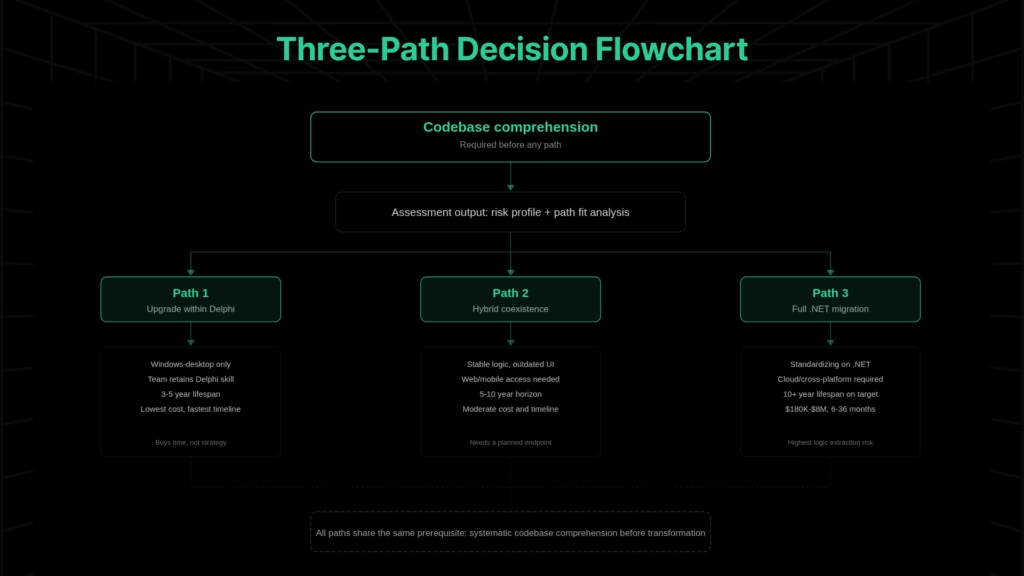
The choice between these paths is system-specific. But the variables that actually determine fit, such as BDE dependency depth, VCL coupling complexity, and business logic distribution across forms, are only visible through systematic codebase analysis.
Not sure which path fits your Delphi system?
The variables that determine fit such as BDE dependency depth, VCL coupling density, business logic distribution aren’t visible from the outside. Legacyleap’s Delphi Migration Platform runs a real assessment on your codebase in 2–5 days and delivers architecture maps, dependency graphs, risk indicators, and a concrete migration plan.
What Are the Risks of Migrating Delphi to .NET?
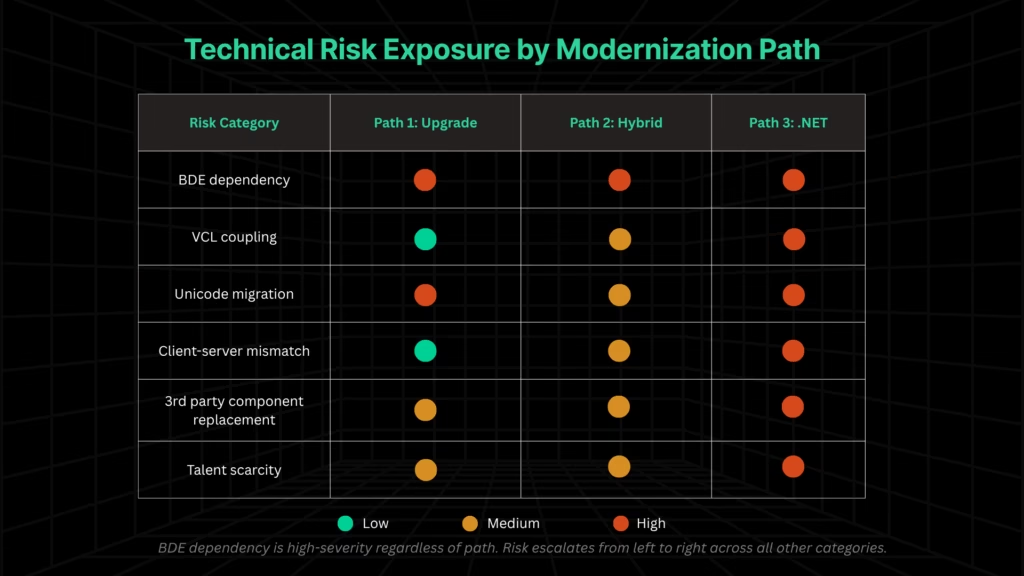
Choosing a path is necessary but not sufficient. The following six risks are the ones that most frequently derail Delphi modernization projects, and they are consistently underestimated during planning.
BDE dependency
The Borland Database Engine was introduced in 1994, deprecated around 2000, and removed from the Delphi installer since XE8. It lacks Unicode support and was never designed for modern operating systems [4].
On Windows 10 and 11, BDE exhibits alias corruption after updates, installation failures on clean deployments, and intermittent networked-environment breakdowns that are difficult to reproduce. BDE-to-FireDAC migration is well-documented, but it touches data access patterns across the entire codebase, not a drop-in swap.
VCL coupling beyond the UI layer
VCL components are not just visual elements. They carry behavior such as data binding, event chains, property-level business rules, and implicit state management. No 1:1 .NET equivalent exists for a VCL component that combines rendering, validation, calculation, and persistence in a single object.
Automated UI migration tools produce interfaces that compile but require substantial redesign. Separating UI from logic in a legacy Delphi application is a refactoring project, not a mapping exercise.
Unicode migration
Codebases predating Delphi 2009 use ANSI strings throughout. The migration to Unicode touches string handling, packed records, binary file I/O, and byte-level manipulation.
Key breakage patterns:
- ShortString types store length in the first byte; behavior changes under Unicode
- Packed records that assumed single-byte characters break when string widths change
- Binary file formats written with ANSI assumptions produce corrupted output under Unicode-aware reads
The compiler does not flag all breaking changes. Practitioners who have completed this migration for multi-million line codebases report months of effort with residual uncertainty about undiscovered edge cases.
Client-server architecture mismatch
Legacy Delphi applications were built for LAN latency and sub-millisecond round-trip times. Many make hundreds of individual database calls per user action, a pattern invisible on a local network but catastrophic when the database moves to the cloud with 5–20ms latency.
Data access re-architecture is a separate workstream from language migration, and it applies to all three paths if the deployment target includes any cloud component.
Third-party component replacement
Many legacy Delphi applications depend on commercial or custom VCL components such as reporting engines, grid controls, charting libraries, and communication protocols that have no direct .NET equivalent.
Custom components are the worst case: the original developer may be gone, the source may be incomplete, and the component’s behavior is understood only through usage patterns across the application. Identifying these dependencies is a prerequisite for accurate effort estimation.
Talent scarcity as cost multiplier
The shrinking Delphi talent pool inflates modernization costs at every stage, not just maintenance.
Assessment requires engineers who understand Delphi’s component model deeply enough to identify where business logic hides. Remediation requires practitioners who can distinguish intentional behavior from side effects.
As the pool contracts, both rates and timelines expand.
Can AI Help with Delphi to .NET Migration?
AI can accelerate specific workstreams in Delphi-to-.NET migration, but the value depends on what level the AI operates at.
Syntax-level tools handle structural conversion like Object Pascal to C# equivalents, data type mapping, and control flow translation. This is useful but addresses the portion of the migration that was never the primary risk.
The harder problems like business logic distributed across VCL event handlers, undocumented cross-form dependencies, or implicit state management requires AI that operates at the full-codebase level with cross-module context.
File-level tools cannot see the chain where Form A’s OnClose affects Form B’s data state. That chain is where projects fail.
The distinction is not AI vs. no AI. It is prompt-level assistance vs. system-level comprehension with governed, human-reviewed transformation.
How Legacyleap’s Agentic AI Platform Structures Delphi Modernization
The article has built a specific case: business logic preservation is the central risk, all three paths require comprehension as a prerequisite, and the technical risks that derail projects are discoverable only through structured analysis.
Legacyleap is the platform that makes comprehension-before-transformation operationally feasible at enterprise scale.
Assessment Agent: Making the system visible
The Assessment Agent maps the entire Delphi codebase: dependencies, module boundaries, risk areas, BDE usage patterns, and VCL-business logic coupling points.
This is the specific answer to the “old code is the requirements document” problem. Before any transformation decision, it makes the system’s actual architecture visible. Not the architecture as it was documented years ago, but the architecture as it exists today, with all accumulated modifications and undocumented dependencies.
Documentation Agent: Extracting implicit business rules
The Documentation Agent reconstructs missing documentation by extracting business rules from VCL event handlers, form-level logic, and undocumented flows into reviewable specifications.
For Delphi estates, this means surfacing rules embedded in OnClick handlers, OnChange events, form validation, and component property configurations. These rules exist in the code. They do not exist anywhere else.
The Documentation Agent makes them explicit in a format that engineers and business stakeholders can review before transformation begins.
This directly addresses the failure pattern from Section 2. The insurance company’s 47 embedded business rules would have been surfaced and documented before any rewrite started, not discovered eighteen months in.
Modernization Agent: Governed, diff-based transformation
The Modernization Agent executes code transformations as diff-based, human-reviewed changes. No AI-generated code merges or deploys without explicit human approval. Every transformation is reviewable, reversible, and traceable.
The output is not a generated codebase that engineers must accept or reject wholesale. It is a series of isolated changes that preserve engineering control at every step.
QA Agent: Behavioral parity validation
The QA Agent generates regression tests and validates behavioral parity between legacy and modernized systems. For Delphi specifically, this addresses the universally acknowledged testing gap: the concern that migrated code compiles but does not behave identically to twenty years of accumulated behavior.
Parity validation runs continuously through the transformation process — catching deviations as they occur, not during user acceptance testing when correction costs are highest.
How this differs from copilots and conversion tools
| Capability | AI Copilots | Automated Conversion Tools | Legacyleap |
| Operating scope | Prompt/file level | File/project syntax | Full codebase, cross-module |
| Business logic handling | No cross-module context | Structural syntax only | Extracted, documented, preserved |
| Human oversight | Developer-dependent | Post-conversion review | Governed at every step (diff-based) |
| Output | Code suggestions | Converted source files | Comprehension artifacts + governed transformations |
Preserving business logic in a 500-form Delphi application requires understanding how Form A’s OnClose event affects Form B’s data state, which triggers Form C’s validation, which references a global variable set at startup. That chain is invisible at the file level. It is visible only through system-level comprehension.
How Much Does Delphi Migration Cost?
Delphi migration costs range from approximately $180,000 for contained applications with clean architecture to $8 million or more for complex enterprise systems with deep BDE dependencies, extensive VCL-embedded business logic, and multi-module interdependencies [3].
The primary cost driver is business logic complexity, not code volume. Timelines range from 3 months for simple applications to 36 months for large enterprise estates [5].
Cost and timeline ranges by approach
| Approach | Estimated Cost | Typical Timeline |
| Automated conversion (structural + manual logic) | ~$565K | 6–12 months |
| VDI bridge (virtualization holding pattern) | $95K + $30K/month ongoing | Immediate, ongoing |
| Strategic rebuild (full greenfield) | ~$5M | 18–36 months |
| Modular monolith (incremental re-architecture) | ~$1.4M | 12–18 months |
| Overall range | $180K–$8M | 3–36 months |
Source: Practitioner estimates from modernization services research [3].
Timeline ranges by complexity: simple applications in 3–4 months, mid-complexity systems in 6–9 months, complex enterprise estates in 9–12 months or longer [5]. Upgrade-within-Delphi generally runs fastest because it avoids the full logic extraction workstream.
The primary cost variable
The dominant cost driver is business logic complexity, not code volume.
A 200,000-line application with clean separation between UI and logic is fundamentally cheaper to modernize than a 50,000-line application where every form contains embedded rules, validation chains, and cross-form dependencies. Lines of code predict project size. Logic density predicts project risk.
Post-modernization economics
Organizations that complete modernization typically see meaningful reductions in operational and infrastructure costs, with TCO payback within 18–24 months [5].
Savings come from reduced maintenance overhead, access to a larger developer pool, elimination of ESU and legacy licensing costs, and deployment on modern, elastically scaled infrastructure.
The modular monolith as a pragmatic target
Not every Delphi migration needs microservices. A modular monolith with clean internal boundaries, well-defined interfaces, deployable as a single unit but architecturally extractable, is often the more pragmatic target. It reduces migration blast radius, avoids distributed-system operational complexity, and preserves the option to extract services later.
The broader industry trend toward consolidating microservices back into modular monoliths supports this approach.
Start with comprehension
Every modernization path begins with understanding the system. The assessment identifies BDE dependency depth, VCL coupling density, business logic distribution, and data access patterns, because these are the variables that determine which path fits and what the real effort looks like for a specific system.
$0 Modernization Assessment: Legacyleap’s assessment produces dependency maps, risk indicators, architecture observations, effort/timeline ranges, and a modernization blueprint. No cost, no commitment. Book your $0 Modernization Assessment here.
Book a technical demo to see the platform in action, including agent workflows, assessment output, diff-based review, and the governance layer.
FAQs
Delphi applications can run on Windows 11, but with significant caveats. Applications built on Delphi 13 are fully supported, including 64-bit compilation and Windows on Arm [4]. However, applications on older versions, particularly those from 1998–2010, face 32-bit VCL compatibility issues, BDE alias corruption triggered by Windows 11 updates, and deprecated component failures that surface unpredictably. “Works on Windows 11” is a narrower claim than it appears.
No single .NET framework replaces VCL. WinForms is the closest structural analog for desktop data-entry applications but lacks VCL’s integrated data binding and event model. WPF provides richer UI through XAML but requires a fundamentally different approach. MAUI targets cross-platform deployment but is the least mature for complex desktop forms. Blazor serves web-based scenarios. In practice, most migrations land on WinForms or WPF initially, with MAUI or Blazor considered for subsequent phases.
Delphi applications can run on cloud VMs, but they were not designed for cloud-native deployment. Most legacy systems make frequent, low-latency database calls that perform acceptably on a LAN but degrade significantly over cloud network latency. Containerization is possible but adds operational complexity. Running Delphi on cloud infrastructure is a viable short-term measure; restructuring data access patterns is required before cloud deployment delivers real performance or cost benefits.
COM and ActiveX components have no direct .NET equivalents and represent one of the more painful migration workstreams. Some can be wrapped via .NET COM Interop as a transitional measure, but this carries instability risks and is not a long-term solution. Components with available source code need to be rewritten as .NET libraries. Those without source require functional reverse-engineering for documenting behavior through usage patterns before rebuilding. Identifying all COM/ActiveX dependencies early is essential for accurate effort estimation.
Yes, but it requires deliberate re-architecture, not direct conversion. VCL forms have no web equivalent, so the UI must be rebuilt entirely. The more viable approach is exposing existing Delphi business logic as REST APIs via RAD Server or DMVCFramework, then building a modern web frontend against those APIs. This is essentially Path 2 from this article – hybrid coexistence – and it preserves tested backend logic while delivering a browser-accessible interface without a full rewrite.
Legacy Delphi applications carry several compounding security exposures: BDE lacks encryption and modern authentication support; older codebases predate secure coding practices for SQL injection and input validation; ANSI-era string handling introduces buffer management vulnerabilities; and dependencies on unsupported third-party components create unpatched attack surfaces. Post-Windows 10 EOL, the underlying OS itself adds to this exposure. These risks are individually manageable but tend to be systemic across the codebase, making point fixes insufficient without broader modernization.
References
[1] StackOverflow,“2025 Developer Survey” — Delphi proficiency at 1.8% worldwide, less than 1% actively learning.
[2] Microsoft,“Extended Security Updates (ESU) Program for Windows 10” — ESU pricing at $61/device Year 1, doubling annually, 3-year maximum, critical/important security updates only.
[3] softwaremodernizationservices.com — Delphi modernization cost ranges by approach ($180K–$8M), insurance company case study (47 business rules in single field UI event handlers).
[4] Embarcadero,“Migration Center / RAD Studio 13 Documentation” — BDE deprecation history, reFind tool, FireDAC architecture, RAD Server, Delphi 13 features.
[5] TechOne.cz — Migration timeline ranges by complexity (3–12 months), post-modernization TCO payback (18–24 months).