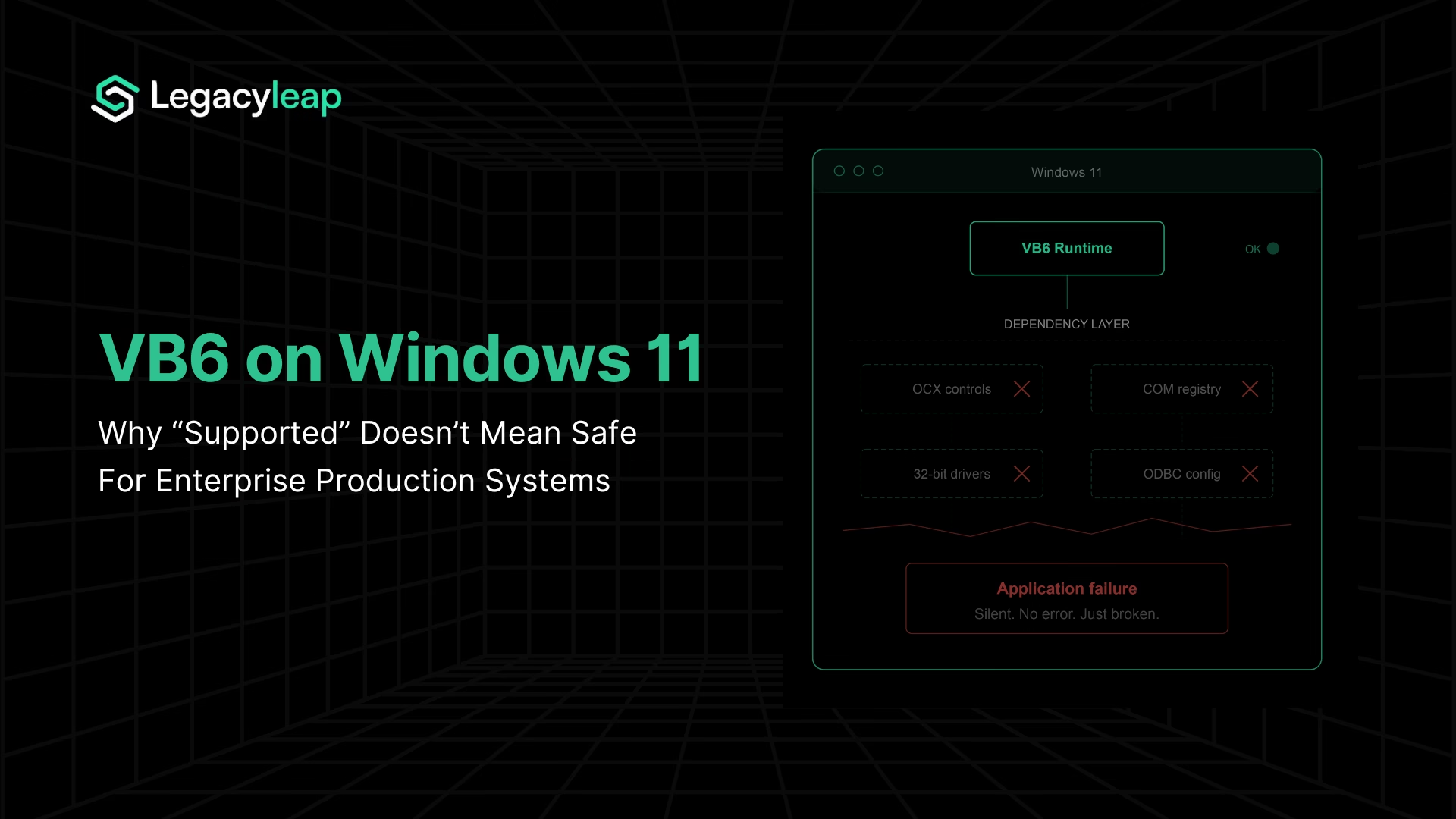
Why VB6 Runtime Support Does Not Make Windows 11 Safe for Production
Yes, the VB6 runtime ships with Windows 11 and is supported for the OS lifetime, but the IDE has been unsupported since 2008, and third-party OCX/ActiveX controls receive no Microsoft support at all.
Yes, the VB6 core runtime ships with Windows 11 and is supported for the lifetime of the operating system. Microsoft’s support policy [1] confirms that the runtime files included in the OS will receive support for “serious regressions and critical security issues” only. The runtime is 32-bit, running under WOW64 on all modern 64-bit Windows installations. Server Core is explicitly not supported.
That’s the direct answer. But it’s the wrong question for any enterprise running VB6 in production.
VB6 remains embedded in enterprise production across financial services, healthcare, manufacturing, and government, with applications built in the late 1990s and early 2000s that handle critical business processes and have never been rewritten. For these organizations, the VB6 runtime is one component in a much larger dependency chain.
The runtime itself is rarely what breaks. What breaks are the hundreds of third-party controls, COM registrations, database drivers, and ODBC configurations that VB6 applications accumulated over decades of deployment on Windows machines.
Microsoft’s support policy draws a sharp boundary around what it covers and what it does not.
| Component | Support Status | Enterprise Implication |
| VB6 Core Runtime | Supported for Windows 11 lifetime. Critical security patches only. No feature work, no enhancements. | Runtime presence does not equal application safety. No proactive hardening or compatibility testing. |
| VB6 IDE | Unsupported since April 2008. Does not install on any modern Windows version. | No development, debugging, or maintenance capability on current infrastructure. |
| Third-Party OCX/ActiveX Controls | No Microsoft support. “Contact the original vendor.” Most original vendors are defunct. | The largest and most fragile layer of VB6 application dependencies has no support path. |
Three converging forces are closing the deferral window for enterprises still running VB6 in production: clean Windows 11 deployments are exposing invisible dependency failures, the Windows 10 Extended Security Updates program is creating escalating costs with no functional return, and tightening compliance frameworks are reclassifying unsupported software from acceptable technical debt to reportable audit exposure.
The rest of this article examines each of these forces and what a structured response looks like.
Why VB6 Applications Break on Windows 11
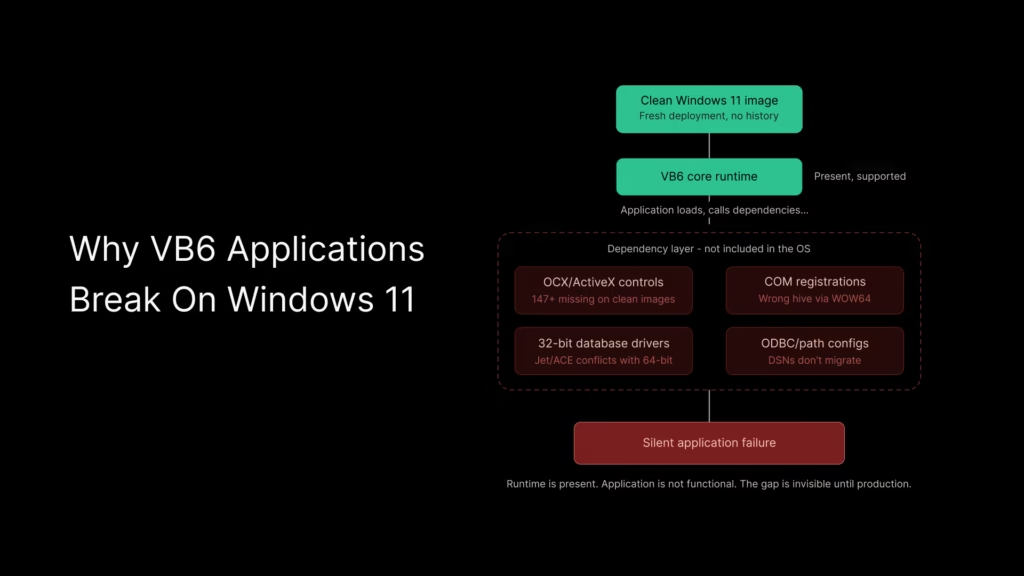
The VB6 runtime’s presence on Windows 11 creates a false sense of continuity. Enterprise architects encountering VB6 breakage during Windows 11 rollouts are not seeing runtime failures. They are seeing the dependency layer collapse.
Why VB6 Applications Fail on Clean Windows 11 Installations
Every VB6 application is a 32-bit legacy application running under WOW64 emulation on modern 64-bit Windows.
VB6 applications running on Windows 10 estates have operated for years on machines that accumulated registered OCX controls, ODBC data source configurations, 32-bit database drivers, and COM registrations through successive installations, updates, and patches.
These components were never part of the OS. They were artifacts of the application’s deployment history, accumulated over time and never inventoried.
A clean Windows 11 image does not carry any of that forward. The runtime is present. Everything the application actually depends on beyond the runtime is not.
This is the insight most existing compatibility guides miss entirely. They test whether VB6 applications can run on Windows 11. The answer is yes, on a machine that has already been configured for them.
On a fresh deployment image, the answer depends on how many undocumented dependencies the application carries.
Four VB6 Dependency Failures Common in Windows 11 Migrations
VB6 application breakage on Windows 11 falls into four distinct categories:
- Missing or unregistered OCX/ActiveX controls. A community project has documented 147 ActiveX controls that are missing or unregistered on Windows 10 and 11 clean installations [2]. These are not obscure edge cases. They include common controls used across thousands of enterprise VB6 applications.
- 32-bit vs. 64-bit database driver conflicts. VB6 applications relying on Microsoft Access databases via Jet/ACE drivers face conflicts when 64-bit Office installations coexist on the same machine. The 32-bit VB6 application cannot use the 64-bit driver, and installing a parallel 32-bit driver creates its own registration conflicts.
- ODBC data source configuration changes. System DSN entries configured on legacy machines do not migrate to new Windows 11 images. Applications that rely on ODBC connections at the system level fail silently when the DSN is absent.
- File path and permission differences under Windows 11’s security model. Tighter UAC enforcement, changed default permissions on Program Files directories, and differences in how Windows 11 handles legacy installer behavior create runtime failures that do not surface until the application attempts to write, read, or register in locations it previously accessed without restriction.
Taken together, VB6 ActiveX and COM dependencies represent the largest unmanaged risk surface in most legacy Windows estates.
WOW64 redirection as a silent failure mechanism
On 64-bit Windows 11, every VB6 application runs under the WOW64 emulation layer. WOW64 redirects registry access from HKLM\Software to the Wow6432Node subkey and filesystem access from System32 to SysWOW64.
These redirections are transparent to well-behaved applications, but VB6 installers and registration scripts written before 64-bit Windows existed frequently do not handle them correctly.
The result: a control may be physically present on the system but registered in the wrong registry hive, or a DLL may exist in System32, but the 32-bit application is redirected to SysWOW64, where it does not exist. The application fails, the error message is unhelpful, and the root cause is invisible without explicit investigation.
A known example illustrates this precisely. A Microsoft security update broke MSCOMCTL.OCX registration across VB6 and Access applications by creating a registry versioning conflict between version 2.0 and 2.1 entries. The control was physically present on the system. It simply stopped working because the registry entry no longer pointed to the correct version.
Why VB6 Breakage Returns After Every Windows Update
Every Windows update, every new device image, every security patch is a potential breakage event for VB6 dependency chains. The dependency surface is unmanaged, undocumented, and invisible until something fails in production.
The Cost of Deferral: Windows 10 ESU and the VB6 Budget Trap
For enterprises that have absorbed the dependency risk and chosen to keep VB6 applications on Windows 10, the financial calculus of deferral changed on October 14, 2025, when Windows 10 mainstream support ended.
Microsoft’s Extended Security Updates program [3] offers a three-year bridge: $61 per device in Year 1, $122 in Year 2, $244 in Year 3. The program runs from October 2025 through October 2028.
Coverage is limited to critical and important security updates only. No feature updates, no bug fixes, no technical support.
ESU licenses are cumulative. An organization that decides to enter in Year 2 does not pay $122. It pays $183 ($61 for Year 1 plus $122 for Year 2). There is no option to skip a year and resume later.
Windows 10 Extended Security Updates cost $61 per device in Year 1, escalating to $244 in Year 3, with cumulative pricing that penalizes late enrollment.
| ESU Year | Per-Device Cost | Cumulative Per-Device Cost | 1,000-Device Estate |
| Year 1 (Oct 2025–Oct 2026) | $61 | $61 | $61,000 |
| Year 2 (Oct 2026–Oct 2027) | $122 | $183 | $183,000 |
| Year 3 (Oct 2027–Oct 2028) | $244 | $427 | $427,000 |
For a 1,000-device estate, three years of ESU coverage costs $427,000 with zero functional return. The applications are no more modern, no more maintainable, and no more secure against non-critical vulnerabilities than they were before the spend.
Why VB6 Deferral Costs Increase Every Year
ESU cost is only one layer. Organizations deferring VB6 modernization are simultaneously absorbing three compounding expenses: ESU premiums for maintaining a Windows 10 environment, elevated VB6 maintenance costs driven by a shrinking talent pool, and accumulating compliance risk that carries its own remediation costs.
VB6 developer rates now sit in the $180–$280/hour range, compared to $100–$150/hour for modern .NET or Java engineers. This is a market scarcity premium, not a complexity premium.
According to ManpowerGroup’s 2026 Global Talent Shortage Survey [4], 72% of employers globally report difficulty filling roles. Legacy-specific skills are a shrinking subset of an already constrained labor pool. Every year of deferral means paying more for less available expertise.
VB6’s end-of-life timeline
For context on where VB6 sits in the support lifecycle: mainstream support ended in 2005, extended support ended in 2008, and the IDE has been unsupported since April 2008.
The runtime is supported for the Windows OS lifetime, but it is functionally frozen. No new features, no tooling updates, no third-party component support. The accurate characterization is architecturally stranded: the runtime will continue to exist, but the ecosystem around it will not.
The decision frame is no longer “can we keep running VB6?” It is “how much are we willing to spend each year to avoid modernizing, and what is the compounding cost of that decision?” For teams weighing that question against actual modernization scope and cost, understanding what their VB6 applications depend on is the prerequisite. A detailed breakdown of modernization cost ranges provides a useful comparison point.
Before committing to a modernization budget, start with a free assessment that maps your VB6 dependencies, risk areas, and modernization scope, so your planning is based on evidence, not estimates.
Security Exposure and Compliance Risk
The technical breakage and financial escalation are quantifiable. The compliance dimension adds a third forcing function that, for regulated enterprises, is often the decisive one.
Known, unpatched vulnerabilities
VB6 components carry known CVEs that will never be patched. Documented vulnerabilities include a buffer overflow in vb6skit.dll that enables arbitrary code execution via a crafted lpstrLinkPath argument, a heap-based buffer overflow in Msmask32.ocx, and buffer overflow vulnerabilities in VBA SDK versions 6.0 through 6.4 [5]. These are exploitable and permanently open.
The attack surface extends beyond individual components. COM and ActiveX controls can interact with critical Windows services. If compromised, attackers gain access to privileged OS functions through components designed for interoperability, not security isolation.
The Vilsel worm, first reported in 2015 and still active in 2026, is VB6-based malware that exploits compatibility layers by executing pseudocode through the runtime’s compatibility infrastructure.
The consequences of running unpatched legacy software in regulated healthcare environments are not theoretical: the Change Healthcare breach, confirmed in early 2025 and affecting 190 million people, stands as the largest healthcare data breach in US history and illustrates the scale of exposure that unpatched legacy infrastructure can create.
This is not a theoretical threat model. It is an active exploitation of VB6’s continued presence on production systems.
Why Compliance Frameworks Now Treat VB6 as a Security Risk
Multiple compliance frameworks now create direct exposure for enterprises running unsupported software in production:
- PCI DSS v4.0 has been mandatory since March 31, 2025, and requires vulnerability management across all system components. Software that cannot receive patches is, by definition, a gap in the vulnerability management program, and under Requirement 12.3.4, end-of-life technology in the asset inventory constitutes an automatic finding with no remediation window within the audit itself.
- HIPAA (for healthcare enterprises) imposes a direct requirement to remediate known vulnerabilities in systems handling electronic protected health information. The Office for Civil Rights issued 10 HIPAA resolution agreements in the first five months of 2025 alone, every one centred on failure to act on known gaps. Running VB6 components in a healthcare environment with unpatched CVEs creates documented exposure under the HIPAA Security Rule.
- SOX Section 404 (for publicly traded companies) requires management to certify the effectiveness of internal controls over financial reporting. Any VB6 application that touches financial data falls within the SOX scope. Legacy systems that cannot be patched, cannot produce required audit logs, and cannot enforce native MFA create structural control failures that external auditors are increasingly unwilling to accept through compensating controls alone.
- SEC 2026 examination priorities have elevated cybersecurity as the dominant risk topic, with explicit focus on operational resilience and technology governance. Flagstar Bank settled with the SEC in December 2024 for a misleading cybersecurity disclosure. Disclosure accuracy is an active enforcement area.
- DORA (Digital Operational Resilience Act), in force since January 2025 for EU financial institutions, establishes mandatory technical controls that presuppose the ability to patch, update, and harden system components. For enterprises with EU-facing operations, DORA adds a parallel compliance surface on top of the US frameworks above.
- The EU Cyber Resilience Act, which applies from 2027, will extend similar requirements to a broader set of digital products and their supply chains.
What auditors now look for
The audit conversation around legacy systems has changed. A risk acceptance memo documenting VB6 presence is no longer sufficient without evidence of an active modernization path.
Auditors now evaluate vendor support status, patchability of deployed components, documented risk assessments with remediation timelines, and the existence of a structured modernization plan.
For regulated industries, modernization programs also carry a compliance premium. Audit trail requirements, functional parity validation, and evidence generation typically add an estimated 20–40% to overall modernization project costs. This is an industry-observed range, not a fixed benchmark, and it varies by regulatory jurisdiction and the depth of the application’s compliance surface.
The longer an enterprise defers modernization of VB6 systems in regulated environments, the higher both the modernization cost and the compliance risk grow. They compound in parallel.
Why VB6 Modernization Starts With Dependency Assessment
The preceding sections establish a convergence: invisible dependency exposure, escalating ESU costs, and compliance frameworks that treat unsupported production software as a reportable finding.
The rational response is not to begin modernization immediately. It is to understand what you actually have.
Most VB6 modernization programs that stall or fail do so at the knowledge layer, not the technology layer. A significant share of VB6 systems have lost original source code, original developers have retired or moved on, and business logic is buried in form event handlers, stored procedures, and COM interop layers that no one has mapped.
Enterprises cannot make sound modernization decisions without a dependency inventory and a documentation baseline.
How Dependency Mapping Identifies VB6 Migration Risk
Legacyleap’s Assessment Agent maps VB6 systems at the dependency level, the same level where Windows 11 breakage occurs. It inventories OCX and ActiveX control dependencies, COM registrations, module boundaries, and inter-module relationships.
This directly addresses the core problem from Section 2. The Assessment Agent produces a dependency and module map, risk indicators, architecture observations, and a structured modernization readiness view.
How Gen AI Reconstructs Missing VB6 System Documentation
For VB6 systems where original developers are unavailable and the codebase was never documented, the Documentation Agent reconstructs the missing knowledge directly from the code.
| Documentation Agent Output | What It Solves |
| Module responsibilities and summaries | Identifies what each VB6 module does without relying on tribal knowledge |
| UI form interactions and event flows | Maps the business logic embedded in VB6 form event handlers |
| Business logic descriptions | Separates core logic from presentation code in tightly coupled VB6 forms |
| Data-flow diagrams | Traces how data moves across modules, databases, and COM components |
| Dependency graphs | Visualizes inter-module relationships and external control dependencies |
This documentation becomes the foundation for any modernization approach, whether automated conversion, strategic refactoring, or a phased strangler-pattern migration.
What the VB6 Modernization Assessment Includes
Legacyleap’s $0 Modernization Assessment is designed for enterprises at exactly this decision stage. It produces a dependency and module map, risk indicators, a modernization blueprint, effort and timeline ranges, and recommended migration targets at zero cost.
The assessment does not prescribe a single path. It gives the enterprise the evidence base to choose with confidence that scope, effort, and risk are understood before any commitment is made. For teams ready to evaluate the full VB6 to .NET modernization path, the assessment output serves as the architectural starting point.
Downstream, Legacyleap’s Modernization Agent handles diff-based, human-reviewed code transformations, and the QA Agent validates behavior parity between original and modernized systems. These ensure the full lifecycle is governed from assessment through deployment. But the starting point is the assessment and comprehension layer.
Understand what you have. Then decide how to move.
Wrapping Up,
The three forces examined in this article do not exist independently. They compound.
Clean Windows 11 deployments are exposing dependency chains that were invisible on accumulated Windows 10 machines. The ESU program is converting deferral into an active, escalating line item with $427,000 over three years for a 1,000-device estate, with no functional return.
Compliance frameworks treat unsupported, unpatched software in production as a finding that requires a documented remediation path.
Each year of continued deferral deepens all three: ESU costs increase, maintenance costs rise as VB6 talent becomes scarcer, and the documentation gap widens as institutional knowledge leaves the organization.
The rational first step is not a modernization commitment. It is understanding what you have.
Start with a $0 Modernization Assessment. Legacyleap’s Assessment Agent maps your VB6 dependencies, module boundaries, and risk areas. The Documentation Agent reconstructs the knowledge that left with the original developers. The output is a dependency map, risk indicators, modernization blueprint, and effort and timeline ranges at no cost.
For teams ready to see the platform in action and understand how Legacyleap Studio orchestrates the modernization lifecycle, book a demo.
FAQs
The primary modernization target for VB6 applications in 2026 is .NET 10 (LTS), released in November 2025 and supported until November 2028, using C# as the target language. It preserves Windows ecosystem alignment while moving to a modern, actively supported framework. ASP.NET Core and Blazor are common targets for web-facing components. The right path depends on the application’s architecture and integration surface. A dependency assessment is the prerequisite to selecting it with confidence.
Not directly. VB6 applications are 32-bit Windows executables dependent on COM registrations, OCX controls, and Windows-specific runtime components — none of which are portable to Linux containers or cloud-native platforms. Some organizations run VB6 on Windows VMs in Azure or AWS, but this is a lift-and-shift that preserves all existing dependencies and maintenance risks. True cloud or container deployment requires modernization to a target stack like .NET 10 or ASP.NET Core.
Microsoft supports the VB6 core runtime for the lifetime of Windows versions it ships with, currently including Windows 11. Support covers serious regressions and critical security issues only, and applies solely to core runtime files like msvbvm60.dll. The VB6 IDE has been unsupported since April 2008. Third-party OCX and ActiveX controls receive no Microsoft support. Runtime longevity does not reduce the risk from the dependency layer that most VB6 production applications actually rely on.
Lost source code is common in VB6 estates. A significant share of VB6 systems have lost original source files, and in many cases the original developers have retired or left the organization. When source code is unavailable, the first step is a structured assessment that maps the application’s dependencies, module boundaries, and runtime behavior from the compiled binaries and deployment artifacts. Legacyleap’s Documentation Agent can reconstruct module responsibilities, UI form interactions, event flows, business logic descriptions, and dependency graphs directly from the codebase, creating the documentation foundation that modernization planning requires.
On ARM64-based Windows, WOW64 supports running 32-bit ARM application, and community reports confirm that VB6 applications and even the unsupported IDE can be installed on Windows 11 ARM with workarounds. However, VB6 on ARM introduces an additional emulation layer beyond standard x64 WOW64, which can affect performance and compatibility. The same dependency-layer risks that apply to x64 Windows 11 (missing OCX controls, COM registration failures, ODBC configuration gaps) apply equally on ARM, with the added uncertainty of a less-tested execution environment. For enterprise production use, ARM deployment of VB6 applications adds risk without resolving any of the underlying modernization drivers.
References
[1] Microsoft Learn — VB6 Support Policy: https://learn.microsoft.com/en-us/previous-versions/visualstudio/visual-basic-6/visual-basic-6-support-policy
[2] GitHub — Bladez1992/ActiveX-Controls-Fix (147 ActiveX controls missing/unregistered on Windows 10 and 11): https://github.com/nicenemo/ActiveX-Controls-Fix
[3] Microsoft Learn — Windows 10 Extended Security Updates Program: https://learn.microsoft.com/en-us/windows/whats-new/extended-security-updates
[4] ManpowerGroup — 2026 Global Talent Shortage Survey: https://www.manpowergroup.com/en/insights/2026-global-talent-shortage
[5] Vulmon — Microsoft Visual Basic 6.0 CVE Records: https://vulmon.com/searchpage?q=visual+basic+6.0