TL;DR
- Azure-SSIS Integration Runtime is the migration path most teams default to, and the one that creates the most deferred cost. IR runs DTSX packages unchanged on Azure compute, but requires persistent SQL Managed Instance hosting and preserves the old operational model rather than resolving it.
- SQL Server 2016 reaching end of extended support in July 2026 is forcing a migration decision many teams aren’t ready for. Organizations still on SQL Server 2016 or earlier are running SSIS with no security patch coverage, while Microsoft Fabric’s 2023 general availability signals no further SSIS tooling investment.
- There are four viable SSIS migration targets, and forcing every package to one of them guarantees rework. Script Task density is the primary routing variable: low-complexity packages fit ADF native or dbt/Snowflake, while dense custom transformation logic needs Databricks or a temporary IR bridge.
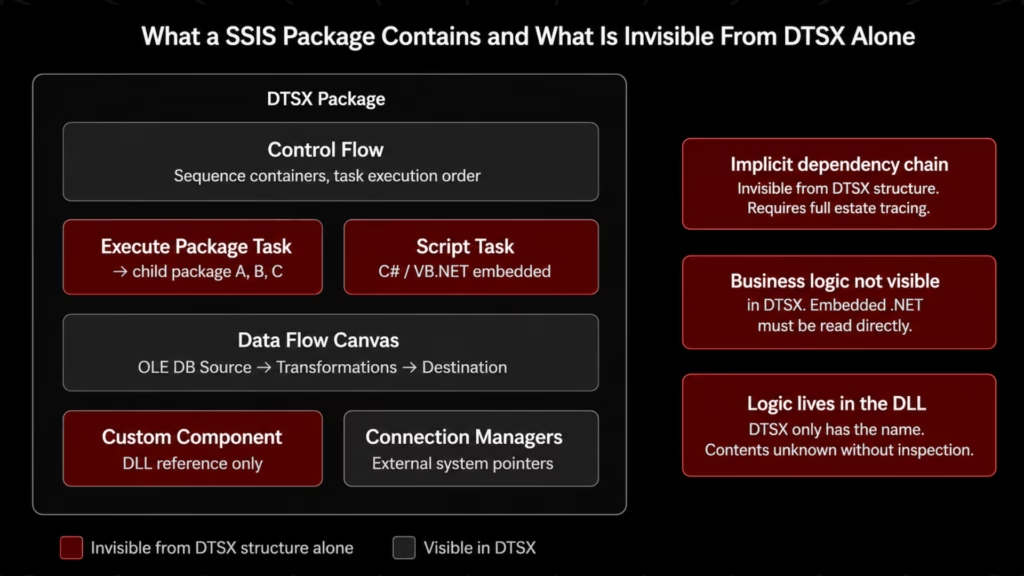
- The business logic in SSIS estates often lives in places the visual designer never shows you. Script Tasks embed arbitrary C#/VB.NET code, custom component DLLs extend the data flow outside the canvas, and Execute Package Task chains create dependency graphs that must be traced manually without tooling.
- SCD Type 2 history-tracking logic is a frequent source of silent post-migration errors. Subtle differences in how effective-date and expiry-date fields are rebuilt in ADF Mapping Data Flows can corrupt historical analysis if not explicitly validated against the legacy output.
Introduction
Enterprise SSIS estates do not age gracefully. Pipelines accumulate across SQL Server versions, development teams turn over, and operational knowledge of what each package does becomes unevenly distributed until only a few engineers can account for it with confidence.
When a cloud data platform initiative forces the migration decision, the instinct is to move quickly: pick a target, run the packages, and validate the outputs. That instinct is where SSIS pipeline migration programs most often go wrong.
The target-state decision is the highest-leverage point in the program. A wrong choice does not surface immediately. It surfaces six to twelve months into execution when rework costs are compounding, and the original timeline is no longer defensible.
This article delivers a decision framework grounded in what pipelines actually contain: the four viable target paths, the technical characteristics that make each appropriate or inappropriate, why Azure-SSIS IR is a bridge rather than a destination, and how Gen AI-assisted pipeline assessment produces the package-level evidence the target-state decision depends on.
Why SSIS Migration Has Become a Program-Level Priority
Three structural drivers are forcing migration decisions in 2025–2026.
- SQL Server EOL. SQL Server 2016 reached end of extended support in July 2026 [1]. Organizations still running SSIS on 2016 or earlier operate on infrastructure with no security patch coverage. SQL Server 2012 and 2014 have been out of support longer; estates that survived those EOL dates without migrating are now running multiple generations past the support boundary.
- Cloud platform consolidation. Snowflake, Databricks, and Microsoft Fabric have become the dominant enterprise analytics destinations. SSIS pipelines loading on-premises SQL Server data warehouses are writing to infrastructure being decommissioned. Microsoft Fabric reached general availability in November 2023 [2] and is now Microsoft’s stated strategic data platform direction, a signal that SSIS tooling investment will not increase.
- Talent scarcity. Data engineers trained post-2018 default to Python, dbt, and cloud-native orchestration. The population of engineers with SSIS designer fluency is narrowing. Every year of deferred migration is a year of institutional knowledge decay that makes a future migration more expensive.
For a broader look at how cloud platform consolidation is reshaping data infrastructure decisions, see our guide to data warehouse modernization.
The Four SSIS Migration Paths and What Each Actually Requires
The four viable target states are not interchangeable. Each fits a specific combination of pipeline complexity, organizational capability, and target platform. Forcing all packages to a single target will either over-engineer simple data movement or under-provision complex transformation logic.
| Path | Paradigm Shift | Script Task Handling | SCD Handling | Best-Fit Pipeline Profile |
| Azure-SSIS IR | None | Runs unchanged | Runs unchanged | Complex Script Tasks, tight timelines — treat as bridge only |
| ADF Native | Moderate | Rewrite to Azure Functions / Logic Apps | Rebuild in Mapping Data Flows or DB merge | Standard movement and transformation; Azure-committed orgs |
| Databricks / Spark | High | Rewrite to PySpark notebooks or DLT | Native Delta Live Tables or merge logic | Complex transformation, large volume, ML-adjacent pipelines |
| dbt + Snowflake (ELT) | Highest | No equivalent — external orchestration required | dbt snapshots | Analytics and reporting pipelines; Snowflake-first orgs |
- Azure-SSIS IR runs existing DTSX packages on Azure compute against a migrated SSISDB. Script Task logic, custom component DLLs, and connection manager configurations all execute as-is. IR is viable for packages where full logic analysis is not feasible in the migration window, but it must be treated as a transitional state with a defined exit date.
- ADF native converts SSIS packages to ADF pipelines using Mapping Data Flows, Activities, and Linked Services [4]. Mapping Data Flows executes on Spark, so the transformation model differs from SSIS’s component model. Script Tasks must be rewritten as Azure Functions or Logic Apps. For standard data movement pipelines without heavy Script Task logic, ADF native is the cost-effective path for Azure-committed organizations.
- Databricks / Apache Spark replaces pipeline logic with PySpark notebooks, Delta Live Tables, or structured streaming jobs against Delta Lake. This requires Python and Spark skills that most SSIS-native teams lack. The tradeoff is compute power: Spark’s distributed execution handles large-volume batch workloads and complex multi-source transformations that would strain ADF Mapping Data Flows.
- dbt + Snowflake moves transformation logic from pipeline code into the warehouse as SQL models. SSIS Data Flow transformations become dbt models expressed as SELECT statements; Snowflake Tasks or Airflow replaces SSIS Control Flow scheduling. For analytics pipelines writing to Snowflake, this produces the most maintainable architecture: transformations are version-controlled, documented, and testable within dbt’s model framework.
For a deeper treatment of the ETL-to-ELT paradigm shift, see our guide to ETL modernization: SSIS and Informatica to modern ELT.
Why Azure-SSIS Integration Runtime Is a Migration Bridge, Not a Destination
IR is the path that requires the least immediate effort and creates the most deferred cost.
IR provisions Azure compute that hosts the SSIS runtime and executes DTSX packages against a migrated SSISDB. Microsoft’s own migration documentation frames this explicitly as a lift-and-shift approach [3].
The on-premises infrastructure dependency is removed. Everything else, such as the execution model, the Script Task logic, the custom component behavior, and the operational procedures, remains unchanged.
Why is it selected by default? The activation energy is low: migrate SSISDB to Azure SQL Managed Instance, provision an IR cluster, and point existing package execution to the new environment. The migration program can report that SSIS pipelines are running in Azure. Technically, that is accurate.
Where the cost accumulates.
- Compute and infrastructure. IR requires persistent Azure SQL Managed Instance hosting for SSISDB, a full managed SQL Server instance that carries hourly compute cost whether pipelines are executing or idle. For large estates with frequent execution schedules, the combined cost structure is materially higher than equivalent ADF native pipeline runs, which consume compute only during execution.
- Operational debt. IR preserves the SSIS operational model in a cloud environment not designed for it. Monitoring and debugging uses SSISDB execution logs and SSIS-native tooling, not Azure Monitor or Application Insights. Teams standardizing on ADF or Databricks for new workloads end up operating two separate monitoring paradigms.
- The second migration. Organizations that commit to IR as a destination reach the same target-state decision they deferred, 12 to 24 months later, having paid IR costs throughout, with the migration clock running against a more urgent consolidation timeline.
When IR is actually the right call. Packages with dense custom components or Script Task logic where full analysis is not feasible within the migration window. It must be deployed as an explicit bridge state with a defined transition date and a program-level commitment to complete the move to ADF native, Databricks, or Snowflake within an agreed timeframe.
If IR appears in the program plan without a defined transition date, it is not a migration strategy. It is a cost-bearing deferral.



The SSIS Migration Evidence Problem: Why Most Pipeline Estates Cannot Support a Sound Target-State Decision
The decision framework in the next section identifies five variables that determine which target state fits a given pipeline. Applying that framework requires knowing what the pipelines contain. In most enterprise SSIS estates, that knowledge does not exist in a form that supports systematic analysis.
What makes SSIS packages structurally opaque:
- DTSX files describe a visual canvas, the transformation component model the SSIS designer renders. The business logic frequently lives in Script Tasks: C#/VB.NET code blocks embedded in the control flow that execute arbitrary .NET logic invisible from the DTSX structure.
- Custom component DLLs extend the data flow with logic that executes entirely outside the visual designer. The DTSX file references the component by name; the logic lives in the DLL.
- Execute Package Task creates implicit dependency chains across packages. Mapping the full execution dependency graph requires tracing these relationships manually — a process that does not scale without tooling.
- The talent dimension. Engineers who built the original packages often no longer work at the organization. Institutional knowledge of what specific packages do, and which business rules are encoded in Script Tasks, has decayed in proportion to the estate’s age.
- The cost of manual documentation. A single complex SSIS package with multiple data flows, Script Tasks, and external component dependencies requires hours of careful analysis to document accurately. Across a large estate, that figure competes directly with migration execution time and rarely fits within approved program budgets.
The consequence is predictable: target-state decisions get made on platform preference, vendor recommendation, or organizational alignment with the cloud provider, not on what the pipelines actually contain. That is where migration cost overruns originate.
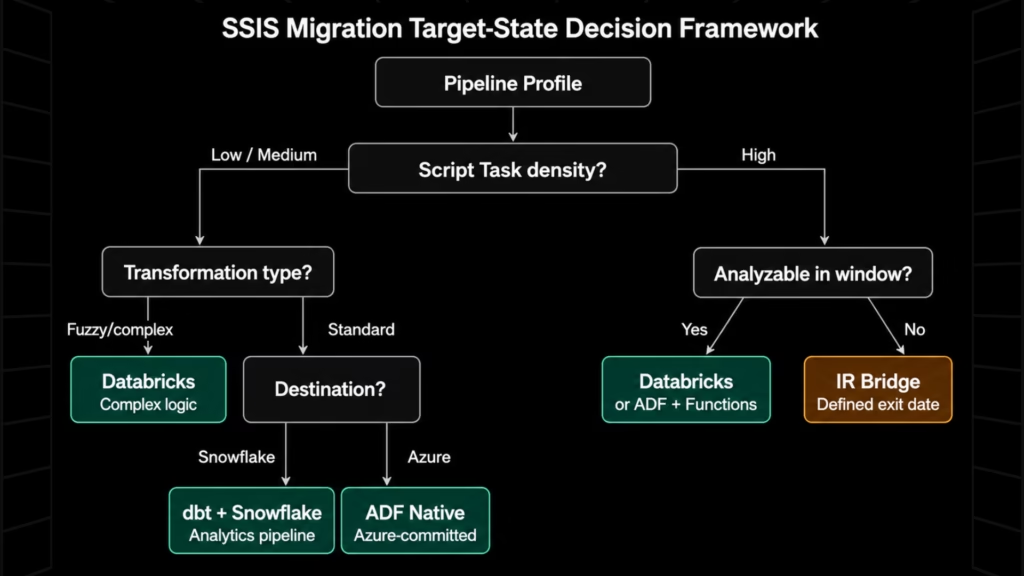
SSIS Migration Target-State Decision Framework: Matching Pipeline Complexity to the Right Path
The target-state decision should be made at the pipeline cluster level, not the program level. Different packages within the same estate will route to different targets. Five variables determine the appropriate target state for a given SSIS pipeline.
1. Script Task density and logic complexity
Script Task density is the primary driver because it determines how much embedded .NET logic must be analyzed and rewritten before the pipeline can move.
- Low Script Task density (primarily visual data flow components): candidates for ADF native or dbt/Snowflake
- High Script Task density with orchestration logic (logging, notifications, parameter loading): ADF with Azure Functions rewrites
- High Script Task density with complex transformation logic (probabilistic matching, API integration, multi-step business rules): Databricks or IR as a bridge while logic is analyzed
2. Transformation type
| Transformation Profile | Recommended Path | Avoid |
| Standard movement: lookups, joins, derived columns, aggregations | ADF native or dbt/Snowflake | Databricks (unnecessary overhead) |
| Fuzzy matching, probabilistic scoring | Databricks or external service | ADF native (no equivalent component) |
| SCD Type 1 (overwrite) | Any path | — |
| SCD Type 2 (historical tracking) | ADF Mapping Data Flows (rebuild) or dbt snapshots | IR if eventual migration is planned |
| Large-scale aggregation with spill risk | Databricks/Spark | ADF Mapping Data Flows |
| Analytics/reporting writing to Snowflake | dbt + Snowflake | Databricks (unnecessary compute layer) |
3. Data volume and latency requirements
High-volume batch pipelines with large intermediate datasets benefit from Databricks’ distributed execution. For low-to-medium volume batch, ADF native provides adequate compute at lower operational complexity.
Near-real-time requirements change the analysis. SSIS is batch-only; any pipeline that must evolve toward streaming should route to Databricks Structured Streaming or an ADF event-trigger architecture now. Migrating to ADF batch and rebuilding for streaming six months later doubles the migration effort.
4. SCD implementation complexity
SCD Type 2 is a frequent source of silent post-migration errors. SSIS SCD wizard-generated data flows implement specific effective date, expiry date, and current record flag behavior. ADF Mapping Data Flows can implement equivalent logic, but the rebuild is not automatic. Subtle differences in effective date handling will silently corrupt historical analysis if not validated against legacy output.
dbt snapshots implement SCD Type 2 with well-defined, testable semantics. For analytics pipelines moving to Snowflake, dbt snapshots are the recommended SCD path.
5. Organizational capability
| Capability Profile | Viable Paths | Constrained Paths |
| Python/Spark skills available | Databricks, ADF native | None |
| Strong SQL, limited Python | dbt/Snowflake, ADF native | Databricks |
| Azure-committed, ADF experience | ADF native | Databricks, dbt/Snowflake |
| SSIS-only skills, tight timeline | IR (bridge — defined exit date required) | All others without upskilling plan |
Applying the framework
Route packages through the five variables in sequence. Script Task density determines whether a package can move off IR in the near term. Transformation type narrows to one or two paths. Data volume and latency apply a further filter. SCD complexity flags packages requiring explicit parity validation regardless of path. Organizational capability applies the practical constraint.
The output is a package-cluster segmentation: ADF native, Databricks, dbt/Snowflake, and IR bridge with a defined analysis and migration plan for the next phase. That segmentation is the migration program’s architecture.
How Gen AI-Assisted Pipeline Assessment Produces the Evidence the Target-State Decision Requires
The decision framework above is only as reliable as the pipeline inventory it operates on. Applying five decision variables to undocumented packages produces unreliable segmentation, and unreliable segmentation produces the wrong migration program architecture.
The prerequisite is a package-level comprehension pass. Manual documentation does not scale to this need within the time constraints of a live migration program. Gen AI-assisted pipeline assessment does.
What changes with Gen AI-assisted assessment:
The specific capability that matters for SSIS estates is multi-layer parsing: simultaneously reading the DTSX XML structure (the visual data flow and control flow components) and the embedded Script Task C#/VB.NET source code (the transformation logic the visual structure does not expose). This produces outputs that feed directly into the decision framework variables:
- Package complexity classification: Script Task density score, custom component flags, transformation type categorization, SCD presence detection
- Dependency graph reconstruction: Execute Package Task chains traced across the full estate
- Custom component risk flagging: DLL references identified and flagged for human review
- Source-to-target mapping documentation: Data sources, transformations applied, and destinations written per package
- Transformation logic summaries: Script Task embedded logic documented in natural language
The assessment output maps directly to the decision framework: complexity classification populates the Script Task density variable; transformation type categorization populates the transformation type variable; SCD detection flags packages requiring explicit parity validation.
What Gen AI assessment does not replace: Human review of edge-case business logic in complex Script Tasks; architectural judgment on organizational capability and platform strategy; final sequencing decisions that account for downstream system dependencies.
For a broader treatment of how Gen AI accelerates the modernization lifecycle, see our guide to Gen AI in modernization.
How Legacyleap Runs the Full SSIS Pipeline Modernization Lifecycle
The target-state decision framework and Gen AI-assisted assessment methodology describe what needs to happen.
Legacyleap is the platform that operationalizes it, as a Gen AI-powered modernization platform built on multi-agent orchestration that executes the full Assess → Comprehend → Modernize → Validate → Deploy lifecycle for SSIS pipeline estates.
The five agents execute in sequence, each producing the outputs the next requires.
- Assessment Agent scans the full SSIS estate: DTSX files, embedded Script Task C#/VB.NET code, Execute Package Task dependency chains, custom component DLL references, and connection manager configurations. Output is a package-level complexity profile (Script Task density, transformation type, SCD presence, dependency depth) that populates the target-state decision framework directly. Assessment and initial documentation are delivered in 2–5 days.
- Documentation Agent reconstructs what the packages do from the code and configuration the Assessment Agent surfaced. For each package: source-to-target mappings, transformation logic summaries, execution dependency diagrams, and connection inventories. The artifact set that migration design requires, produced in days rather than months.
- Recommendation Agent applies the decision framework using the Assessment Agent’s classification output. It routes pipeline clusters to recommended target states with effort estimates, risk flags for custom components and complex Script Tasks, and a sequenced migration plan that accounts for execution dependencies.
- Modernization Agent executes the pipeline transformation under human governance. Converted pipelines, gap reports for Script Tasks requiring manual rewrite, and to-do lists for custom component handling are delivered as diff-based, reviewable outputs. Approximately 70% of the transformation effort is automated; complex Script Task rewrites and SCD pattern rebuilds are scoped, flagged, and handed to engineers with the analysis the earlier agents produced.
- QA Agent validates parity between legacy SSIS pipeline output and migrated pipeline output before production cutover. Auto-generated source-to-target test cases execute against both environments; regression mapping identifies behavioral deviations; parity validation reports confirm 100% functional equivalence before sign-off. This directly addresses the failure mode that makes SSIS migrations high-risk: pipelines that produce incorrect outputs silently after cutover.
Platform governance: All processing runs inside the client’s infrastructure. No source code leaves the enterprise environment. Human review checkpoints gate every phase. Agents do not merge, deploy, or execute code autonomously.
Conclusion
The target-state decision is the highest-leverage point in an SSIS pipeline migration program. A program that commits to Azure-SSIS IR without a defined transition plan pays cloud costs without completing the migration. A program that commits to ADF native, Databricks, or dbt/Snowflake without package-level evidence assigns engineering effort to a path that may not fit what the pipelines contain. In both cases, the cost compounds.
The decision framework here is structured around what the pipelines contain: Script Task density, transformation type, data volume and latency, SCD complexity, and organizational capability. Applied to a documented pipeline inventory, it produces a defensible, sequenced migration program architecture. The prerequisite is that inventory — and for most enterprise SSIS estates, producing it requires active pipeline comprehension that manual documentation cannot deliver at program scale.
Gen AI-assisted pipeline assessment is what makes the framework executable at the speed migration programs require. Legacyleap’s five-agent system runs the full lifecycle from package comprehension through parity-validated production cutover.
Claim a $0 SSIS Assessment. Share a representative portion of your SSIS estate and receive package complexity classification, dependency maps, Script Task inventory, and a target-state migration roadmap in 3–5 days. All processing runs inside your infrastructure. No source code leaves your environment.
Book a Technical Demo. See the Assessment Agent and Documentation Agent process SSIS packages in a live session before sharing code.
FAQs
Third-party custom components, such as licensed DLLs from vendors like CozyRoc or Task Factory, have no equivalent in ADF, Databricks, or dbt. Before migration, each component must be catalogued, its vendor’s cloud roadmap assessed, and a replacement identified: Azure Functions for procedural logic, native Spark transformations for data manipulation, or external APIs where the component called one. Packages relying on unsupported third-party components should route to IR as a bridge until replacements are scoped and built, not migrated directly.
SSIS flat file sources and destinations that reference on-premises UNC paths or mapped drives cannot resolve those paths from cloud compute. Before migration, each file-based connection must be remapped: on-premises file shares typically move to Azure Data Lake Storage Gen2 or Azure Blob Storage, with Self-Hosted Integration Runtimes bridging any on-premises file system that cannot move immediately. Flat file format complexity, including fixed-width layouts, multi-row headers, and custom delimiters, requires explicit schema definition in the target platform that SSIS handled natively through the visual designer.
Incremental migration is not only possible; for large estates, it is the lower-risk approach. Packages are segmented by target state, dependency chain, and business criticality, then migrated in waves. The critical constraint is dependency integrity: packages with Execute Package Task relationships must move together, or the orchestration chain breaks. Wave sequencing should start with standalone, low-complexity packages to build operational confidence in the target platform before tackling Script Task-heavy or SCD-dependent pipelines that carry higher validation overhead.
Downstream BI tools such as Power BI, Tableau, and SSRS consume data that SSIS pipelines produce, often against specific table structures, column names, and refresh schedules. A migrated pipeline that changes output schema, alters null handling, or shifts refresh timing breaks downstream reports without generating an obvious pipeline error. Parity validation must extend beyond execution logs to include output dataset comparison: row counts, column-level value distributions, and surrogate key continuity for SCD Type 2 tables. This downstream impact assessment is frequently absent from SSIS migration scopes until something breaks.
Migration preserves what the existing SSIS pipeline does, translating its logic into ADF constructs with functional equivalence as the success criterion. Re-platforming uses the migration as an opportunity to redesign pipeline logic: consolidating redundant packages, replacing inefficient transformation sequences, and aligning data flows with the target platform’s native patterns. Re-platforming produces a better long-term architecture but requires deeper business logic understanding and broader scope sign-off. For most enterprise programs, migration-first is the correct sequencing: establish parity, then optimize, rather than attempting both simultaneously under a single delivery timeline.
References
[1] Microsoft. “SQL Server 2016 – End of Support.” Microsoft Lifecycle Documentation. https://learn.microsoft.com/en-us/lifecycle/products/sql-server-2016
[2] Microsoft. “Microsoft Fabric is now generally available.” Azure Blog, November 2023. https://azure.microsoft.com/en-us/blog/microsoft-fabric-is-now-generally-available/
[3] Microsoft. “Migrate SQL Server Integration Services workloads to the cloud lift-and-shift.” Microsoft Learn. https://learn.microsoft.com/en-us/azure/data-factory/scenario-ssis-migration-overview
[4] Microsoft. “Migrate SSIS packages to Azure Data Factory.” Microsoft Learn. https://learn.microsoft.com/en-us/azure/data-factory/migrate-from-ssis-to-azure-data-factory