
TL;DR
- The legacy frontend stack has run out its clock, not just its budget. AngularJS ended in December 2021, IE11 support ended June 2022, Bower was deprecated back in 2017, and Google replaced FID with Interaction to Next Paint in March 2024.
- jQuery’s continued dominance shows how deep frontend technical debt still runs. jQuery powers roughly 72% of all websites even as Core Web Vitals and WCAG 2.2 push the industry toward component-based, accessibility-first architectures.
- AI tooling is measurably speeding up both everyday coding and modernization work itself. GitHub Copilot users finished JavaScript tasks 55.8% faster in studies, while McKinsey reports a 20-45% productivity uplift in software engineering from GenAI adoption.
- The guide narrows enterprise frontend modernization down to six projects that matter most. They span AngularJS-to-modern-framework migration, jQuery replacement, IE11 code removal, Core Web Vitals optimization, toolchain upgrades to Vite or Rspack, and SPA-to-microfrontend decomposition.
- Legacyleap runs modernization through five specialized AI agents under human review. Assessment, Documentation, Recommendation, Modernization, and QA agents each pass through an AI Gateway with GDPR/HIPAA-aligned audit logging, targeting 2-3x higher delivery throughput.
AngularJS reached end of life in December 2021, Internet Explorer 11 support ended in June 2022, and Bower was deprecated as far back as 2017. Even Google’s Core Web Vitals replaced the First Input Delay (FID) metric with Interaction to Next Paint (INP) in March 2024, permanently changing how responsiveness is measured.
For enterprises still running legacy frontends, the clock has already run out.
Every outdated UI framework now carries measurable penalties:
- User experience and SEO degradation are directly influenced by Core Web Vitals, which are used by Google’s ranking systems alongside other signals to impact ranking and conversions. Improving INP, LCP, and CLS enhances the user experience and search outcomes.
- Compliance risk as WCAG 2.2 expands accessibility benchmarks that older stacks simply can’t meet.
- Rising developer costs as talent for AngularJS, jQuery, or IE-bound code becomes scarce.
- AI readiness gaps, since older frontends can’t expose the APIs, telemetry, or modular structure required to integrate modern Gen AI experiences.
This guide lays out what to do next. You’ll see how legacy interfaces map to modern frameworks, which modernization projects matter most, how AI accelerates the transition, where the key risks lie, and which KPIs define success in 2026.
By the end, you’ll have a clear, verifiable path to a compliant, performant, and AI-ready frontend architecture.
Economic & Business Justification
The economics of maintaining outdated frameworks have shifted dramatically in the last few years. What once felt like technical debt now carries real operational and financial impact.
Why Legacy Frontends Are a Cost and Risk Multiplier
The longer organizations hold on to end-of-life frameworks, the more expensive it becomes to sustain them.
AngularJS, IE11, and Bower are already officially deprecated, leaving unpatched vulnerabilities and compliance blind spots that can’t be ignored.
Search performance is another casualty where Core Web Vitals now influence Google rankings, and older UIs routinely fail these benchmarks.
Add to that the rising cost of legacy expertise, and developers with the skills to maintain aging systems are becoming scarce, and every release starts to feel slower, riskier, and more expensive than the last.
How Modern Frontends Deliver Tangible Returns
Modern frameworks change that equation. Toolchains like npm, Vite, and Rspack simplify builds, reduce bundle sizes, and enable faster deployments through CI/CD automation.
Frontend performance improvements across INP and LCP metrics drive better engagement and retention, directly translating into revenue impact.
And for enterprises preparing for AI adoption, a modern architecture becomes the foundation with event-driven telemetry, modular components, and API-first designs to make it easier to integrate AI copilots and adaptive interfaces without rewriting entire systems.
What the Numbers Tell Us
Despite a decade of innovation, legacy dependencies still dominate:
- jQuery powers around 72% of all websites, showing how deep technical debt runs across the web. But the gains from modernization are tangible.
- Developers using GitHub Copilot completed JavaScript tasks 55.8% faster than those without assistance, illustrating how modernized toolchains amplify productivity.
- At the enterprise level, McKinsey reports a 20–45% productivity uplift in software engineering through GenAI adoption, with the greatest returns seen in organizations running up-to-date frameworks.
Bottom line: Every month spent maintaining a legacy UI adds cost and friction, while competitors move ahead with faster, AI-enabled user experiences. Frontend modernization delivers measurable returns in lower operational risk, faster iteration cycles, and a digital foundation that’s ready for what comes next.
Legacy-to-Modern Map (What to Upgrade and Why)
| Legacy | Modern | EOL / Status | Pitfalls | Outcomes / ROI |
| AngularJS | Angular / React / Vue | EOL Dec 31, 2021 | Security exposure, dated tooling, hard to hire for | LTS paths, TS-first DX, predictable releases |
| jQuery-heavy UIs | Component frameworks (React, Vue) or Web Components | Active, but not ideal for SPA architecture; still ~widely used | DOM-mutation patterns, poor state isolation | Reusable components, testable state, SSR/ISR options |
| IE11-specific code | Evergreen browsers; Edge IE-mode where needed | IE11 desktop app ended support June 15, 2022 | Polyfill bloat, ES6+ limits, security risk | Smaller bundles, modern JS/CSS, lower vuln surface |
| Backbone / Knockout | React / Angular / Vue | Smaller/maintenance-mode communities (KO maintenance mode discussion) | Fragmented patterns, scarce talent | Standardized stacks, healthier ecosystems |
| Ext JS | React (+MUI), Angular, Vue | Commercial, proprietary licensing (not EOL) | Vendor lock-in, heavier runtime, licensing cost | Open ecosystem, lighter UI libs, lower TCO |
| Silverlight / Flash | WebAssembly, HTML5, Canvas/WebGL | Silverlight EoS Oct 12, 2021; Flash EoL Dec 31, 2020 | Plugin dead-ends; browser blocks | Cross-browser apps, security & compliance alignment |
| ASP.NET Web Forms UI | ASP.NET Core (MVC/Razor), Blazor | Not supported on .NET Core/.NET 5+ (Web Forms stays on .NET Framework) | ViewState bloat, limited client reactivity | Cloud-ready, API-first, SPA/SSR support |
| SharePoint Classic | SharePoint Modern (SPFx) | Classic experience exists; modern is the recommended default | Non-responsive layouts, dated UX, customization limits | Responsive UX, React toolchain, better governance |
| RequireJS / AMD | Native ES Modules + Vite/Webpack/Rspack | ES Modules are the modern standard (RequireJS not EOL) | Loader complexity, slower startup | Native module loading, simpler builds |
| Bower | npm / Yarn / pnpm | Deprecated / migration recommended since 2017 | Broken chains, flat deps quirks | Unified pkg mgmt, CI/CD-friendly pipelines |
| Grunt / Gulp | Vite / esbuild / Rspack | Not EOL; superseded by faster bundlers in most new apps | Slow pipelines, more config | 2–3× faster builds (org-dependent), simpler DX |
| Selenium-only testing | Playwright / Cypress (+Selenium where needed) | All active; trend to modern frameworks for speed/stability | Flakiness, orchestration overhead | Faster CI, parallel runs, richer selectors |
| Moment.js | Luxon / Day.js / Temporal API | Maintenance mode (legacy project) | Large bundles, TZ quirks | Smaller libs, modern Intl/Temporal support |
| WCAG 2.0/2.1 only | WCAG 2.2 conformance | 2.2 published as W3C Recommendation (2023; updated 2024) | Gaps in focus indicators, target sizes | Accessibility compliance, reduced legal risk |
This mapping serves as a quick assessment reference for modernization planning. Each “Legacy” row indicates a known risk area or deprecated tool, while the “Modern Equivalent” column provides viable 2026-ready replacements that align with enterprise standards for scalability, performance, and AI integration.
The 6 Modernization Projects That Matter Most
After reviewing the legacy-to-modern table, most enterprises find that only a few modernization paths truly apply to them.
The following six scenarios represent the most common and high-impact frontend modernization initiatives seen across enterprise portfolios.
Each scenario describes when it applies, what’s at risk if it’s delayed, and what immediate steps lead to measurable gains.
1. AngularJS → Angular, React, or Vue
When this is you:
You’re maintaining a large AngularJS app built before 2016 using custom directives, controllers, and legacy routing. The UI depends on outdated polyfills, and new developers struggle to onboard or extend features.
Primary risks:
AngularJS is end-of-life since December 2021. Security patches and dependency updates are no longer available, creating audit and compliance exposure. Talent shortages make even routine fixes expensive.
What to do now:
Run a proof-of-concept migration using a modern framework with TypeScript and modular architecture. For 2026, the recommended selection framework looks like this:
- Angular: Choose if you need enterprise-level governance, strong typing, and integrated tooling.
- React: Choose if you prefer flexibility, microfrontends, and community ecosystem depth.
- Vue: Choose if your teams want lighter syntax, fast ramp-up, and lower learning overhead.
Effort/risk profile: Medium to high; requires module-by-module rewrite and testing parity.
Success KPI: Build time ↓40%, regression defects <2% in migrated modules.
See how Legacyleap’s AngularJS migration service delivers this outcome.
2. jQuery → Component-Based UIs or Web Components
When this is you:
Your application still relies on jQuery for DOM updates, form validation, and AJAX calls. The codebase is fragmented across inline scripts with minimal testing.
Primary risks:
jQuery still powers 70%+ of websites, but it no longer fits modern build workflows. Its global selectors and direct DOM manipulation create technical debt that blocks CI/CD and test automation.
What to do now:
Refactor key features into React, Vue, or native Web Components, using design tokens and reusable UI modules.
Effort/risk profile: Medium; incremental adoption possible without full rebuild.
Success KPI: Code duplication ↓50%, UI defects per release ↓30%.
3. IE11 Remediation → Evergreen Browsers
When this is you:
Your app includes conditional stylesheets, ‘document.all’ checks, or fallback scripts for IE11, even though support ended in June 2022.
Primary risks:
Legacy code for obsolete browsers adds size, security issues, and prevents ES6+ optimization. Accessibility also suffers due to nonstandard CSS behavior.
What to do now:
Remove all IE-specific conditions, drop polyfills, and enforce evergreen browser support via build configuration and telemetry logs.
Effort/risk profile: Low to medium; mostly code cleanup and testing adjustments.
Success KPI: Bundle size ↓15–25%, Lighthouse performance score >90.
4. Performance Uplift → Core Web Vitals Optimization
When this is you:
Your site loads slowly, with high interaction delays or layout shifts. Google’s Core Web Vitals
show INP, LCP, or CLS values outside recommended thresholds.
Primary risks:
Direct SEO penalties and declining user satisfaction; even minor visual instability can increase bounce rate.
What to do now:
Modernize code splitting, introduce lazy loading, and migrate to server-side rendering or edge-based deployments.
Effort/risk profile: Low to medium; primarily optimization and CI/CD tuning.
Success KPI: INP ≤200 ms, LCP ≤2.5 s, CLS ≤0.1 (75th percentile).
5. Toolchain Modernization → npm, Vite, Rspack, or Webpack 5
When this is you:
Your builds depend on Bower, Grunt, or Gulp, and deployment takes minutes instead of seconds. Dependency conflicts and inconsistent package management are routine.
Primary risks:
Old toolchains limit modularization, increase build time, and block CI/CD integration. Security audits also flag outdated dependencies.
What to do now:
Standardize package management with npm or pnpm, migrate build processes to Vite, Rspack, or Webpack 5, and implement incremental caching.
Effort/risk profile: Medium; requires DevOps alignment and dependency audits.
Success KPI: Build time ↓60%, CI success rate ≥ 98%.
6. SPA Modernization → Microfrontends via Module Federation
When this is you:
Your single-page application has become a “frontend monolith.” Teams can’t deploy independently, and release cycles are slowed by full-app builds.
Primary risks:
Scaling issues, fragile code ownership, and longer regression cycles.
What to do now:
Refactor SPA into microfrontends using Module Federation or Web Components for shared state and routing. Assign ownership boundaries per module to parallelize development.
Effort/risk profile: High; requires architecture redesign and DevOps changes.
Success KPI: Release cycle time ↓50%, independent deploy success ≥90%.
Summary:
These six modernization paths cover nearly every legacy frontend scenario seen in enterprises today. Whether your challenge is AngularJS obsolescence, IE11 remnants, or performance decay, each project delivers tangible gains in speed, cost, and maintainability, laying the groundwork for AI-assisted and agent-driven experiences ahead.
Modernization Patterns & Approaches
Modernizing the frontend is rarely a single-step process. It’s a combination of proven architectural patterns and tactical upgrades that work together to create sustainable, performant, and AI-ready interfaces.
The following approaches represent the most widely adopted modernization patterns across enterprise environments in 2026.
1. Framework Replacement
Replacing an end-of-life or stagnant framework with a supported one is the most visible modernization pattern. Migrations from AngularJS, Knockout, or ExtJS to Angular, React, or Vue are driven by a need for long-term support, performance consistency, and developer availability.
The key to success is parallel modernization. That means running legacy and new components side by side during transition. This approach reduces disruption while validating feature parity incrementally.
Example outcome: Transitioning from AngularJS to Angular reduces build complexity and dependency size by up to 60%, while aligning teams around TypeScript and unified coding standards.
2. SPA → Microfrontends
Single-page applications (SPAs) served their purpose but often evolved into large, interdependent monoliths. Microfrontend architecture decomposes a single UI into smaller, self-contained applications that can be built, deployed, and maintained independently.
By using Module Federation or Web Components, each team can own a specific feature domain, such as billing, analytics, or reporting, without impacting others. This pattern also enables independent release cycles and easier integration with distributed backend services.
Example outcome: Parallelized development across multiple teams and up to 50% shorter release cycles.
3. Legacy SSR → Modern SSR, SSG, or ISR
Many older enterprise web apps rely on legacy server-side rendering (SSR) engines like JSP, Razor Views, or PHP templates that aren’t optimized for modern caching and performance.
Replacing these with modern rendering techniques like Next.js, Nuxt, or SvelteKit enables Server-Side Rendering (SSR), Static Site Generation (SSG), or Incremental Static Regeneration (ISR).
Each offers different trade-offs: SSR for dynamic personalization, SSG for pre-rendered speed, and ISR for content updates without full rebuilds.
For organizations focused on performance and SEO, this pattern is one of the fastest ways to improve page experience and scalability.
4. Toolchain Modernization (Bower / Grunt → Vite / Rspack)
Toolchain upgrades ensure that frontend modernization isn’t held back by slow or incompatible build pipelines.
Older tools like Bower, Grunt, and Gulp are replaced with npm, Vite, Rspack, or esbuild, all bundlers that support hot reloading, native ES modules, and incremental builds.
Enterprises adopting this pattern report 2-3× faster build times and drastically simpler CI/CD integration, especially for large multi-repo applications.
5. Testing Uplift (Selenium → Playwright / Cypress)
Modern testing frameworks are critical to validating modernization efforts. While Selenium remains useful for end-to-end coverage, Playwright and Cypress provide faster, more stable alternatives that integrate seamlessly with modern CI pipelines.
They support parallel test execution, visual regression testing, and API mocking—features that reduce validation time while increasing confidence in release quality.
Example outcome: Regression test cycles shrink from days to hours, improving release reliability and deployment frequency.
6. Accessibility Uplift (WCAG 2.2 Compliance)
Accessibility is a compliance requirement across industries today. Upgrading legacy UIs to meet WCAG 2.2 involves more than color contrast or keyboard navigation. It extends to focus indicators, pointer targets, and dynamic content updates that assistive technologies can interpret accurately.
Modern frameworks include accessibility-first patterns by design, enabling teams to embed these standards directly into component libraries.
Example outcome: Compliance audits passed on first attempt; measurable reduction in accessibility-related bug backlog.
7. Integration with Backend and APIs (GraphQL, REST, gRPC)
Frontend modernization doesn’t end at the browser. It depends on the quality and accessibility of backend services.
Modernized frontends consume APIs more intelligently, and integration patterns play a defining role in user performance and AI readiness.
- REST remains the baseline for most enterprise apps, balancing predictability with wide ecosystem support.
- GraphQL offers flexibility and efficiency, letting the frontend query exactly what it needs, that are critical for microfrontends and AI-powered UIs.
- gRPC enables high-speed, low-latency communication for internal microservices, making it ideal for real-time dashboards or data-heavy UIs.
By aligning frontend modernization with a scalable API strategy, enterprises eliminate round-trip inefficiencies and open the door for real-time, AI-augmented experiences.
Summary:
Each of these patterns tackles a specific modernization layer, from framework and tooling to testing, accessibility, and API orchestration. When applied together, they create a resilient frontend foundation that’s modular, performant, compliant, and ready for continuous evolution alongside backend systems.
AI in the Frontend Modernization Lifecycle
AI has become inseparable from modern frontend engineering. It doesn’t just change how interfaces behave, but it does change how they’re built, tested, and maintained.
For enterprises, this makes AI both the reason modernization can’t wait and the accelerator that makes modernization faster, safer, and more predictable.
Why AI Makes Modernization Urgent
Most legacy frontends were never designed for the level of responsiveness or integration modern experiences demand. Metrics like Interaction to Next Paint (INP), now part of Google’s Core Web Vitals, set a new baseline for interactivity that older stacks simply can’t achieve.
Just as critically, AI-powered experiences like contextual chat interfaces, adaptive layouts, or predictive recommendations depend on telemetry, modular APIs, and event streams that older frameworks lack. Without modernization, teams can’t safely connect these systems to internal APIs or large language models.
Enterprises that delay modernization stall their ability to integrate AI meaningfully. In contrast, organizations that modernize early create a foundation for real-time insight, automation, and assistive user flows.
How AI Accelerates Modernization Itself
AI also plays a direct role in executing modernization. Tools powered by generative models already analyze code, build documentation, and create test coverage far faster than manual methods.
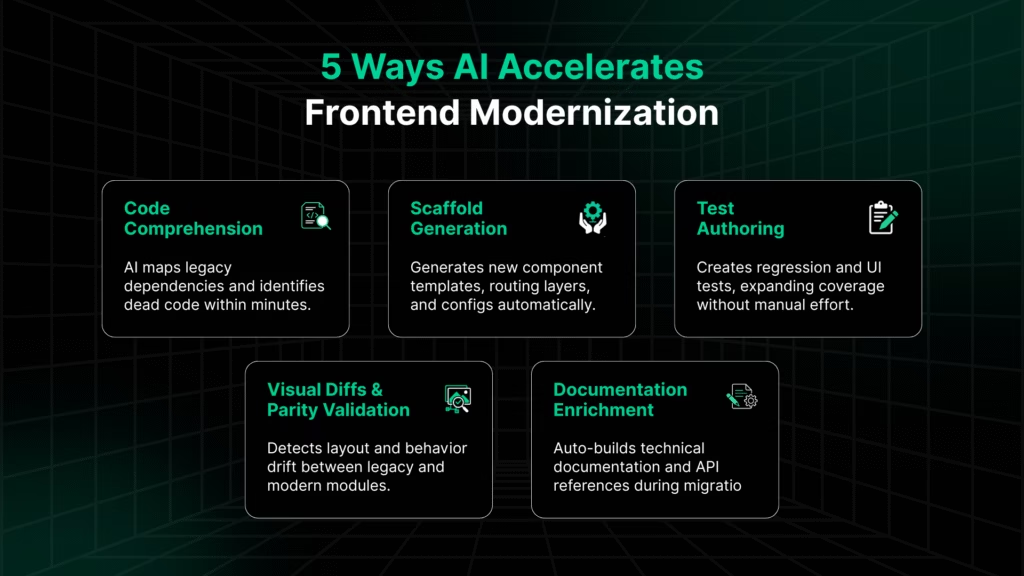
- Code comprehension: AI can map legacy codebases, detect dependencies, and surface anti-patterns in minutes for work that previously took weeks.
- Scaffold generation: It auto-creates component templates, routing layers, and configuration files, giving teams a reliable starting point.
- Test authoring: Intelligent test creation through tools like Playwright’s AI-assist features or custom copilots helps teams achieve wider regression coverage without extra headcount.
- Visual diffs and parity validation: AI highlights layout or behavior drift between legacy and modern modules, accelerating the validation loop.
- Documentation enrichment: When documentation doesn’t exist (as in most legacy UIs), AI can infer intent, describe components, and maintain up-to-date system knowledge.
This isn’t theoretical. Developer studies like the 2024 Stack Overflow survey show that over three-quarters of developers already use AI in daily workflows, and research from McKinsey reports productivity uplifts of 20–45% in software engineering.
The fastest gains are seen in documentation, test authoring, and code review, all exactly the areas modernization depends on.
For more on this, read ‘How Can Gen AI Drive Every Step of Your Modernization Journey?’
Why This Matters for Frontend Modernization
Frontend modernization is no longer just a response to framework end-of-life cycles. It’s a prerequisite for AI adoption.
Legacy architectures isolate data, mix presentation and business logic, and lack instrumentation, making them incompatible with the next generation of intelligent interfaces. Modern frameworks, on the other hand, separate concerns cleanly and expose events, APIs, and telemetry in ways AI systems can consume.
By adopting a modern, AI-ready frontend architecture, enterprises can:
- Integrate AI copilots and agents directly into user flows.
- Use AI-generated telemetry to personalize interfaces in real time.
- Leverage AI for continuous testing, documentation, and governance.
In short, modernization and AI aren’t parallel tracks but mutually reinforcing. Modernization creates the environment AI needs to thrive, and AI accelerates modernization in return.
Together, they define the new lifecycle of enterprise frontend development.
Legacyleap’s Approach to Frontend Modernization
Modernizing an enterprise frontend isn’t a linear rewrite. AngularJS controllers holding business logic, jQuery-driven flows spread across DOM scripts, and years of IE11-targeted workarounds create systems that behave in unpredictable ways.
Legacyleap handles this complexity with a multi-agent modernization system, where each agent specializes in a part of the lifecycle, and every action runs through the AI Gateway with human oversight at critical points. The result is a modernization process that is fast, verifiable, and controlled.
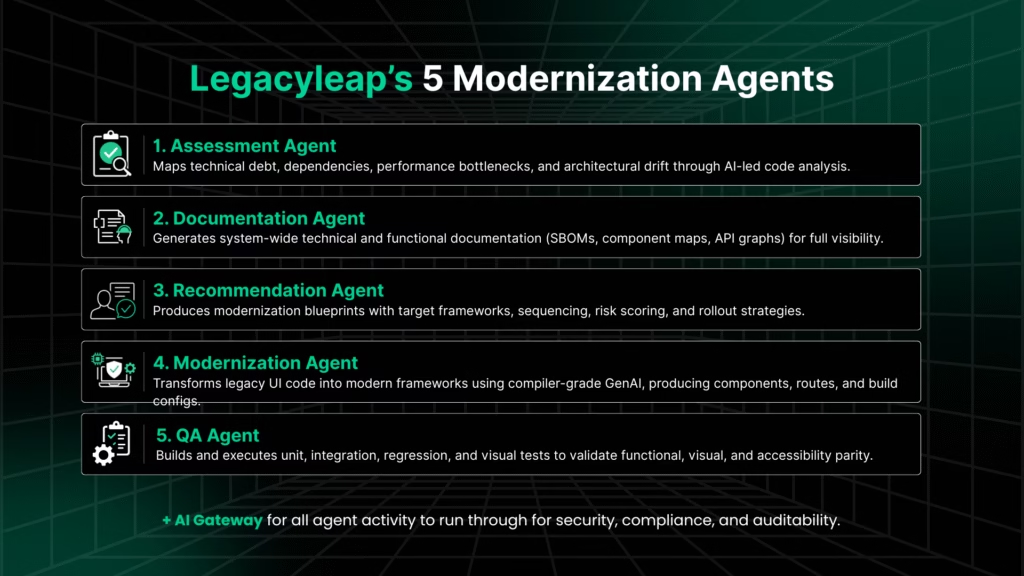
1. Assessment Agent
Modernization starts by building a truthful representation of the UI as it actually runs.
The Assessment Agent analyzes repositories, routes, bundles, templates, dependencies, and runtime artifacts to surface:
- Legacy patterns (AngularJS scopes, jQuery handlers, IE-specific branches)
- Dead/duplicate code
- Accessibility gaps against WCAG 2.2
- Performance baselines across INP, LCP, CLS, bundle size, and build times
The goal is clarity with a ground truth model of the existing system. Human reviewers then confirm business-critical flows, pixel-parity requirements, and risk areas that should not change.
2. Documentation Agent
Alongside analysis, the Documentation Agent converts system behavior into usable, up-to-date documentation: component maps, route diagrams, API call graphs, SBOM-style inventories, and functional flow descriptions.
Most legacy frontends lack reliable documentation; this fills the gap so every stakeholder understands the current state before modernization begins.
3. Recommendation Agent
Using the insights from both agents, the Recommendation Agent creates a modernization blueprint that aligns with the system’s real constraints.
It evaluates:
- Framework suitability (Angular/React/Vue)
- Design-system drift and UI inconsistencies
- Module and dependency clusters
- Sequencing and rollout strategies that reduce breakage risk
Architects and product owners perform HITL review to validate decisions, adjust for business constraints, and finalize the migration direction.
4. Modernization Agent
Once direction is set, the Modernization Agent transforms legacy UI code into modern equivalents in controlled slices.
It handles:
- Converting templates into components
- Extracting state into predictable stores
- Generating routes, layouts, and module boundaries
- Producing modern build configs (Vite/Rspack/Webpack 5)
- Removing Bower/Grunt-era tooling and legacy scripts
Developers step in where judgment is needed, like custom directives, third-party widgets, or deeply coupled flows. Every modernized slice is gated behind feature flags, letting teams deploy safely as the migration progresses.
5. QA Agent
No module ships without measurable proof that it works. The QA Agent generates:
- Playwright regression tests
- Unit and integration tests
- Visual diff snapshots
- WCAG 2.2 accessibility checks
- Performance comparisons against baseline budgets
HITL reviews remain essential here: QA, design, and product approve exceptions, confirm intentional improvements, and validate business-critical interactions.
AI Gateway
Across all phases, every agent’s work flows through the AI Gateway. This is the trust layer that ensures:
- Data minimization and redaction
- In-environment execution and encryption
- Policy routing and model governance
- Full audit logs of changes, tests, diffs, and recommendations
- Compliance with GDPR, HIPAA, and enterprise security controls
The Gateway makes the entire agentic workflow enterprise-grade, not just AI-assisted.
For more on this, read: “Inside Legacyleap’s AI Gateway: Securing Gen AI Legacy Modernization“.
What This Delivers
By structuring modernization around these five agents and grounding every action in documentation, parity validation, and policy controls, Legacyleap delivers modernization that is:
- Faster (2–3× higher throughput)
- Verifiable (tests, diffs, a11y reports, budgets)
- Modular and modern (components, ESM, updated tooling)
- Safe to deploy (feature flags, rollbacks, telemetry)
- Ready for AI-driven interfaces
This agent-driven model transforms fragile, outdated UIs into performant, compliant, and maintainable frontends with predictable outcomes.
Risk Landscape & Governance
Every UI change in frontend modernization touches user interactions, design systems, and live traffic. Without structure, modernization can easily introduce regression, inconsistency, or user disruption.
Legacyleap approaches this with a clear philosophy: move fast, but never without visibility and control.
The Real Risks in Frontend Modernization
Even well-intentioned modernization projects can create new layers of debt if unmanaged. The most common risks include:
- Interaction debt: Breakage in event handling, state transitions, or animations during migration.
- Design-system drift: Gradual misalignment between old and new UIs, often visible in spacing, typography, or theming.
- Routing and session coupling: Legacy SPAs that entangle authentication, routing, and state can fail silently after refactor.
- Microfrontend dependency hell: Version mismatches between independently deployed modules leading to runtime errors.
- Fragile test coverage: Aging Selenium scripts and manual validation processes are unable to track rapid changes.
Each of these can stall modernization or worse, push regressions to production. That’s where Legacyleap’s built-in safeguards step in.
How Legacyleap Preempts Risk
Legacyleap prevents these issues before they occur by combining AI-driven detection with policy-based enforcement.
- Architectural controls: The Assess phase maps dependencies, shared libraries, and cross-module interactions using AI graphing. Strangler UI rollout ensures that modernization happens incrementally, where old and new coexist until parity is validated.
- Quality and consistency controls: Legacyleap’s design-token extraction aligns all new components to the source design system. AI-driven visual diffs and accessibility scans catch UI drift or WCAG 2.2 violations early.
- Operational controls: Core Web Vitals (INP, LCP, CLS) and accessibility thresholds are configured as CI/CD gates. Any build that underperforms or fails accessibility checks cannot be promoted. Shared dependency policies are also enforced at build time, preventing version mismatches across microfrontends.
Together, these controls form a closed feedback loop of detect, correct, and validate that keeps modernization predictable and auditable.
Governance in Practice
Governance under Legacyleap is a living system that spans architecture, delivery, and validation.
- Strangler UI rollout: Enables parallel operation of old and new UIs, giving teams freedom to modernize progressively without downtime.
- Shared-dependency management: Centralized registry with version locks ensures that all modules consume consistent dependencies.
- Design token governance: Extracted tokens are versioned and stored centrally, guaranteeing uniform visual behavior across frameworks and microfrontends.
- Continuous validation: Each release passes through automated parity checks and human-in-the-loop (HITL) review before production sign-off.
This embedded governance structure ensures modernization remains fast, reversible, and fully observable.
Change Management & Adoption
Technical success depends on organizational readiness. Legacyleap builds adoption support directly into the modernization process.
- Training and upskilling: AI-generated documentation from the Assess phase doubles as internal training material, helping teams understand new frameworks and standards.
- Stakeholder visibility: Every phase outputs measurable progress through parity metrics, CWV improvements, and accessibility compliance that leadership can track through dashboards.
- Governance onboarding: Predefined policy templates (dependency governance, design rules, rollout cadence) allow enterprises to institutionalize best practices without starting from scratch.
By making governance transparent and measurable, Legacyleap helps teams move with confidence.
5. Enterprise Rollout Models
Even with perfect modernization, deployment risk remains. Legacyleap minimizes this through enterprise-grade rollout models integrated into its CI/CD framework.
- Blue/Green deployments: Run legacy and modern UIs side-by-side, allowing instant rollback if anomalies are detected.
- Feature flags: Control release exposure to specific user cohorts and toggle new components gradually.
- Canary testing: Push updates to small user segments first, with telemetry tracking for early anomaly detection.
Every rollout event from build to rollback is captured through Legacyleap’s AI Gateway audit logs, ensuring traceability and compliance for regulated environments.
Summary:
Modernization risk doesn’t disappear. It’s managed. Legacyleap weaves governance through every layer of the process: architecture, design, testing, deployment, and change adoption.
The result is a modernization program that scales safely, predictably, compliantly, and fully verifiably without slowing down the pace of delivery.
Outcomes & ROI
Legacyleap delivers modernization with verifiable outcomes. Every phase in the 5-step AI + HITL model feeds measurable improvements into delivery, quality, and governance metrics. The result is faster, safer, and demonstrably compliant modernization across large-scale frontends.
Quantifiable Delivery Gains
Modernization velocity under Legacyleap improves by 2-3× through AI-assisted code comprehension, scaffold generation, and automated test authoring.
Each slice of modernization moves from weeks to days without compromising coverage or control.
Incremental rollouts and strangler UIs allow production releases to continue even during large framework transitions, maintaining business continuity while modernization proceeds in the background.
Quality and Stability Improvements
Automated Playwright test generation, visual diffing, and accessibility scans shrink regression cycles by 50-70%.
Core Web Vitals (INP, LCP, and CLS) are tracked continuously, with performance budgets integrated directly into CI/CD gates. Every build meets pre-defined thresholds before deployment.
Visual and functional parity are validated, logged, and approved through HITL checkpoints. The result is modernized UIs that behave identically where it matters and improve where it counts.
Operational Efficiency & Compliance Readiness
Replacing legacy toolchains (Bower, Grunt, Gulp) with Vite, Rspack, or Webpack 5 cuts build times by up to 60% and simplifies dependency management.
Governance policies ensure that every release passes WCAG 2.2 accessibility compliance, while GDPR and HIPAA overlays inside the AI Gateway maintain auditability and data minimization.
Strategic ROI
Modernization with Legacyleap produces measurable, long-term return:
- Lower total cost of ownership through reduced maintenance and regression effort.
- Shorter time-to-market from automated pipelines and modularized builds.
- Improved developer productivity through AI copilots and consistent architecture.
- Future-ready frontends that are already instrumented for GenAI interfaces and adaptive experiences.
Enterprises achieve modernization that’s faster, auditable, compliant, and AI-ready by design.
In summary:
Legacyleap transforms modernization from a one-off project into a governed lifecycle combining compiler-grade precision, agentic AI speed, and human-in-the-loop assurance.
It’s how organizations replace fragile, legacy frontends with architectures built for performance, compliance, and the next decade of intelligent applications.
Future-Proofing Beyond 2026
The modernization path doesn’t end at migrating frameworks or cleaning up legacy code. To stay ahead in a rapidly evolving landscape, frontends must embrace next-generation architectures.
Here are three strategic technologies you’ll want on your roadmap now what they mean for enterprise modernization.
WebAssembly (Wasm) → Near-native browser apps
With WebAssembly (Wasm), browsers are no longer limited to JavaScript-only execution. Applications can compile performance-critical modules (like Rust, C++, Go) into Wasm, delivering near-native speed.
For enterprises with heavy UI domains with complex dashboards, real-time visualisation, and simulation tools, Wasm offers faster load and runtime, a lighter CPU footprint, and better client responsiveness.
Modernization implication: As you decouple legacy UI logic, isolate compute-intensive modules for Wasm migration. That makes the modern stack not just “newer” but faster and future-ready.
Headless & Composable Frontends → Modular, swap-ready architecture
The shift to Headless architecture or composable frontends means decoupling frontend presentation from backend logic and creating modular UI components that can evolve independently.
In practical terms, your UI leverages best-in-class services (CMS, commerce engine, analytics) connected through APIs, and your frontend code is built to swap or evolve pieces without rewriting the whole.
Modernization implication: As part of the migration, ensure your stack supports this modularity (e.g., component libraries, API-first design, micro-apps). That ensures when the next shift arrives, you’ll adapt, not break.
Edge-native Rendering → Global performance at scale
Modern frontends go beyond client-side JS; they shift rendering closer to the user. By pushing rendering and delivery to the edge (CDNs, edge functions), you reduce latency and speed up interaction.
For global enterprises, this matters: users across geographies get consistent speed, and you lower round-trip time for dynamic parts of the UI.
Modernization implication: As you refactor, incorporate edge-rendering patterns (SSR/ISR at edge, client hydration, pre-fetching) so that the modern stack isn’t just internally optimized but globally performant too.
Wrapping Up
The window for maintaining legacy frontends has closed. Frameworks like AngularJS and IE11 are past end-of-life, and every month spent on outdated stacks compounds SEO penalties, accessibility gaps, and missed AI opportunities.
Modernization is about keeping pace. But it’s also about reclaiming speed, compliance, and user experience as competitive advantages.
Legacyleap makes that shift verifiable. Our AI + HITL platform modernizes faster, validates every change through automated parity checks, enforces governance through CWV and accessibility gates, and delivers frontends ready for AI-driven experiences.
The urgency is real. The path is proven. Start with a $0 Frontend Modernization Assessment and see how quickly your legacy UI can evolve into a high-performance, compliant, and AI-ready architecture.
FAQs
Readiness comes down to visibility and alignment. If you’re seeing performance debt (slow INP/LCP), escalating maintenance costs, and difficulty onboarding new developers, you’re already late. Legacyleap’s $0 Assessment provides a quantified readiness report with dependency mapping, risk scoring, and framework recommendations so leadership can plan modernization with facts, not assumptions.
Modernization ROI is best tracked through quantifiable metrics:
– Velocity: Build time and release frequency (aim for 50–60 % faster builds).
– Quality: Regression escape rate and test coverage growth.
– Performance: Core Web Vitals (INP ≤ 200 ms, LCP ≤ 2.5 s, CLS ≤ 0.1).
– Compliance: 100 % WCAG 2.2 and accessibility audits passed.
– Governance: CI/CD pass rate ≥ 98 % across parity and a11y gates.
These KPIs turn modernization from a subjective goal into a measurable business program.
Microfrontend success depends on isolation without breaking user flows. Legacyleap decouples shared state and auth concerns from legacy SPA architecture, then externalizes them into secure, modular services. During modernization, identity flows (login, session, token refresh) are validated with parity tests and implemented across federated modules using patterns like custom events and shared auth providers, ensuring seamless user experience even across fragmented UIs.
Productivity gain is quantifiable. Legacyleap measures diff velocity (how fast modern components evolve vs legacy ones), reduction in manual rework, and regression test coverage. Teams typically report 60–70% fewer cycles spent on parity validation and 2–3× faster turnarounds for each modernized module. These metrics are visualized in the platform, so stakeholders can track modernization velocity in real time.
Absolutely. Legacyleap is framework-agnostic. During the Assess → Recommend phases, the platform evaluates your legacy structure, team skill set, and integration landscape to recommend the best-fit framework: Angular for governed complexity, React for flexibility, Vue for lightweight modularity. Once chosen, the same AI + HITL process handles migration, testing, and rollout with equal precision.
Timelines vary by codebase size and risk, but most projects see first production modules live within 8–12 weeks. Legacyleap’s phased approach, starting with low-dependency modules, then scaling through strangler rollouts, lets modernization progress while existing systems stay operational. Typical enterprise transformations complete 2–3× faster than manual rewrites while maintaining full test and compliance coverage.