“Supported” Is Not the Same as “Strategically Viable”
.NET Framework 4.8 is supported. It has no standalone end-of-support date. Microsoft classifies it as a component of the Windows operating system, which means it follows the lifecycle of the Windows version it runs on and will continue to be distributed with future Windows releases, including Windows 11 and Windows Server 2025 [1].
But support and strategic viability are not the same thing.
“Supported” means Microsoft will continue to issue critical security patches. It does not mean .NET Framework 4.8 is being maintained in any meaningful development sense. There have been:
- No new features since the 4.8.1 release in August 2022.
- No performance improvements.
- No new APIs.
- No C# language advances beyond what 4.8 supports.
- No cross-platform capability.
Microsoft has directed all active development, performance engineering, and language innovation to modern .NET (.NET 8 LTS, .NET 10 LTS).
The distinction matters because most content on this topic conflates three different categories: supported (security patches), maintained (bug fixes for non-security issues), and actively developed (features, performance, ecosystem growth).
.NET Framework 4.8 is only the first of those three. It receives security patches. It does not receive non-security bug fixes. It receives no new development of any kind.
The practical difference between .NET Framework 4.8 and modern .NET (.NET 8 and beyond) is not incremental.
Modern .NET supports C# 13 language features, native AOT compilation, cross-platform deployment to Linux and containers, substantially improved HTTP throughput, native AI/ML integration paths, and an active ecosystem of libraries and tooling. .NET Framework 4.8 receives none of this and never will.
For enterprise teams that have deferred migration because “it’s still supported,” the real question is not whether Microsoft will pull the plug. It is whether an indefinitely frozen framework is a viable foundation for the applications, teams, and infrastructure strategies that enterprises need over the next five to ten years.
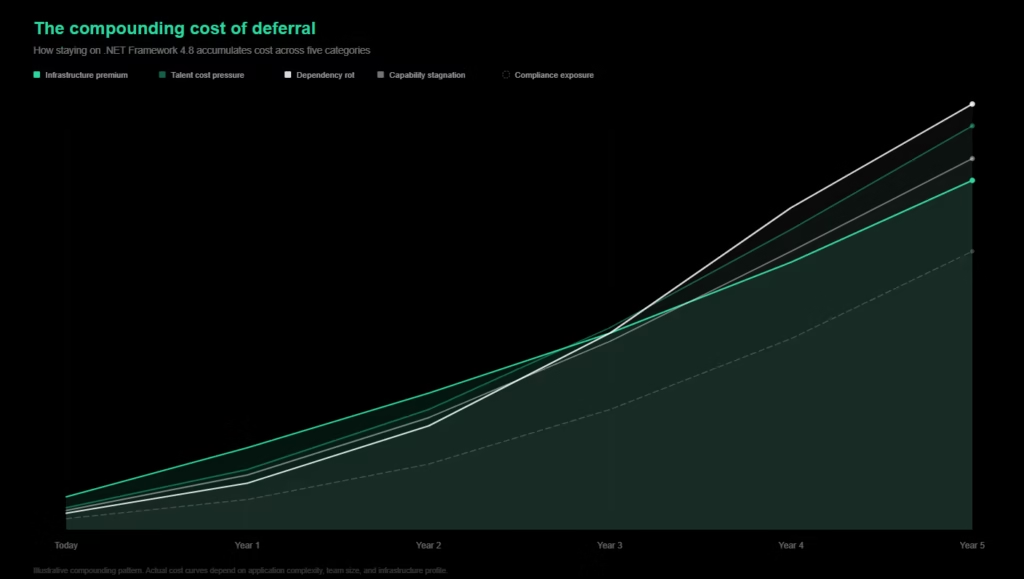
The costs of staying are not hypothetical. They are compounding now, and they are measurable.
What Staying on .NET Framework 4.8 Actually Costs
The absence of a deprecation deadline creates a false sense of optionality. In practice, every quarter that passes without a migration decision increases cost across five categories that compound independently.
Infrastructure cost premium
- .NET Framework applications cannot run on Linux containers.
- Cross-platform deployment requires porting to modern .NET as a prerequisite.
- Enterprises running Framework applications on Windows-licensed cloud instances are paying a structural premium that modern .NET eliminates.
- Cloud providers consistently document significant infrastructure savings when organizations move from Windows-licensed instances to Linux containers, with figures ranging from 20% to 45% depending on workload profile and instance configuration [2].
- Windows Server Core container images run at 4GB or more compared to roughly 100MB for equivalent Linux .NET images, which affects storage, pull times, and scaling overhead.
These are directional indicators, not guaranteed outcomes. The actual savings depend on the enterprise’s specific workload, licensing structure, and deployment model. But the structural premium is real, and it recurs every billing cycle.
Talent cost pressure
The .NET developer market has fragmented.
Senior .NET engineers are no longer a single hiring pool. They have split into distinct specializations: MAUI, API-first development, Azure-native architecture, and legacy .NET Framework maintenance.
According to Pearson Carter, a specialist .NET recruiter, senior developers are actively avoiding companies still running .NET 4.x or monolith architectures [3]. The candidates qualified to maintain Framework applications are a shrinking subset of a market that is itself becoming harder to hire from.
The U.S. Bureau of Labor Statistics projects 15% employment growth for software developers between 2024 and 2034, roughly five times the average occupation growth rate [4]. That macro demand pressure applies to an already fragmented .NET talent pool.
The practical impact:
- longer hiring timelines,
- higher compensation requirements for maintenance-oriented roles, and
- increasing difficulty retaining engineers who want to work on modern stacks.
Dependency rot
Third-party NuGet packages are progressively dropping .NET Framework support. This is not speculative. Major libraries that enterprise .NET applications commonly depend on have already made the move.
- System.Text.Json replaced Newtonsoft.Json as Microsoft’s recommended serialization library but ships with full feature parity only on modern .NET.
- Entity Framework Core 8+ targets modern .NET exclusively, leaving Framework applications locked to EF6.
- Microsoft.Extensions.DependencyInjection, Microsoft.Extensions.Logging, and Microsoft.Extensions.Configuration (foundational packages in most enterprise applications) has moved its active development and latest features to modern .NET.
Each year that passes means more packages that must be replaced rather than upgraded during the eventual migration.
An incompatible package discovered during migration is not a one-hour fix. It requires research into alternatives, evaluation of behavioral equivalence, and potentially significant code rewriting around the replacement.
The longer the delay, the more packages cross the compatibility threshold, and the wider the eventual migration scope becomes. This is consistently the single most cited cause of migration timeline overruns in practitioner accounts.
Capability stagnation
Modern .NET receives C# 13 features, native AOT compilation, substantial HTTP throughput improvements, native AI/ML integration paths, and cross-platform deployment to Linux, containers, and serverless environments.
None of this reaches .NET Framework. Every quarter widens the gap between what Framework applications can do and what the broader .NET ecosystem expects.
For applications with active users, this translates to slower feature delivery, inability to adopt modern architectural patterns, and growing friction with CI/CD toolchains and cloud services that assume modern .NET compatibility.
Compliance and audit exposure
In regulated industries like financial services, healthcare, and government, auditors are increasingly scrutinizing feature-frozen runtimes.
A framework that receives only security patches and no active development raises questions during compliance reviews, even if it is technically within Microsoft’s support policy.
The absence of active maintenance means non-security bugs are not fixed, runtime behavior does not evolve to meet updated standards, and the framework’s security posture depends entirely on patch-level coverage rather than architectural improvements.
For organizations subject to SOC 2, HIPAA, or PCI-DSS audits, this creates a recurring compliance conversation that consumes internal resources and introduces risk to audit outcomes.
When to migrate vs. when to defer
Staying on .NET Framework 4.8 is a rational decision under a specific set of conditions. Equally, the case for migration becomes clear when a different set of conditions applies. The decision framework below maps both sides.
Migrate if:
- The application has active users and ongoing feature development
- Cloud or container deployment is part of the infrastructure roadmap
- The application depends on NuGet packages that are dropping Framework support
- Hiring or retaining .NET engineers is becoming more difficult or expensive
- The organization operates in a regulated industry where auditors are scrutinizing runtime currency
- Multiple applications share dependencies that are diverging between Framework and modern .NET
Defer if:
- The application is stable, in maintenance mode, and will not change materially
- There is no cloud or container deployment requirement
- The Windows Server lifecycle provides sufficient security coverage for the deployment environment
- The organization accepts the narrowing talent pool as a manageable constraint for the application’s remaining operational life
Most enterprise applications do not meet all of the deferral conditions simultaneously. And for those that do today, the conditions may not hold in three years as the dependency ecosystem, talent market, and tooling landscape continue to shift.
Your migration cost is specific to your codebase, not an industry average. Legacyleap’s $0 Assessment maps your dependencies, surfaces blockers, and produces effort estimates grounded in what you actually have. Start with visibility.
What Breaks When You Migrate, And How Big Is the Actual Scope?
Several core components that enterprise .NET Framework applications depend on have no direct equivalent in modern .NET. Microsoft has confirmed that they will not be ported.
Understanding what breaks and what it takes to replace is the foundation of realistic migration planning.
Hard blockers
| Component | Status in Modern .NET | Replacement Path |
| ASP.NET Web Forms | Not ported. Microsoft has confirmed Web Forms will never come to modern .NET. | Rebuild in Blazor or Razor Pages. For teams evaluating this path, see our Web Forms to Blazor migration approach |
| WCF (server-side) | Not ported to modern .NET. CoreWCF exists as an interim community-maintained bridge. | gRPC for internal service-to-service communication; REST APIs for external-facing services. For detailed guidance, see WCF to REST and gRPC migration paths |
| .NET Remoting | Removed. | gRPC or REST. |
| AppDomains | Removed. | AssemblyLoadContext for assembly isolation scenarios. |
| System.Web | Not available in ASP.NET Core. | ASP.NET Core middleware pipeline. |
These are hard blockers, not optional upgrades. Any application that depends on them requires architectural replacement.
Third-party dependencies are the #1 timeline killer
Across practitioner migration accounts, incompatible NuGet packages are consistently cited as the primary cause of timeline overruns. Some packages are abandoned. Others have been forked under different names or replaced by entirely different libraries with different APIs.
Each incompatible dependency requires research, evaluation, and potentially code rewriting, and the full list of incompatible dependencies in a given codebase is discoverable only through systematic analysis, not through estimation or developer memory.
This is the single most underestimated dimension of .NET Framework migration scope. The blockers in the table above are known and documented. Dependency incompatibilities are specific to each codebase and invisible until someone does the inventory.
Migration complexity and timeline ranges
| Application Complexity | Typical Timeline | Primary Cost Drivers |
| Simple library or API | 2-4 months | NuGet dependency resolution, API surface updates |
| Mid-size application (50K-250K LOC) | 4-9 months | WCF replacement, test generation, dependency remediation |
| Large application with Web Forms (250K-1M LOC) | 9-18 months | UI rebuild, data layer migration, cross-module dependency resolution |
| Enterprise portfolio (multi-application estate) | 12-36 months | Sequencing, parallel validation, organizational readiness, shared dependency coordination |
Timelines are in calendar months and assume a dedicated migration team (not partial allocation alongside feature work). Partial allocation extends timelines proportionally.
These ranges assume traditional migration approaches. Structured, platform-level tooling can compress timelines significantly, particularly in the discovery and dependency resolution phases that consume the most unplanned effort.
Two planning calibrations that practitioners consistently validate are budgeting two to three times the initial estimate and building test coverage before migration begins.
If the legacy application lacks automated tests, test creation is a prerequisite, not a parallel workstream. Parallel running of old and new systems catches behavioral differences that pass all unit and integration tests.
For teams looking for deeper execution guidance on the technical migration path, our comprehensive .NET modernization planning guide covers the full framework.
The pattern across all of these blockers is the same: they are discoverable through systematic codebase analysis, not through estimation or developer memory.
Why the .NET Framework Migration Tooling Landscape Has Changed
For years, Microsoft’s .NET Upgrade Assistant served as the default starting point for .NET Framework migration. It was free, deterministic, and integrated directly into Visual Studio. It handled mechanical migration tasks such as project file conversion, API surface updates, and basic dependency resolution with predictable, repeatable results.
That tool was deprecated in late 2025. Microsoft’s documentation now directs teams to GitHub Copilot App Modernization, a subscription-based AI agent that operates through the Copilot Chat interface in Visual Studio [5]. The shift is material for three reasons.
- First, the replacement requires a paid Copilot subscription (Pro, Business, or Enterprise). The free path no longer exists.
- Second, the output is non-deterministic. The same codebase run through the agent twice may produce different results, which complicates validation and audit.
- Third, the tool operates at the file level rather than the system level. Microsoft’s own example walkthrough uses under 2,000 lines of code across 54 files, a scale that does not represent the complexity of most enterprise .NET Framework estates.
Developer feedback has been direct. Practitioners report inconsistent results with complex architectures, hallucinated NuGet packages that do not exist, and a loss of the structured, step-by-step process that the original tool provided.
For teams accustomed to the Upgrade Assistant’s deterministic workflow, the replacement introduces uncertainty where there was previously predictability.
For small applications and straightforward version upgrades, the new tooling may be sufficient. For enterprise-scale .NET Framework migration with applications with hundreds of thousands of lines of code, WCF dependencies, Web Forms UI layers, undocumented business rules, and cross-module dependency chains, the gap between what file-level AI assistance provides and what the migration actually requires is substantial.
For more on why AI coding tools fall short for enterprise modernization, see our detailed analysis: Why AI Coding Tools Can’t Handle Legacy App Modernization.
How Legacyleap Addresses Enterprise .NET Framework Migration
The pattern across the blockers, dependency challenges, and tooling gaps described in the preceding sections is consistent: the core migration problem is not code transformation. It is discovery, estimation, and validation.
Enterprises do not know what they have. Untracked dependencies, undocumented business rules, missing test coverage, and hidden cross-module coupling produce migration plans that bear little resemblance to the actual work required.
Legacyleap addresses this at the system level, not the file level.
Discovery and estimation: the Assessment Agent and Documentation Agent
The most common cause of migration program failure is not bad code transformation. It is bad estimation. Enterprises do not know what they have. Untracked dependencies, undocumented business rules, missing test coverage, and hidden cross-module coupling produce migration plans that bear little resemblance to the actual work required.
Legacyleap’s Assessment Agent addresses this directly. It provides system-level inventory in the form of:
- dependency maps,
- unsupported API identification,
- risk scoring, and
- modernization feasibility analysis across the full codebase.
The output is not a summary. It is a structured map of what exists, what breaks, and what the migration path looks like for each component.
The Documentation Agent handles the knowledge gap that nearly every legacy codebase carries. .NET Framework applications that have been in production for a decade or more rarely have current documentation.
The module boundaries, data flows, business rules, and architectural decisions that shaped the application exist in the heads of engineers who may no longer be on the team.
The Documentation Agent reconstructs that knowledge in architecture diagrams, module responsibilities, workflow documentation and API inventories, creating the comprehension layer that informed migration planning requires.
Together, these two agents convert the “budget 2-3x” reality into a more predictable starting point. The dependency map tells you what is incompatible. The documentation tells you what the code actually does. The migration plan that emerges from that foundation is grounded in the codebase itself, not in estimates derived from rough LOC counts and developer memory.
Governed transformation and parity validation: the Modernization Agent and QA Agent
The enterprise concern with AI-assisted migration is not speed. It is trust. The question is whether AI-generated code changes at scale introduce unverified behavioral differences that surface in production rather than in testing.
Legacyleap addresses this structurally. All transformations produced by the Modernization Agent are diff-based and human-reviewed.
- The AI does not merge, deploy, or apply changes directly.
- Every change is presented as a reviewable diff with full traceability to the original code and the reasoning behind the transformation.
- Engineers approve, modify, or reject each change before it enters the codebase.
The QA Agent then validates functional parity through automated regression suites, behavior comparison between legacy and modernized systems, and automated test generation for codebases that lack existing coverage.
This is the validation layer that file-level AI tools do not provide: system-level confidence that the migrated application behaves identically to the original.
The $0 Assessment as a concrete entry point
The gap between “we should probably migrate” and “here is what migration looks like for our specific codebase” is where most migration programs stall. The $0 Assessment closes that gap. It produces:
- Dependency and module maps
- Risk indicators
- A modernization blueprint
- Architecture observations
- Effort and timeline ranges
- Recommended migration targets
There is no cost and no commitment. The output is a structured modernization readiness view that turns an abstract cost-of-staying argument into a concrete, boardroom-ready business case. For teams whose primary blocker is the inability to scope the migration with confidence, this is where the conversation starts.
The Migration Window Is Open, But It Is Not Getting Wider
.NET Framework 4.8 is supported. It will remain supported for the foreseeable future, tied to the Windows lifecycle. That fact has not changed, and this article does not argue otherwise.
What has changed is everything around it.
- The feature freeze is permanent.
- The talent market has fragmented away from Framework maintenance.
- The dependency ecosystem is migrating to modern .NET.
- The free, deterministic tooling path that made incremental migration approachable has been deprecated and replaced with something that does not operate at enterprise scale.
Every quarter that passes increases infrastructure costs, narrows the talent pool, adds incompatible dependencies, and widens the capability gap between what Framework applications can do and what the .NET ecosystem now expects.
The migration does not get easier by waiting. The scope does not shrink. The costs do not stabilize. The teams best positioned to move are the ones that start with clarity about what they actually have. Not industry averages, not rough estimates, but a grounded view of their specific codebase, dependencies, and migration path.
Start with Legacyleap’s $0 Modernization Assessment. It delivers dependency and module maps, risk indicators, a modernization blueprint, architecture observations, effort and timeline ranges, and recommended migration targets at no cost. The output is the foundation for a migration business case built on evidence, not estimation.
Or book a demo to see how the platform handles .NET Framework modernization in practice and evaluate whether structured, platform-level modernization fits your migration program.
FAQs
For most enterprise teams migrating in 2026, .NET 8 (LTS) or .NET 10 (LTS, releasing November 2025) are the practical targets. If the migration is already scoped and underway, .NET 8 provides a stable, well-documented target. If the migration is still in planning, targeting .NET 10 avoids a near-term version hop after migration completes. The migration effort from .NET Framework 4.8 is substantially the same either way. The hard work is moving off Framework, not choosing between modern .NET versions.
This is the lifecycle paradox that causes the most confusion. .NET Framework 4.8 will be supported for decades, while .NET 8 LTS has a three-year window. But “supported” means something very different for each. Framework support is security patches only. Modern .NET’s three-year LTS cadence comes with an active upgrade path: moving from .NET 8 to .NET 10 is a minor version upgrade measured in days or weeks. Moving off Framework is a migration program measured in months or years. The longer the deferral, the larger that gap becomes.
Yes, and for most enterprise applications above 50K lines of code, incremental migration is the recommended approach. The Strangler Fig pattern of replacing components one at a time while legacy and modernized systems coexist is the most common strategy. Shared libraries and data access layers typically move first, followed by API layers, then UI. The exception is Web Forms, which has no modern .NET equivalent and requires a rebuild in Blazor or Razor Pages. The critical prerequisite is a dependency map that identifies which modules can migrate independently and which are tightly coupled.
The difference is architectural, not incremental. .NET Framework 4.8 is Windows-only, receives security patches only, and supports C# up to version 7.3. .NET 8 is cross-platform, actively developed, supports C# 12 with native AOT compilation, delivers substantially higher web throughput, and integrates natively with containers and modern CI/CD toolchains. The ecosystem has diverged as well, where the most actively maintained NuGet packages now target modern .NET, and foundational libraries like Entity Framework Core and Microsoft.Extensions.* have moved their latest features exclusively to modern .NET.
.NET Framework 4.8 receives critical security patches, so it is not unsupported in the security sense. However, the scope is narrower than many teams assume. Non-security bugs are not fixed, runtime behavior does not evolve to reflect updated standards, and there are no architectural security improvements or updated cryptographic defaults. In regulated industries, auditors are increasingly distinguishing between “supported” and “actively maintained” when evaluating runtime currency. The risk is not that an auditor flags .NET Framework 4.8 as non-compliant today. It is that the compliance position becomes harder to defend with each year of inactivity.
References
[1] Microsoft, “.NET Framework Official Support Policy.” https://dotnet.microsoft.com/en-us/platform/support/policy/dotnet-framework
[2] AWS, “Why You Should Modernize Legacy .NET Applications on AWS.” https://aws.amazon.com/blogs/modernizing-with-aws/why-you-should-modernize-legacy-net-applications-on-aws-and-how-we-can-help/
[3] Pearson Carter, “How to Hire .NET Developers in 2026.” https://www.pearsoncarter.com/2025/12/01/hire-dot-net-developers/
[4] U.S. Bureau of Labor Statistics, “Software Developers, Quality Assurance Analysts, and Testers: Occupational Outlook Handbook.” https://www.bls.gov/ooh/computer-and-information-technology/software-developers.htm
[5] Microsoft Learn, “.NET Upgrade Assistant — How to Upgrade a Project.” https://learn.microsoft.com/en-us/dotnet/core/porting/upgrade-assistant-how-to-upgrade