TL;DR
- React officially killed Create React App, but the deprecation only made an existing enterprise problem visible. CRA was deprecated on February 14, 2025, and its pinned dependency tree already conflicts with React 19’s peer dependencies, so npx create-react-app fails outright on the new version.
- At enterprise scale, the real migration isn’t the component layer, it’s a build pipeline almost no one fully understands. Enterprise Webpack configs running three to seven years in production typically span 300 to 1,000-plus lines of undocumented custom loaders and chained plugins that CRA’s zero-config philosophy encouraged teams to ignore.
- Retool’s six-month CRA-to-Vite migration shows every major breakage category was infrastructure, not React code. The CommonJS-to-ESM conversion alone consumed weeks of codemod work, and the team caught a chunking-behavior change that would have caused a significant production page-load regression had it shipped.
- Frozen CRA dependency trees have become an active supply-chain liability, not just a maintenance headache. In September 2025, 18 npm packages including chalk and debug, with 2.6 billion combined weekly downloads, were compromised via a maintainer phishing attack, and in March 2026 Axios was hit by a state-linked actor injecting a remote access trojan.
- Vite 8’s single Rust-based bundler removes the works-in-dev-breaks-in-prod risk that made earlier versions risky for enterprises. Linear’s published benchmarks show production builds dropping from 46 to 6 seconds and HMR latency falling from about 60 seconds to under 50 milliseconds, though Retool found its own production build times unchanged after migrating.
The CRA Deprecation Didn’t Create the Problem. It Made It Visible.
Enterprise React modernization is being misdiagnosed. The conversation triggered by CRA’s deprecation has focused almost entirely on which tool to migrate to (Vite, Next.js, or Rspack?), while ignoring the more fundamental question: what are you actually migrating from?
For organizations running multiple React applications built on CRA with customized Webpack configurations, shared libraries, and CI/CD pipelines coupled to CRA’s output structure, the answer to that question is far more complex than any developer-level migration guide acknowledges.
At enterprise scale, the build pipeline is the migration scope. Webpack configs, dependency governance, CI/CD coupling, plugin chains. The component layer (hooks vs. classes, routing, state management) matters, but it is secondary. Fix the pipeline first.
Is Create React App Deprecated?
Yes. The React team officially deprecated Create React App on February 14, 2025 [1].
CRA receives no new features, no security updates, and no active maintenance. React 19 has already created a hard dependency mismatch that breaks CRA project setup. This is because CRA’s pinned dependency tree conflicts with React 19’s peer dependency requirements, meaning npx create-react-app fails outright with React 19, and existing CRA projects cannot upgrade to React 19 without ejecting and manually resolving the dependency tree.
The React team recommends migrating to Vite, Next.js, or another modern alternative. For individual developers, that is a straightforward config migration.
For enterprises running multiple CRA applications with customized Webpack configurations, shared libraries, and CI/CD pipelines coupled to CRA’s output, the migration scope is fundamentally larger than most guides acknowledge.
Why Was Create React App Deprecated?
Four factors converged:
- Performance limitations at enterprise scale. CRA’s reliance on Webpack produces dev server reload times of 20-30+ seconds on large codebases, a daily productivity drag that compounds across teams and projects.
- No active maintainers. CRA was effectively unmaintained for over two years before the official deprecation. The gap between the ecosystem’s evolution and CRA’s frozen state widened with every React release.
- React 19 incompatibility. The dependency mismatch is not a theoretical future risk. CRA is actively broken with the current React version, making it impossible to adopt new React features without abandoning CRA first.
- Supply chain risk. CRA’s frozen dependency tree accumulates CVEs with no remediation path. Each month without migration widens the attack surface, a compounding problem explored in detail later in this article.
The deprecation did not introduce these problems. It made them visible.
CRA was the default bootstrapping tool for nine years (2016-2025), and its zero-config philosophy encouraged teams to treat the build pipeline as someone else’s concern.
The result is an enterprise footprint of undocumented, unmaintained build infrastructure that most teams have never inspected.
What Enterprise Webpack Configs Actually Look Like
Most enterprise React applications on CRA are running Webpack configurations that no one fully understands. This is not an exaggeration. It is the predictable outcome of CRA’s architecture.
Pre-eject, CRA hid the entire build pipeline behind react-scripts. Teams had zero visibility into what their bundler was doing, how dependencies were resolved, or how production builds were optimized. Post-eject, they inherited Webpack configs they did not write and were never designed to maintain. The workaround ecosystem (react-app-rewired, craco) added configuration layers that further obscured the pipeline rather than resolving the visibility gap.
The result, across enterprise React codebases that have been in production for three to seven years, is remarkably consistent:
- Webpack configs running 300 to 1,000+ lines with custom loaders, chained plugins, and environment-specific branches that serve as undocumented proprietary build systems
- No separation between dependencies and devDependencies, inflating production bundles and creating phantom security alerts
- Overlapping utility libraries (multiple date libraries, multiple HTTP clients) that were never consolidated because the build config was treated as immutable
- Dev server reload times of 20-30+ seconds, a daily productivity drag that compounds across teams
The problem extends beyond individual applications. Enterprise React estates often include shared component libraries with their own CRA-based build chains, and monorepo setups where multiple applications inherit build configurations that are themselves undocumented.
A migration that touches one application’s Webpack config frequently triggers cascading changes across shared build infrastructure that no single team owns or fully understands.
These are not edge cases. They are the default outcome when build tooling is set up once and left untouched for years, which is exactly the behavior CRA’s zero-config philosophy encouraged.
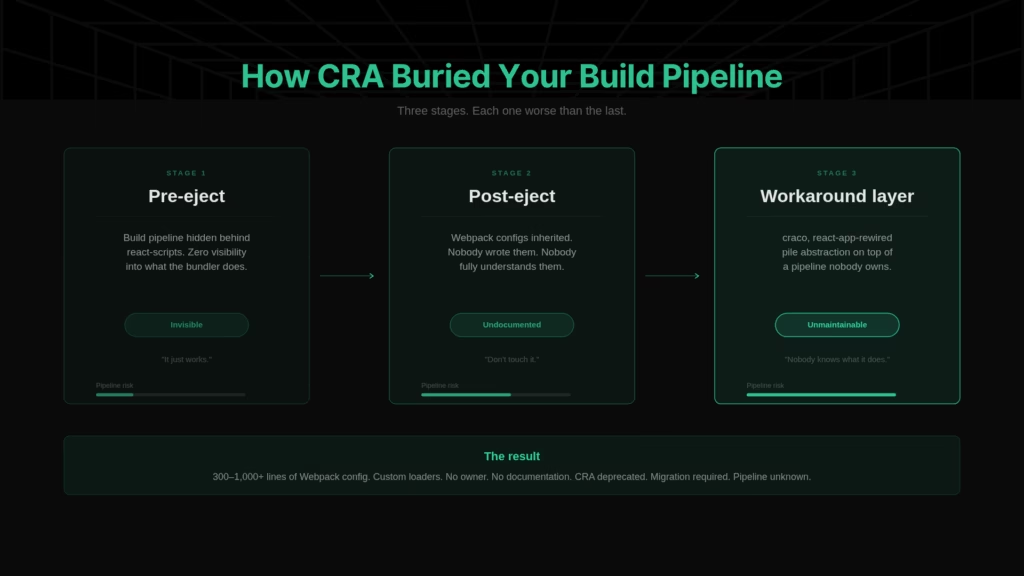
The build pipeline was never treated with engineering discipline because CRA made it invisible. Surfacing what that pipeline actually does is the prerequisite for migrating it.
For a deeper look at how enterprise Webpack complexity maps to broader frontend modernization patterns, see our frontend modernization guide.
What Breaks During Enterprise CRA-to-Vite Migration
The thesis that this is a pipeline problem, not a component problem, is provable. Every major breakage category documented in enterprise CRA-to-Vite migrations is infrastructure.
Retool’s engineering team published a detailed account of their migration [2], one of the most specific first-party enterprise case studies available.
Their experience, alongside patterns observed across large-scale React modernization programs, maps to seven consistent breakage categories.
| Breakage Category | What Breaks | Why It’s a Pipeline Problem |
| CommonJS → ESM conversion | Every require() pattern across 5-7 years of mixed module usage needs conversion to ESM import. Retool identified this as the first and largest blocker. | Module system is build infrastructure, not application logic. |
| Environment variable prefix change | REACT_APP_ → VITE_. Trivial in isolation; a cross-team coordination exercise across CI/CD, secrets management, and deployment scripts at scale. | Environment configuration is pipeline architecture. |
| Dynamic import refactoring | Webpack’s require() with expressions → ESM import() with different resolution behavior. Changes both syntax and semantics. | Module resolution is bundler behavior, not component logic. |
| File extension enforcement | JSX in .js/.ts files must be renamed to .jsx/.tsx or Vite must be explicitly configured. Touches every file and every import path. | File resolution rules are build tooling concerns. |
| Plugin equivalents | Custom Webpack loaders and plugins need Vite/Rollup equivalents. Vite’s plugin ecosystem is growing but still smaller than Webpack’s decade-old library. | Plugin chains are build pipeline components. |
| Chunking behavior differences | Vite/Rollup produces fundamentally different bundle structures. Retool documented a near-regression where different chunking would have caused significant page load degradation had it not been caught before production. | Bundle output structure is bundler architecture. |
| Module Federation | Categorically harder for micro-frontend architectures using Module Federation. The @module-federation/vite plugin exists but has acknowledged dev-mode limitations. | MFE architecture is build-time infrastructure. |
None of these categories involves React component patterns. Every one is a build pipeline infrastructure.
The Retool migration took six months. The CommonJS-to-ESM conversion alone consumed weeks of codemod work.
At enterprise scale, the migration could not block feature development, which meant writing idempotent codemod scripts designed for parallel execution alongside ongoing product work.
This is what “migration scope” actually looks like for enterprise React applications. Teams that plan for a config swap and discover a build infrastructure program mid-flight lose months to re-scoping, re-estimation, and organizational re-alignment.



Supply Chain Risk in Unmaintained React Build Pipelines
Build pipeline modernization is not only a productivity and migration-scope problem. It is increasingly a security imperative.
CRA’s dependency management created a structural governance gap that has compounded over time. The react-scripts package placed itself in dependencies rather than devDependencies by default.
The consequence: every npm audit surfaced hundreds of warnings for transitive vulnerabilities that were irrelevant to the production runtime. CRA’s own maintainers acknowledged in the project’s issue tracker that despite hundreds of filed issues and thousands of comments about npm audit warnings, none had been real vulnerabilities for CRA users.
This created a boy-who-cried-wolf dynamic. Teams learned to ignore npm audit entirely, suppressing warnings as noise. The governance muscle to detect real threats atrophied. And the npm supply chain threat environment has escalated sharply.
In September 2025, 18 npm packages, including chalk and debug, were compromised via a phishing attack on a maintainer. These packages have a combined 2.6 billion weekly downloads. The injected code intercepted cryptocurrency transactions in browsers. The malicious versions were live for roughly two hours before detection.
In March 2026, days before this writing, the Axios package was compromised through a maintainer account takeover. Axios has over 100 million weekly downloads. The attacker injected a dependency that executed a cross-platform remote access trojan (RAT) via postinstall script. The malicious versions were live for approximately three hours. Microsoft Threat Intelligence attributed the attack to a North Korean state actor.
The pattern is clear: maintainer account compromise followed by malicious package injection into the npm registry, targeting foundational dependencies with massive downstream reach.
For enterprise React applications running on frozen CRA dependency trees, there is no remediation path. Dependencies cannot be safely updated because the build pipeline is unmaintained. Each month without migration widens the attack surface.
Supply chain security is now a build pipeline architecture decision. The team responsible for the build tooling is, whether they realize it or not, the first line of supply chain defense.
Create React App Alternatives for Enterprise Teams
The migration target question matters, but it is the second question. The first question is always: what does our build pipeline actually do? Without that answer, any migration target selection is based on incomplete information.
With that prerequisite acknowledged, here is the decision framework.
| Migration Target | Best Fit | Key Tradeoff | Migration Effort |
| Vite 8 | SPAs and teams ready for full ESM conversion. Highest performance ceiling. | Requires complete CommonJS-to-ESM conversion. No backward compatibility with CJS in application code. | High (weeks to months depending on codebase size and CJS footprint) |
| Rspack | Deeply Webpack-invested enterprises, Module Federation dependencies, teams that need build pipeline modernization without config-layer rewrites. | Lower performance ceiling than Vite. Still Webpack-compatible, which means carrying some legacy patterns forward. | Low to moderate (near-drop-in replacement for most Webpack configs) |
| Webpack 5 (stay) | Applications with no active development, minimal risk tolerance, and acceptance of maintenance-mode tooling. | Not a long-term strategy. The ecosystem is moving away from Webpack. | Minimal (upgrade path, not a migration) |
Should Enterprises Use Next.js or Vite for React?
Migrating to Next.js or Remix is not the same category of change as migrating to Vite.
Frameworks introduce SSR, new routing paradigms, and server components. That is a fundamentally larger scope change for enterprise CRA SPAs that extends well beyond the build pipeline.
Unless there is a business reason to adopt SSR, the build tool path (CRA → Vite or Rspack) preserves application architecture and isolates the migration to infrastructure. For most enterprise SPA estates, that is the lower-risk migration.
Vite 8 Context for the Decision
Vite 8, released March 12, 2026 [3], ships with Rolldown as a single, unified, Rust-based bundler. This eliminates the previous dual-bundler inconsistency (esbuild for dev, Rollup for production) that caused “works in dev, breaks in prod” issues.
Named benchmarks from the preview and beta phases are significant:
- Linear: Production builds dropped from 46 seconds to 6 seconds
- HMR latency: Dropped from roughly 60 seconds to under 50 milliseconds
- Architecture: Single Rust-based bundler across dev and production, eliminating behavioral inconsistency
One critical nuance the benchmarks do not capture: Retool’s production build times did not improve after migrating to Vite [2]. Both Webpack and Vite/Rollup took approximately four minutes. The gains were exclusively in dev server startup and hot module replacement.
Production build improvements are not guaranteed, particularly for very large codebases. Dev experience improvements are where Vite delivers most consistently.
Vite 8 requires Node.js 20.19+ or 22.12+. Enterprises must audit CI base images before upgrading. The recommended migration path is gradual: start with the rolldown-vite compatibility package, validate, then upgrade to Vite 8 proper.
For a deeper comparison of Vite, esbuild, and Rspack migration mechanics across frontend stacks, see our frontend toolchain modernization guide. For context on how build modernization affects Core Web Vitals and performance metrics, see our INP and Core Web Vitals analysis.
Why 2026 Is the Optimal Migration Window
Three factors converge to make this the right time:
- Vite 8 resolves the dev/prod inconsistency that previously made enterprise adoption risky. Prior Vite versions used esbuild for development and Rollup for production, two different bundlers with different module resolution, chunking, and plugin behavior. Vite 8’s single Rust-based bundler eliminates this class of “works in dev, breaks in prod” divergence entirely. That architectural change is what makes this version materially different from its predecessors for enterprise adoption.
- CRA’s frozen dependency tree accumulates security exposure monthly. A typical frozen CRA project accumulates dozens of new transitive CVEs per quarter through its unmaintained dependency tree. Combined with the governance gap described earlier of where teams learned to suppress npm audit as noise, these vulnerabilities compound silently. The September 2025 and March 2026 supply chain incidents demonstrate that the threat is not theoretical.
- Migration complexity only increases with time. Every new feature built on the current CRA stack adds another CJS pattern, another CI/CD dependency, another undocumented config branch that the future migration team will have to reverse-engineer. The CommonJS-to-ESM conversion that consumed weeks of Retool’s six-month migration grows proportionally with every line of CJS code written between now and the migration start date.
Delaying does not reduce scope. It increases it.
How Legacyleap Maps Your React Build Pipeline Before Migration
Every successful enterprise migration documented in this article shares one pattern: the teams that invested in understanding what their build pipeline actually does before attempting to change it shipped on schedule. The near-failures happened when comprehension was incomplete.
Retool’s chunking near-regression would have caused significant user-facing performance degradation had it shipped to production. Teams that discovered shared code extraction requirements mid-migration lost weeks to unplanned cross-team coordination.
This is not a principle unique to Legacyleap. It is an observable pattern across every documented enterprise build pipeline migration. Legacyleap operationalizes it at the platform level.
Assessment Agent: Map the Pipeline Before Migration Begins
For legacy React estates, this means surfacing what custom Webpack loaders actually do, which plugins have downstream dependencies, where environment-specific config branches create hidden complexity, and which applications carry the highest migration risk.
The undocumented Webpack governance trap described earlier is exactly what this is designed to resolve. It produces the dependency maps, risk indicators, and system-level architecture observations that should have existed from the start.
Documentation Agent: Reconstruct What Was Never Written
Module summaries, dependency graphs, data-flow diagrams, and workflow documentation generated from code behavior. For enterprise Webpack configurations that exist as tribal knowledge in the heads of two or three engineers, the Documentation Agent creates the documentation that never existed, making the build pipeline legible to the entire migration team.
QA Agent: Validate Behavior Parity Post-Migration
Build tool migrations introduce a category of silent divergence that functional tests alone cannot catch: different chunking algorithms producing different bundle structures, different code-splitting behavior changing load order, and different module resolution affecting runtime behavior.
The QA Agent runs parity checks and regression coverage mapping that detect this class of divergence before it reaches production. This is the safety net that catches what Retool’s team caught manually in their chunking near-regression, automated and applied at enterprise scale.
Incremental, Human-Reviewed Execution
Every migration change is diff-based, incremental, reversible, and requires human approval before acceptance. This matches the pattern every successful large-scale migration follows: parallelizable changes that do not block feature development.
$0 Modernization Assessment as Entry Point
The $0 assessment produces a dependency map, risk indicators, modernization blueprint, architecture observations, and effort/timeline ranges for your React estate. For enterprise build pipeline modernization specifically, it surfaces the intelligence that this article has argued is the prerequisite before the first config file is touched.
For a deeper look at how enterprise-wide source code intelligence and dependency mapping work across large application portfolios, see our enterprise source code intelligence overview.
The Build Pipeline Is the Migration Scope
The CRA deprecation triggered a migration conversation that most teams are framing too narrowly. For enterprises, this is a build infrastructure modernization program. The component layer matters, but the build pipeline is the scope, the risk, and the prerequisite.
The actionable sequence:
- Audit your build pipeline first. Custom loaders, plugin chains, environment-specific branches, shared library build chains, and dependency governance. Understand what you are migrating from before selecting what you are migrating to.
- Select your migration target. Vite 8 for most SPAs ready for ESM conversion. Rspack for deeply Webpack-invested estates and micro-frontend architectures. Webpack 5 only for applications in genuine maintenance mode.
- Execute incrementally with comprehension and parity validation at every step. The first step is not selecting a tool. It is understanding what you are migrating from.
Legacyleap’s $0 Modernization Assessment surfaces the build pipeline intelligence that this article argues is the prerequisite for safe migration. Dependency maps, risk indicators, modernization blueprint, architecture observations, effort and timeline ranges. No cost. Start with a $0 Assessment.
For teams ready to see how the Assessment, Documentation, and QA Agents work on enterprise React codebases, including how the platform maps undocumented Webpack configurations and validates behavior parity post-migration: Book a Demo.
FAQs
Technically, yes. Existing CRA projects will continue to build and run. But CRA receives no security patches, no dependency updates, and no compatibility fixes. React 19 already breaks new CRA project setup due to peer dependency conflicts, and existing projects cannot adopt React 19 without ejecting and manually resolving the dependency tree. CRA is not broken in the sense that builds fail overnight, but it is accumulating risk that compounds monthly.
Isolate the build tool swap from CI/CD pipeline changes and sequence them deliberately. Run Vite and Webpack in parallel first. Build with both and diff the outputs to catch chunking or bundle structure divergences before production. Migrate environment variables (REACT_APP_ to VITE_) across CI/CD configs and secrets managers as a discrete step. Audit CI base images for Node.js compatibility (Vite 8 requires 20.19+ or 22.12+). Deploy in phases: internal dogfooding, then incremental rollout with observability monitoring. Teams that treat CI/CD migration as a separate workstream from the build tool swap avoid compounding failures.
Rspack is a Rust-based bundler from ByteDance designed as a near-drop-in Webpack replacement. It supports Webpack’s configuration API and plugin ecosystem, so teams with deeply customized configs can modernize without rewriting their config layer. The tradeoff is performance ceiling: Rspack is faster than Webpack but does not match Vite 8’s Rolldown-powered benchmarks. For enterprises with Module Federation dependencies or monorepo build chains that cannot absorb a full ESM conversion, Rspack is the lower-risk path. Vite 8 is the better choice for teams ready for full CJS-to-ESM conversion who want the highest performance ceiling.
The conversion replaces every require() with ESM import and every module.exports with export. At enterprise scale, the complexity comes from mixed module patterns accumulated over years: dynamic requires with variable paths, conditional requires, and dependencies that only ship CJS builds. Retool identified this as the largest blocker in their six-month migration. The practical approach is idempotent codemod scripts executed incrementally alongside ongoing feature development, converting modules in batches rather than attempting a single conversion that blocks the entire team.
Start with npm audit but understand its limits. CRA projects generate hundreds of warnings for transitive vulnerabilities in react-scripts that are irrelevant to production, which is the governance gap that trained teams to ignore audit output entirely. A more targeted approach: separate runtime dependencies from build-time dependencies, then audit only the runtime tree. Tools like Socket, Snyk, or npm audit –omit=dev help narrow the signal. For enterprise estates with multiple applications sharing dependency trees, a portfolio-level audit mapping vulnerable transitive dependencies across applications is the prerequisite for prioritizing remediation.
References
[1] React.dev, “Sunsetting Create React App,” February 14, 2025. https://react.dev/blog/2025/02/14/sunsetting-create-react-app
[2] Retool Engineering Blog, “How Retool Migrated to ViteJS,” April 2025. https://retool.com/blog/vitejs-migration
[3] Vite.dev, “Announcing Vite 8,” March 12, 2026. https://vite.dev/blog/announcing-vite8